How to Get ChatGPT to Recommend You as the Expert: 10 MUSTS for Business Owners Who Want AI Referral Traffic

Quick answer: To get ChatGPT to recommend you as the expert, make your website easy for AI to find, read and trust. Let the AI search crawlers in, get indexed by Bing and Google, say clearly who you are and what you are known for, answer questions directly with FAQs and structured data, publish original material only you have, keep publishing on one topic, earn mentions and reviews elsewhere, and track your AI referral traffic every month.
“Who is the best person to help me with…”
That question used to go to Google. Then to a friend. Now, more and more often, it goes straight to ChatGPT.
And here is the bit that keeps me up at night on behalf of every business owner I know: AI can only recommend you if it can find you, understand you and trust you. If there is very little about you online, or what is there is messy, vague or locked away, you simply won’t show up. Someone else will.
I’ve been banging the drum about this for a while. I wrote about why blogging, SEO, AEO and AI search matter more than ever, and the response told me one thing loud and clear. You get WHY it matters. What you want now is exactly HOW.
So here it is. My 10 musts for getting ChatGPT (and Claude, Gemini, Perplexity and friends) to recommend you as the expert, step by step, with a screenshot or visual for every action and a copy-and-paste prompt so your AI can do most of the work for you.
And at the end, I’ll show you how I make all of this happen without writing every post myself, using my AI connected to my Tekmatix account.
TL;DR
- Let the bots in. If OAI-SearchBot is blocked, ChatGPT search can’t use your content in its answers.
- Get indexed properly in Bing Webmaster Tools and Google Search Console. ChatGPT search also draws on third-party search providers.
- Be one clear entity. Same name, same expertise, same bio, everywhere.
- Answer first, then explain. Quick answers, question headings, FAQs and schema make you easy to quote.
- Publish what only you can say. Your stories, your data, your frameworks. Not generic filler.
- Own one topic and keep publishing on it, then get other people talking about you too.
- Track it. ChatGPT adds utm_source=chatgpt.com to the links it sends, so you can see AI referrals in Google Analytics.
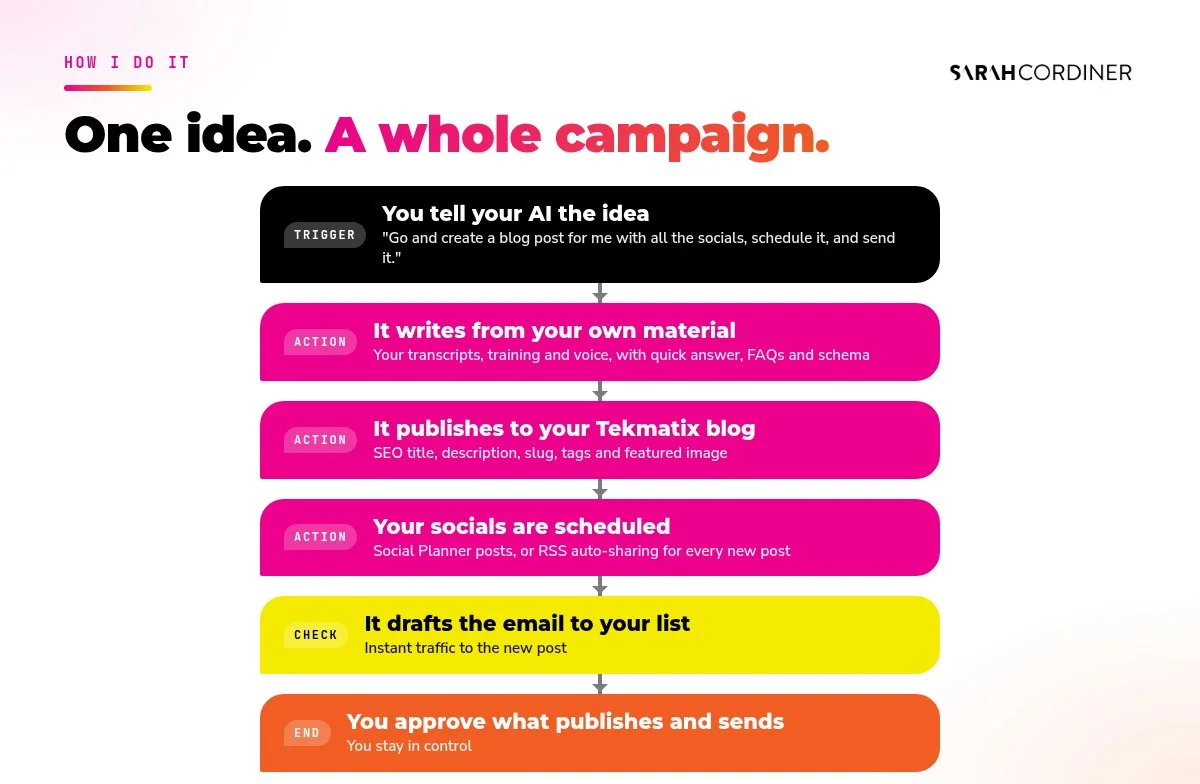
- Automate the boring bit. I have my AI write from my own material, publish to my blog, share it to my socials and draft the email to my list. More on that in the Tekmatix section.
What’s in this post
- Why AI referral traffic matters now
- Must 1: Let the AI crawlers in
- Must 2: Get indexed by Bing and Google
- Must 3: Be crystal clear about who you are
- Must 4: Add structured data (schema)
- Must 5: Answer first, then explain
- Must 6: Put FAQs on every key page
- Must 7: Publish original material only you have
- Must 8: Own your topic and publish consistently
- Must 9: Get other people talking about you
- Must 10: Track your AI referrals and test monthly
- How I make all 10 happen with my AI and Tekmatix
- FAQs
Why AI referral traffic matters now
When ChatGPT answers a question using the web, it shows sources and links. When someone clicks one of those links, that’s AI referral traffic. And those visitors are often warmer than a random Google click, because the AI has already told them why you are worth a look.
There is no paid shortcut here. OpenAI says placement in ChatGPT search isn’t guaranteed and depends on several factors intended to surface relevant, reliable information. So the job is the same one it has always been in good marketing: be genuinely helpful, be easy to find, and be the obvious, trusted answer for your topic.
The good news? Almost everything below is free. Most of it is a one-off setup. And the ongoing part (publishing helpful content consistently) is exactly the part AI is now brilliant at helping with.
Must 1: Let the AI crawlers in
Before ChatGPT can use your content in a search answer, OpenAI’s search crawler has to be allowed to read your site. OpenAI is very clear about this in its crawler documentation: OAI-SearchBot is the crawler used to surface websites in ChatGPT search, and sites that block it won’t be shown in ChatGPT search answers.
There are three OpenAI user agents worth knowing:
- OAI-SearchBot decides whether your pages can appear in ChatGPT search. This is the one you want to allow.
- GPTBot crawls content that may be used to train OpenAI’s models. You can allow or block it separately. Blocking it doesn’t stop you appearing in search.
- ChatGPT-User visits a page when a person asks ChatGPT to look at it. It isn’t used to decide what appears in search.
How to check yours in two minutes:
- Type your domain followed by
/robots.txtinto your browser, for exampleyourwebsite.com/robots.txt. - Look for any
Disallow: /line underUser-agent: *,OAI-SearchBotorGPTBot.Disallow: /means “keep out of everything”. - If you use WordPress with Yoast, you can edit the file under Yoast SEO, Tools, File editor. On other platforms, look in your SEO settings.
- Check your security layer too. If your site sits behind Cloudflare or a firewall plugin, look for “block AI bots” or AI crawler settings. A site can have a perfect robots.txt and still be blocked at the firewall.
- Changes aren’t instant. OpenAI says it can take around 24 hours for its systems to adjust after a robots.txt update.
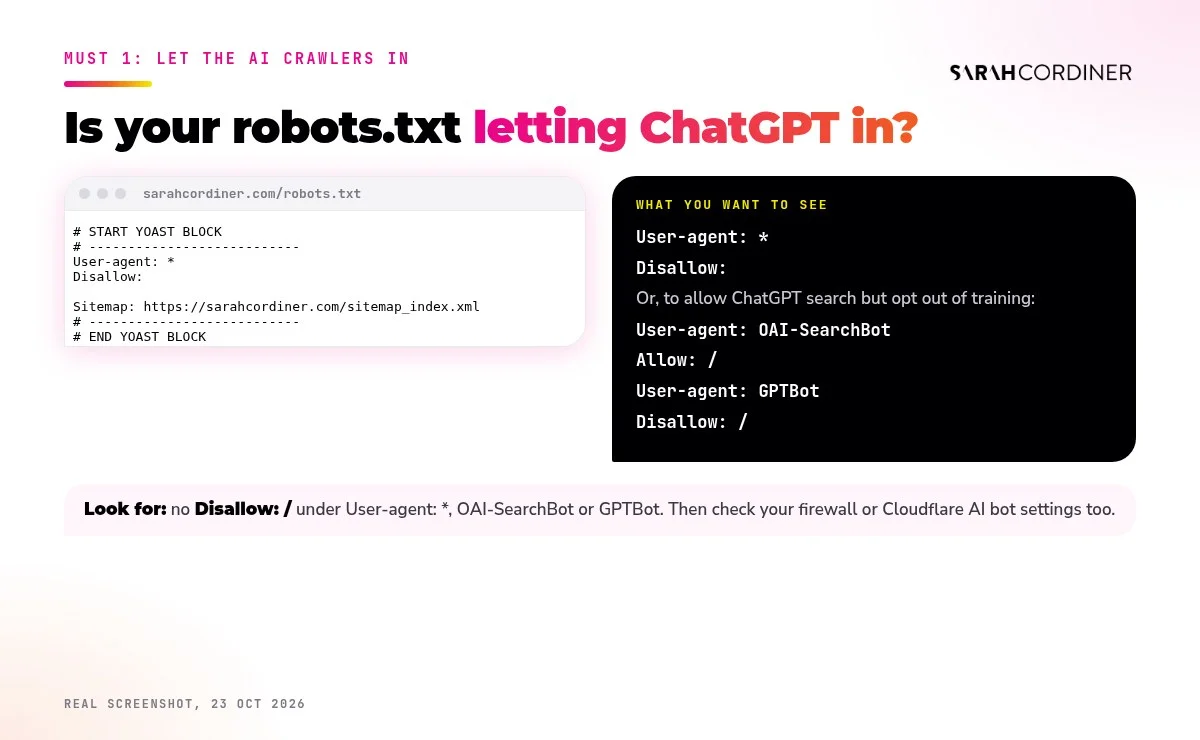
Here’s mine. “User-agent: *” with an empty “Disallow:” means every crawler, including OAI-SearchBot, is welcome. I also tested my pages with OpenAI’s and Bing’s crawler names and they load normally.
Prompt to try (GrokBot, Claude or ChatGPT)
“Check https://[yourwebsite.com]/robots.txt and tell me in plain English whether OAI-SearchBot, GPTBot, ChatGPT-User, Bingbot and Googlebot are allowed or blocked. If anything important is blocked, write me the exact lines to change and tell me where to change them on [WordPress / my platform]. Don't change anything yourself.”
Must 2: Get indexed by Bing and Google
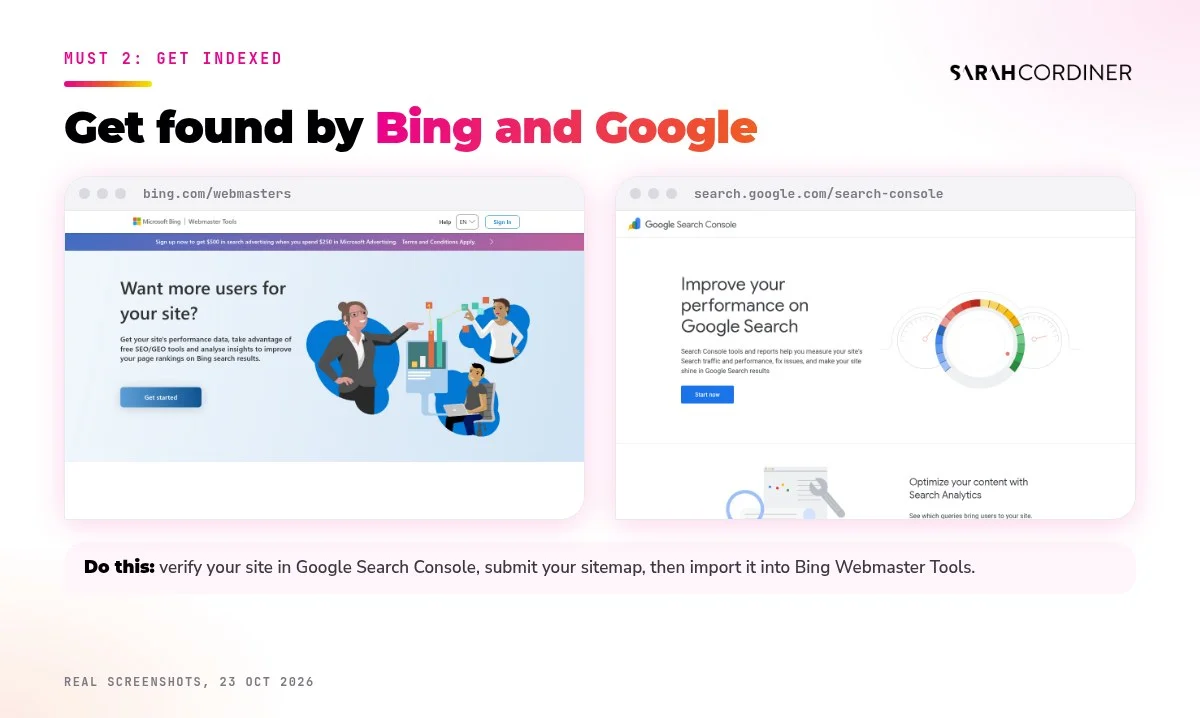
OpenAI says ChatGPT search sometimes partners with other search providers to find results. So you want your site properly indexed in the big search engines, not just “live”. The two free tools that make that happen are Bing Webmaster Tools and Google Search Console.
Step by step:
- Set up Google Search Console first and verify your domain (your web host or SEO plugin usually walks you through it).
- Submit your sitemap. On WordPress with Yoast it’s usually
yourwebsite.com/sitemap_index.xml. - Open Bing Webmaster Tools and choose the option to import your site from Google Search Console. It brings your verified site and sitemap across in a few clicks.
- Turn on IndexNow if your platform or an SEO plugin offers it, so Bing hears about new and updated pages quickly.
- Once a month, check the Pages (Google) and Site Explorer (Bing) reports for pages that are “discovered” but not indexed, and fix them.
Prompt to try (GrokBot, Claude or ChatGPT)
“I've connected Google Search Console. Walk me through importing my site into Bing Webmaster Tools step by step, then give me a monthly checklist of the reports to look at so my important pages stay indexed. Keep it to plain English and short steps.”
How Tekmatix helps: every blog post you publish in Tekmatix gets its own URL slug, description and canonical link, so each one is a clean, indexable page. Funnel and website pages have their own SEO title, description and keywords settings too.
Must 3: Be crystal clear about who you are
AI tools build a picture of you as an “entity”: a person or business with a name, a topic, a location and a reputation. If your bio says “marketing consultant” on your website, “mum of three and coffee lover” on Instagram and “growth strategist” on LinkedIn, you are making that picture blurry.
Make it unmistakable:
- Write one clear sentence: I help [who] to [result] through [how]. Use it everywhere.
- Have a proper About or speaker page with your full name, your expertise, your credentials, where you are based and links to your profiles.
- Use the exact same name and title across your website, LinkedIn, Facebook, Instagram, YouTube, your Google Business Profile, podcast bios and directory listings.
- Link your profiles back to your website, and your website out to your profiles.
- Only claim proof you can back up: qualifications, awards, media features and real numbers.
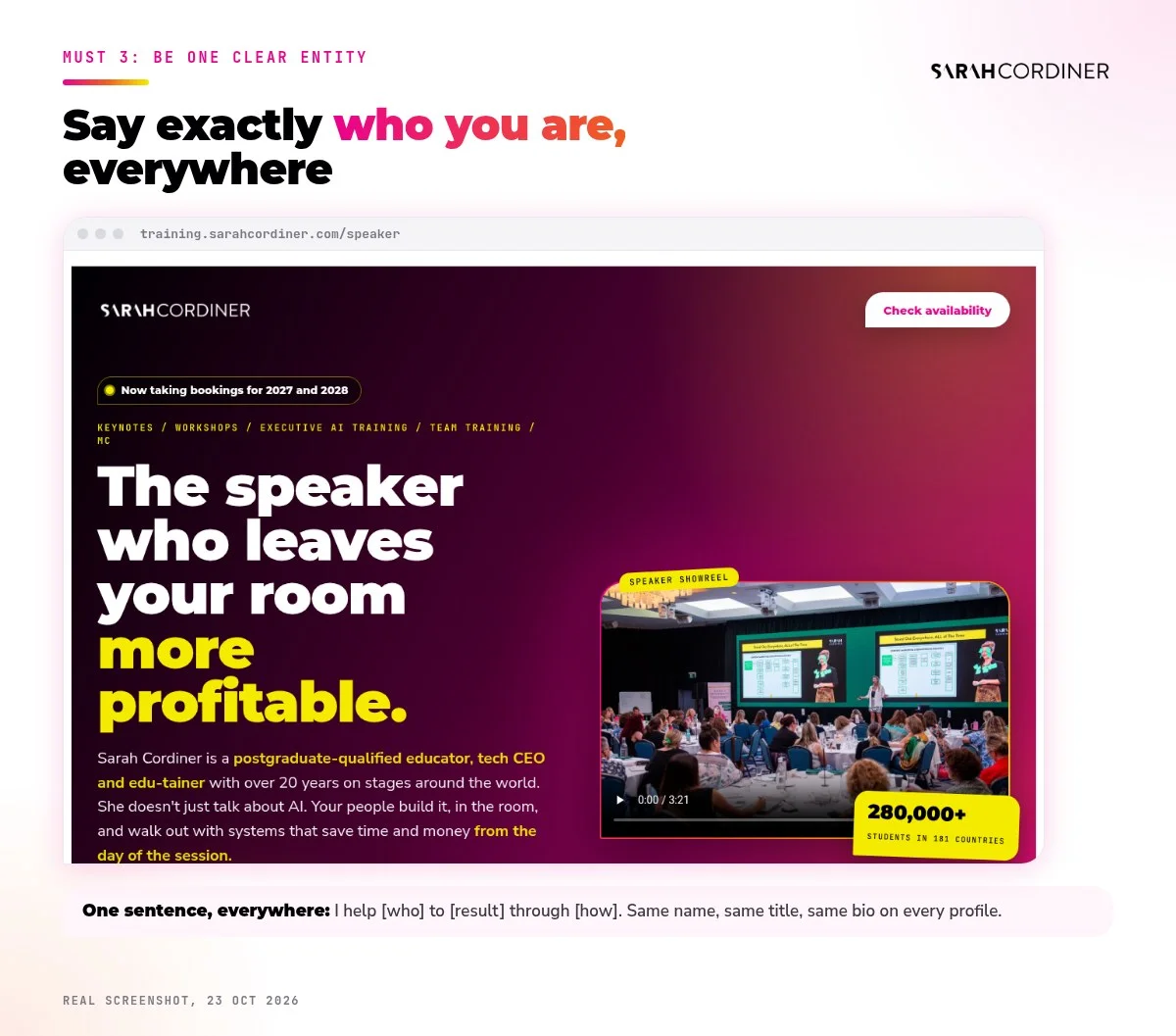
Mine is my speaker page. In one screen you know I’m a postgraduate-qualified educator and tech CEO, what I speak about and that I’ve taught 280,000+ students in 181 countries. That is the kind of clarity AI can repeat with confidence.
Prompt to try (GrokBot, Claude or ChatGPT)
“Search the web for [your full name] and [your business name]. List every bio and title you find about me, where it appears, and where they contradict each other. Then write me one consistent 1-sentence bio, a 50-word bio and a 150-word bio I can paste into every profile, using only facts you found or I give you.”
How Tekmatix helps: set up your Business Brain and Brand Kit once in Tekmatix, and your AI employees and Ask AI write about you in the same voice and with the same facts every time, instead of reinventing your bio on every post.
Must 4: Add structured data (schema)
Structured data, or schema, is a small block of code that labels what is on a page in a language machines understand: this is an Article, this is the Person who wrote it, this is the Organisation behind it, these are the FAQs. It doesn’t change how the page looks. It changes how easily search engines and AI can read it.
The essentials for a business owner:
- Person (you) and Organization (your business), with your name, logo and social profiles.
- Article on every blog post, with author and date.
- FAQPage where you have a FAQ section.
- Product, Service, Course or Event on your sales and booking pages.
How to check it: paste any of your page URLs into the free Schema Markup Validator or Google’s Rich Results Test. Most WordPress SEO plugins add the basics automatically. You add the rest.
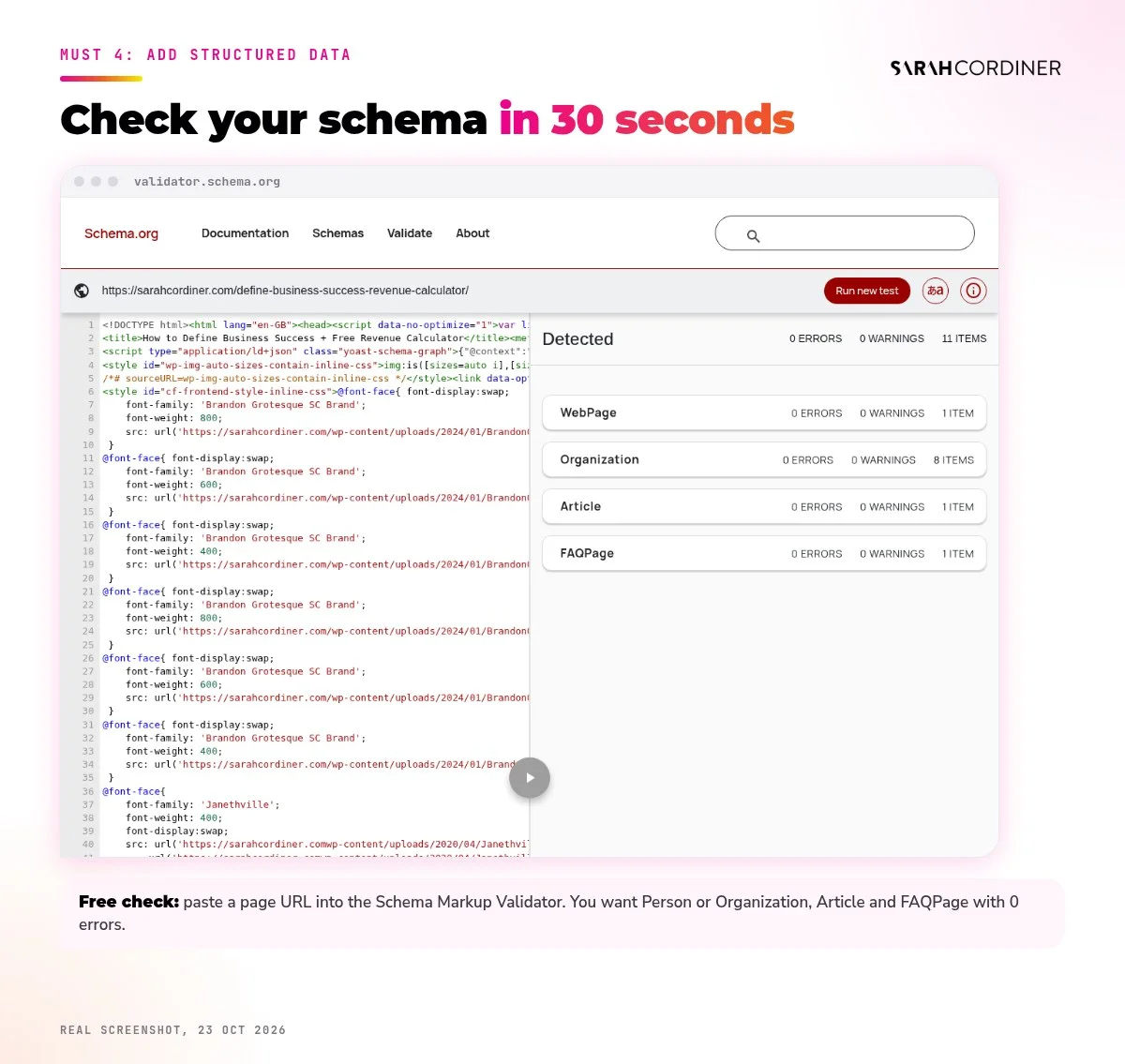
Prompt to try (GrokBot, Claude or ChatGPT)
“Here is the URL of my [sales page / about page / blog post]: [URL]. Read it and write the JSON-LD structured data it should have (Person, Organization, plus Service, Course, Product or Event if relevant). Use only facts that are on the page or that I give you. Then tell me exactly where to paste it on [WordPress / my platform] and how to test it in the Schema Markup Validator.”
How Tekmatix helps: Tekmatix funnel and website pages let you add code to the page header, which is where JSON-LD structured data goes. Your AI writes it, you paste it in (or ask a Tekspert to), then you validate it.
Must 5: Answer first, then explain
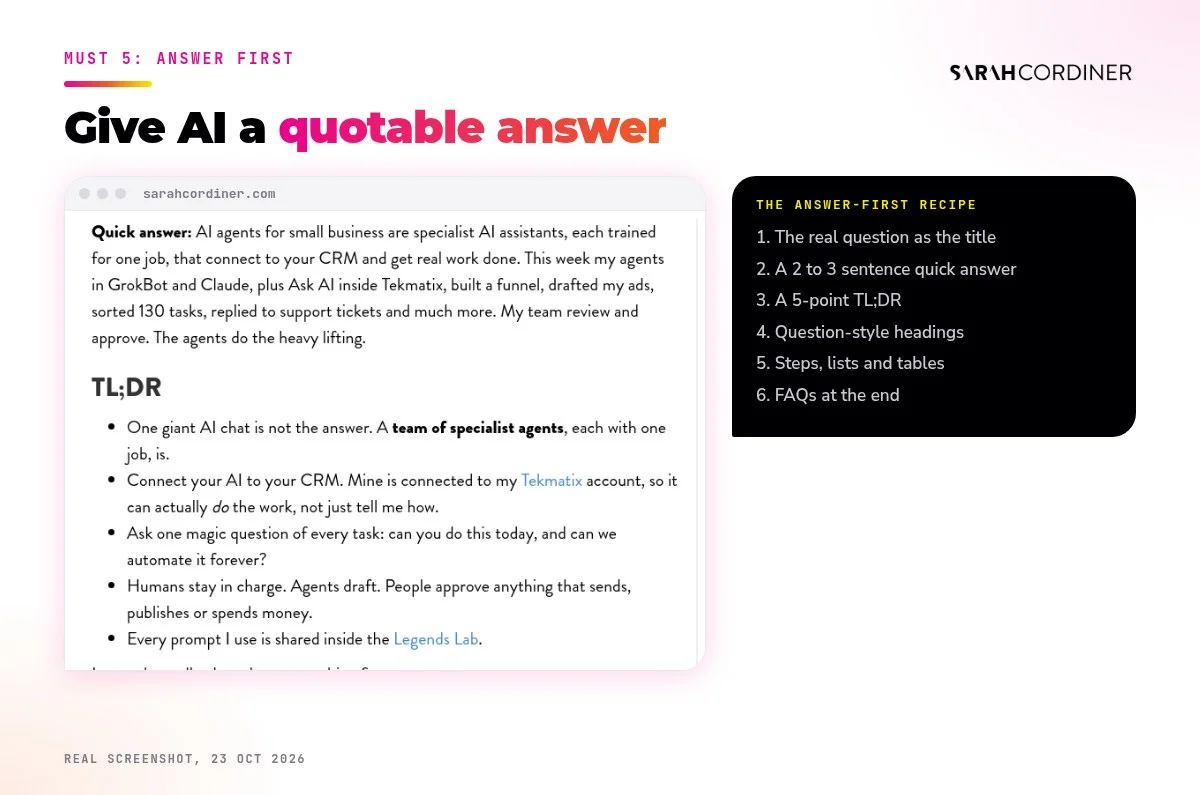
AI tools are looking for the clearest, most quotable answer to a question. Long, winding intros bury your answer. So flip it.
- Use the real question as a heading, the way people actually ask it: “How much does a business coach cost in Australia?” not “Pricing considerations”.
- Answer it in the first two or three sentences, plainly.
- Then expand: steps, examples, your story, the nuance.
- Use short paragraphs, numbered steps, lists and tables. Structure is easy to read for humans and machines.
- Add a “Quick answer” and a TL;DR at the top of longer posts.
I go deeper on structure, headings and metadata in how to write AI-optimised blog posts that rank on Google and AI search.
Prompt to try (GrokBot, Claude or ChatGPT)
“Here is my blog post: [paste or URL]. Rewrite only the opening so it starts with a 2 to 3 sentence "Quick answer" to the question in the title, then a 5-point TL;DR. Turn my vague headings into the actual questions my audience asks. Keep my voice and my stories exactly as they are. Don't add facts I didn't write.”
Try it with Ask AI in Tekmatix
“Rewrite the first paragraph of my blog post "[title]" as a 3-sentence quick answer, and suggest 6 question-style headings for it.”
Must 6: Put FAQs on every key page
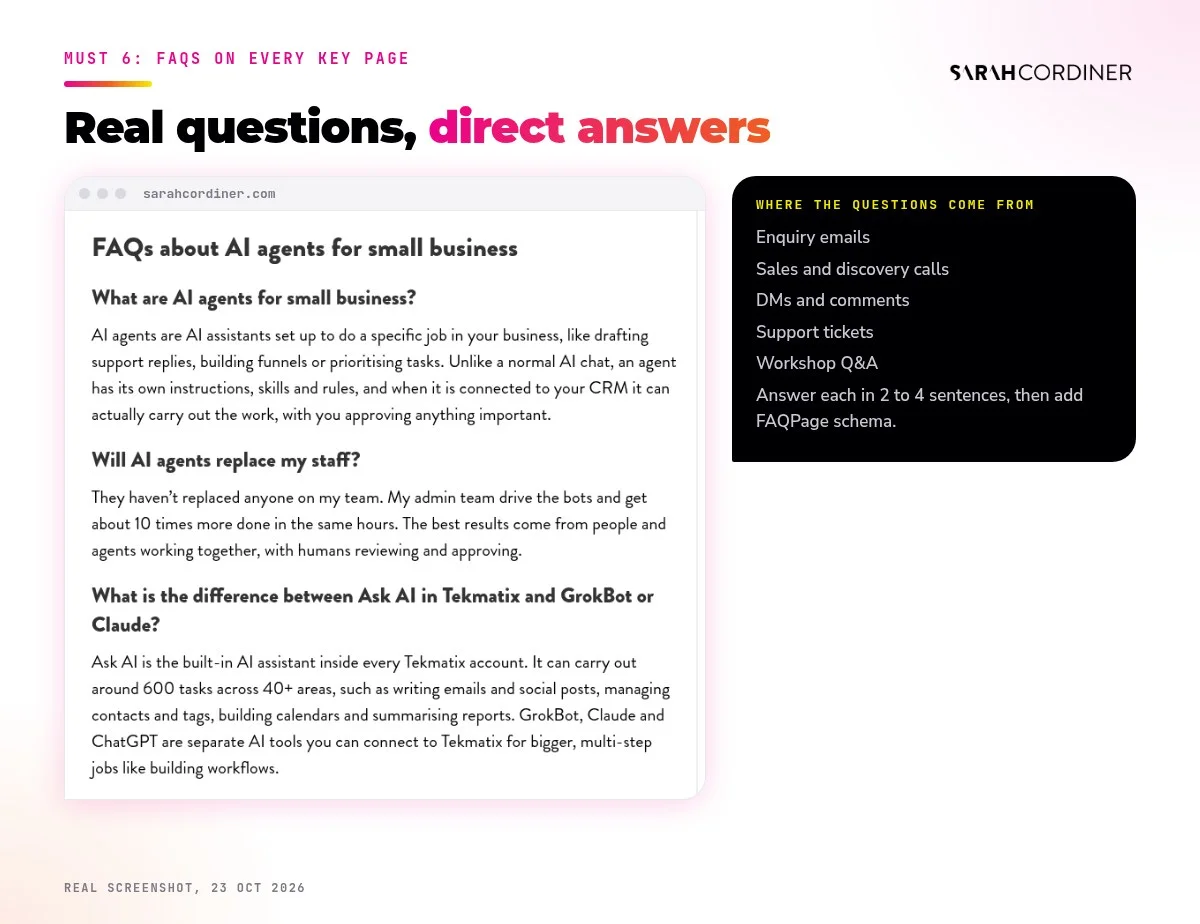
FAQs are gold for AI search. Each one is a ready-made question and answer, which is exactly the format an AI assistant is trying to give its user.
- Collect the real questions: your enquiry emails, sales calls, DMs, comments and support tickets.
- Add 5 to 8 FAQs to every important page and blog post. Answer each in 2 to 4 sentences.
- Mark them up with FAQPage schema (most SEO plugins can do this, or your AI can write it, see Must 4).
- Keep the answers honest and specific. “It depends” is not an answer. “Usually 2 to 4 weeks, depending on X” is.
One honest note: Google now rarely shows FAQ rich results in search for most websites. But the structured questions and answers still help search engines and AI understand and quote your page, and your readers love them. So keep them.
Prompt to try (GrokBot, Claude or ChatGPT)
“Go through my last 50 enquiry emails and DMs [paste or connect] and list the 30 questions people ask most, grouped by topic. For each one, draft a 2 to 4 sentence answer in my voice using only what I've said before, and tell me which page or blog post it belongs on.”
How Tekmatix helps: add the same FAQs to your Knowledge Base in Tekmatix and they do double duty: your AI employees use them to answer enquiries accurately, and your website uses them to be found.
Must 7: Publish original material only you have
This is the one most people skip, and it’s the one that matters most.
If your content says the same thing as a thousand other pages, why would an AI recommend you? It needs a reason. That reason is information only you have.
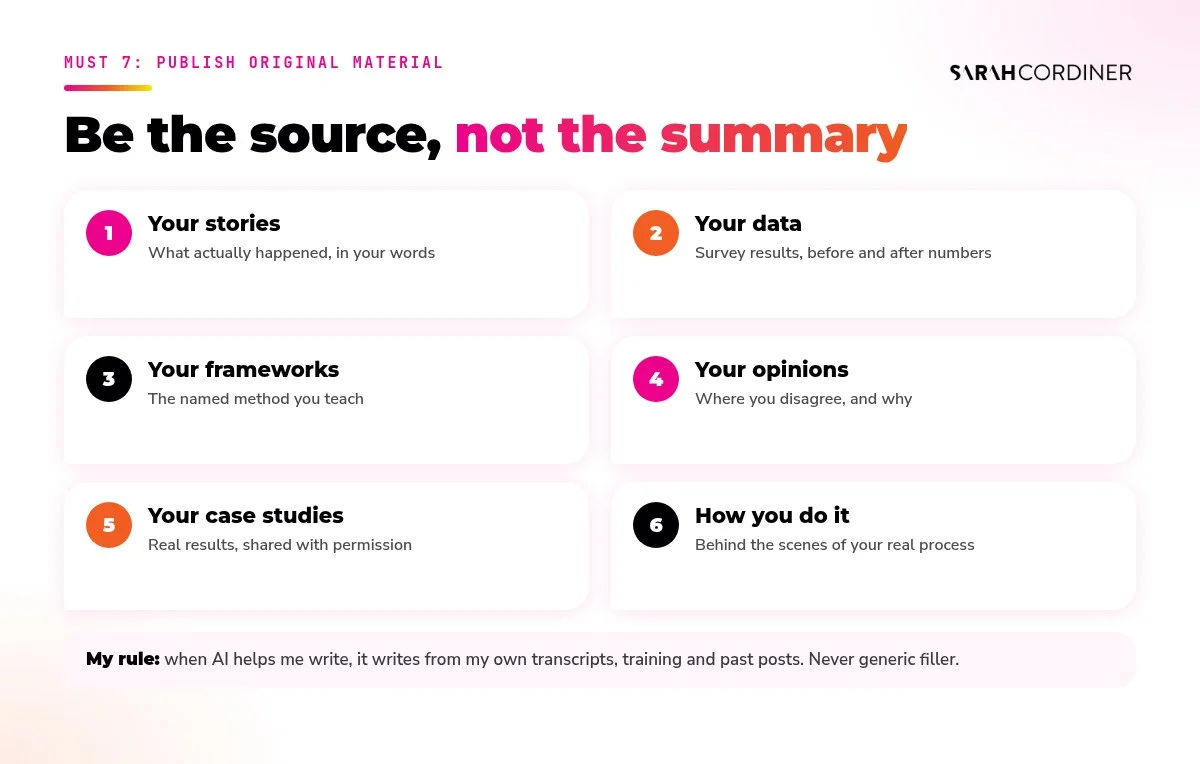
- Your stories. What actually happened, with names changed where needed.
- Your data. Survey results, before and after numbers, what you found.
- Your frameworks. The named method you teach. Give it a name and use it consistently.
- Your opinions. Where you disagree with the industry, and why.
- Your case studies. Real results, with permission.
- Your how I do it. Screenshots and behind-the-scenes of your actual process.
Here’s my non-negotiable when AI helps me write: it writes from my own original material. My workshop transcripts, my training, my past posts, my voice. Not generic internet filler. AI only sounds generic when you give it nothing of you to work with.
Prompt to try (GrokBot, Claude or ChatGPT)
“Here is the transcript of my [workshop / video / podcast episode] on [topic]. Pull out every original story, opinion, framework, example and number I mention. Then plan a blog post built around those, with question-style headings, a quick answer and FAQs. Use only my material and my voice. Flag anything you'd need me to confirm.”
Want to turn what you already know into a year of content? My Content Creation Workshop covers blogging, vlogging, podcasting and video.
Must 8: Own your topic and publish consistently
One great post won’t make you the expert. A body of work will.
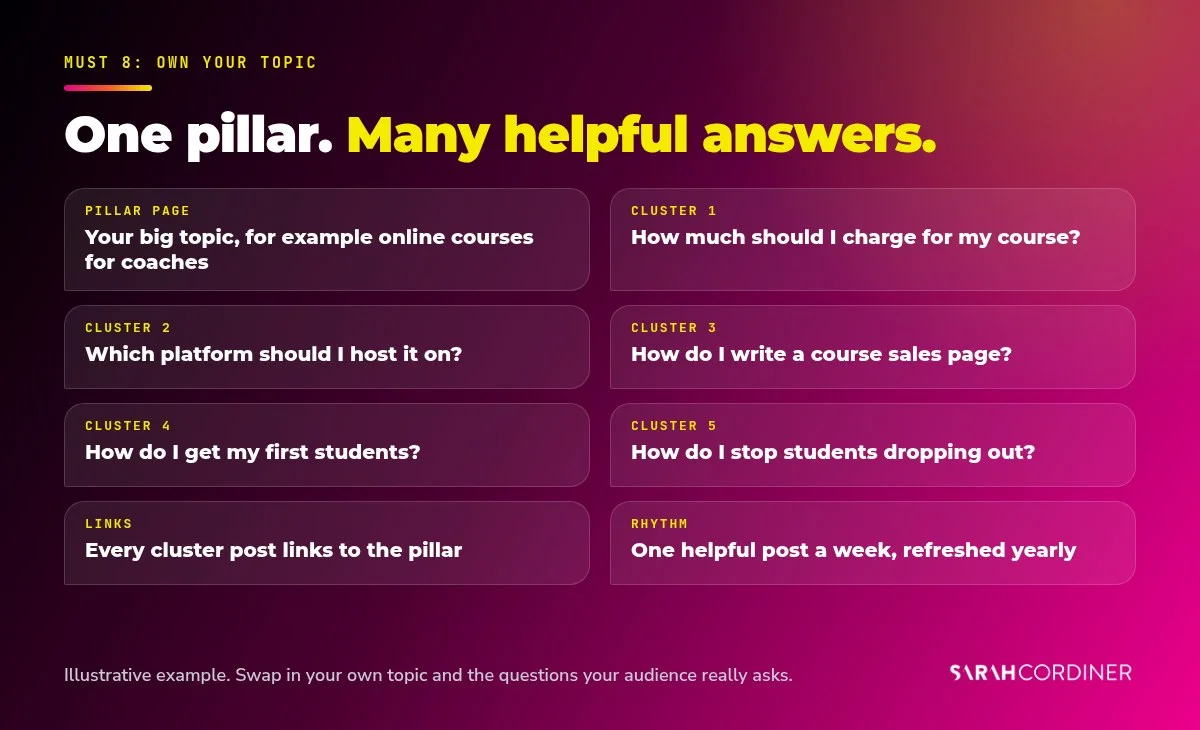
AI tools and search engines trust sites that cover a topic deeply and keep showing up on it. So pick your topic, then build a cluster around it:
- Choose one pillar topic you want to be recommended for, for example “online courses for coaches”.
- List the 50 to 100 questions your audience asks about it.
- Write one helpful post per question, each linking back to your pillar page and to each other where it helps.
- Publish on a rhythm you can keep. Weekly beats a burst of ten followed by silence.
- Refresh your best old posts every 6 to 12 months with new examples, dates and FAQs.
Prompt to try (GrokBot, Claude or ChatGPT)
“My pillar topic is [topic] and my audience is [who]. List the 100 questions they most often ask about it, grouped into 8 to 10 clusters. Then build me a 12-week publishing calendar (one post a week) that covers the most valuable questions first, with a working title, focus keyword and the internal links each post should include.”
If you want to get a run of posts actually published, my 10 Day Blogging Challenge walks you through publishing 10 SEO-optimised blogs.
How Tekmatix helps: this is where it gets fun. Your blog lives in Tekmatix, your AI can create and publish posts to it, and each new post can be shared to your social channels automatically. I explain exactly how in the Tekmatix section below.
Must 9: Get other people talking about you
Saying you’re the expert is one thing. Other people saying it is what makes it believable, to humans and to AI.
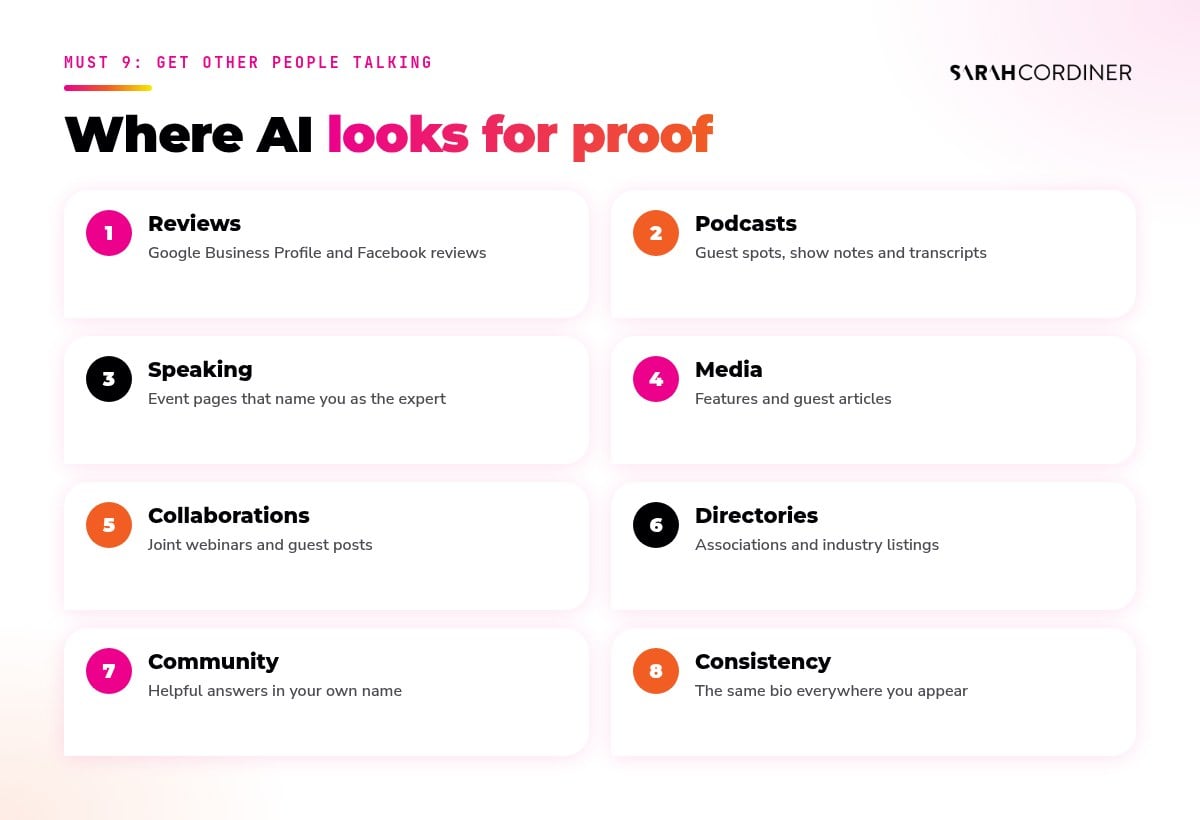
- Reviews. Google Business Profile reviews are often among the first things people (and AI) look at. Ask every happy customer.
- Podcasts and interviews. Every guest spot creates a page, a transcript and a link that talks about you.
- Speaking. Event pages and write-ups name you as the expert on your topic.
- Media and guest articles. Pitch helpful, specific stories to publications your audience reads.
- Collaborations. Joint webinars and guest posts with people in your space.
- Directories and associations. Industry listings with your consistent bio from Must 3.
- Community answers. Genuinely helpful answers in LinkedIn posts, groups and forums, in your own name.
Reviews are the quickest win here, and I explain exactly how to ask for them (and what not to do) in why reviews might be the fastest way to get more customers right now.
Prompt to try (GrokBot, Claude or ChatGPT)
“Find 20 podcasts, publications, associations and events in [country] where my ideal clients ([who]) spend time and where an expert on [topic] would be a good fit. For each, give me the link, why it fits, and a short, personal pitch idea based on my original material. Don't contact anyone. Just give me the list.”
How Tekmatix helps: automate the review ask. A workflow in Tekmatix can send a review request when a sale, session or project is completed, and Reviews AI can suggest replies to the reviews that come in.
And if you want the full authority-building plan, my 15 Ways To Build Your Personal Brand workshop covers it.
Must 10: Track your AI referrals and test monthly
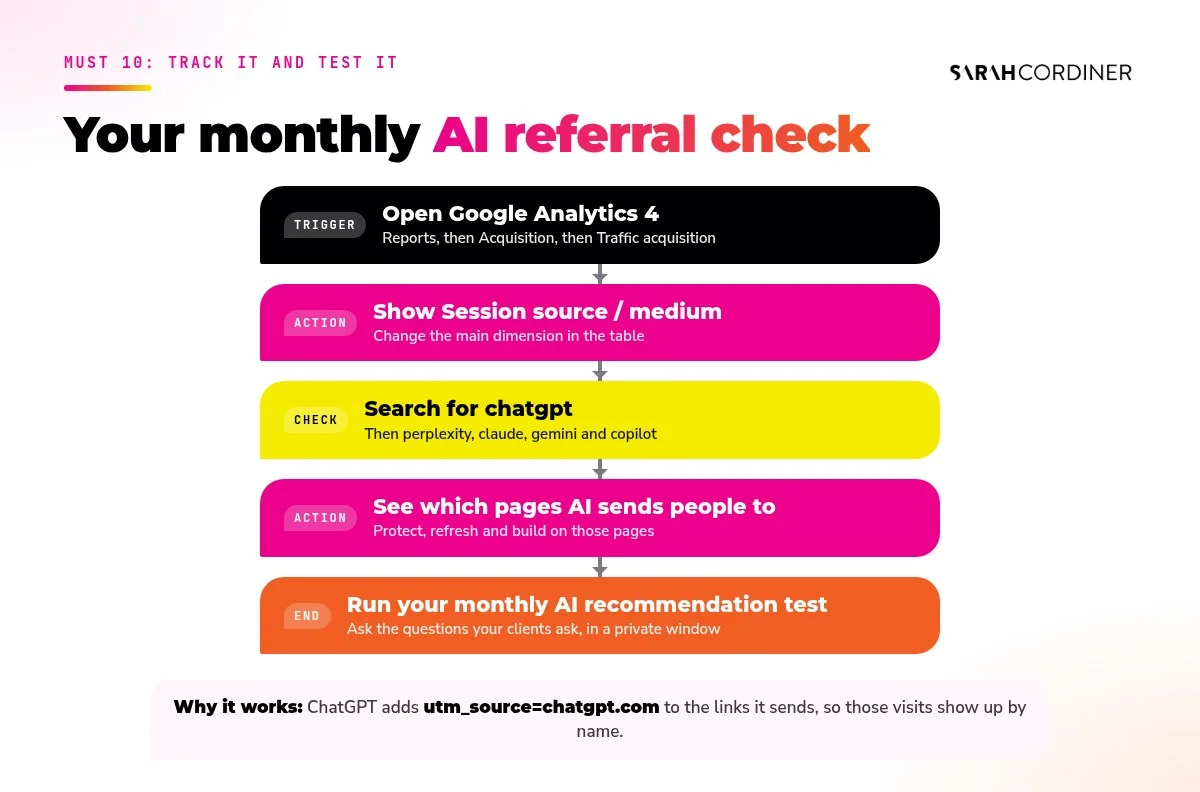
What gets measured gets managed. OpenAI says ChatGPT automatically adds utm_source=chatgpt.com to the links it sends, which means you can see those visits in Google Analytics.
How to see your AI referral traffic in Google Analytics 4:
- Open Reports, then Acquisition, then Traffic acquisition.
- Change the main dimension to Session source / medium.
- Search for chatgpt. Then try perplexity, claude, gemini and copilot.
- Click through to see which pages AI is sending people to. Those are the pages to protect, refresh and build on.
Then do a monthly “would AI recommend me?” test: open ChatGPT, Claude and Gemini in a private window and ask the questions your ideal client would ask, like “Who is the best [your expertise] for [your audience] in [your area]?” Note who gets named, which sources get cited, and what is said about you. That tells you exactly where to focus next month.
Prompt to try (GrokBot, Claude or ChatGPT)
“Every month on the 1st, ask these 10 questions as if you were my ideal client: [list]. For each, record whether I'm mentioned, who is mentioned instead, and which websites are cited as sources. Compare it with last month and give me the 3 most useful things to publish or fix next.”
How I make all 10 happen with my AI and Tekmatix
Full disclosure: I’m the founder and CEO of Tekmatix, the platform I run my whole business on, so yes, I’m a little biased. Everything above works on any decent website. This is simply how I do it in mine.
Here’s the honest truth. Steps 1 to 4 are a one-off setup. Steps 5 to 10 are the ongoing work: writing helpful, original, well-structured content, every week, then getting it in front of people. That’s the part that falls over when you’re busy.
So I don’t do that part by hand any more. My AI does it, from my material, and I approve it.
Option 1: Ask AI, already inside your Tekmatix account
Every Tekmatix account comes with Ask AI, the in-built AI assistant. You open it, type what you want, and it does the work in your account. It can write and refine your content, including blog posts, and Tekmatix’s own team had Ask AI draft the first version of one of their guides and publish it to their blog, before their Teksperts polished it.
Two practical tips. Give it your own material to work from (paste in your transcript, notes or old post) so it writes in your voice with your ideas. And use it on your computer for blog posts for now: Ask AI on the mobile app is still rolling out and can’t build blog posts or funnels yet. A full draft usually takes a few minutes, not seconds.
Try it with Ask AI in Tekmatix
“Using the transcript below, write a blog post for my Tekmatix blog titled "[title]". Start with a 3-sentence quick answer and a TL;DR, use question-style headings, add 6 FAQs, and end with a call to action to [your opt-in or offer]. Write it in my voice using only my material. Save it as a draft for me to review. [paste transcript]”
Option 2: Your blog posts share themselves to your socials
Inside the Social Planner in Tekmatix there’s an RSS post option. Point it at your blog’s RSS feed, choose your connected social accounts, and every new post that gets published is shared automatically, once, with duplicate protection. It works with your Tekmatix blog, and with any other blog that has an RSS feed (including WordPress). X/Twitter isn’t supported for RSS posting, so share those manually. Here are the official RSS posting steps.
Option 3: Connect Claude, ChatGPT or GrokBot and make it a daily rule
This is where I live. I connect my own AI to my Tekmatix account (here’s how to connect ChatGPT to Tekmatix), and it can create and publish blog posts on my Tekmatix blog and create and schedule posts in my Social Planner, all in my branding and promoting my own opt-ins, offers, services and products.
Then I turn it into a rule and a skill: a short brief my AI follows every time (my voice, my links, the claims I can make, the words I never use), set up as a scheduled task in the AI app I’m using. The connection itself does what you ask when you ask it; the daily schedule lives in your AI app (GrokBot routines, Claude or ChatGPT scheduled tasks, depending on your plan). Inside Tekmatix, managed agents can also run jobs like “write and schedule on-brand social posts each week” on a schedule.
And any time I have an idea in the car, in the shower, or halfway through a coffee, I just tell my AI:
Copy and paste into your connected AI (GrokBot, Claude, ChatGPT)
The "one idea, whole campaign" prompt
Go and create a blog post for me with all the socials, schedule it, and send it.

The idea: [your idea in a sentence or two]
Use my own material: [transcript / notes / old post / voice memo]

1. Write the blog post in my voice, from my material only. Start with a quick answer and TL;DR, use question-style headings, add 6 FAQs with FAQ schema, link to 2 of my related posts, and end with a call to action to [opt-in / offer].
2. Publish it to my Tekmatix blog with the SEO title, description, URL slug, tags and a featured image in my branding.
3. Write a social post for Facebook, Instagram and LinkedIn with a strong hook, no links in the caption, and the link in the first comment. Schedule them in my Social Planner at [time].
4. Draft the email to my list sending them to the post, in my email template, with 3 subject line options.
5. Show me anything that will publish or send before it goes, and tell me if any step needs me.
Then step it up: send your list to the post
Here’s the bit most people forget. Search and AI traffic builds over time. Your email list is traffic today.
So once the post is live, tell your AI to craft the email campaign that sends your subscribers to it. That gives your new post instant visitors, which is good for you and good for every reader who needed that answer this week.
Honest version of how that works in Tekmatix: your connected AI writes the email and can save it as an email template in your account, Email AI in the email builder can design an on-brand email from a prompt, and the campaign itself is set up and scheduled in the email builder, by you, a Tekspert, or your AI using browser control. Either way, you approve it before it sends.
Prompt to try (GrokBot, Claude or ChatGPT)
“The blog post "[title]" is now live at [URL]. Write an email to my list that teases the most useful idea in it and sends them to read the full post. Use my voice, keep it under 200 words, one clear button to the post, 3 subject line options and a preheader. Save it as a draft email template in my Tekmatix account for me to approve and schedule.”
Want to see your own AI do this? In my GrokBot Masterclass I show you how I set up the agents, skills and routines that run my content, and my Claude CoWork Masterclass does the same for Claude.
The platform I run my business on
Let your AI do the publishing for you
Tekmatix is the all-in-one business platform you run by talking to AI. Blog, social planner, email, CRM and Ask AI in one subscription, and it connects to the AI you already use (Claude, ChatGPT and GrokBot). Real human Teksperts are on hand 24/7.
Book a free Tekmatix demoOr explore every way to use AI in it: the complete guide
Your 10 musts checklist
- OAI-SearchBot, Bingbot and Googlebot are allowed in robots.txt and at your firewall.
- Your site and sitemap are verified in Google Search Console and Bing Webmaster Tools.
- Your name, title and bio are identical everywhere.
- Person, Organization, Article and FAQ schema validate with 0 errors.
- Key pages and posts open with a quick answer and use question headings.
- 5 to 8 honest FAQs sit on every important page.
- Every post includes something only you could have written.
- You have one pillar topic and a weekly publishing rhythm.
- You are collecting reviews and earning mentions every month.
- You check AI referrals in GA4 and run your AI recommendation test monthly.
Build your brand and business
Want help becoming the go-to expert?
If you want to build your authority, your content engine and the AI systems that keep it running, with every prompt I use handed to you, join the Legends Lab business coaching program by Sarah Cordiner.
Join the Legends LabFAQs
How do I get ChatGPT to recommend my business?
Make your website easy for AI to find, read and trust. Allow OAI-SearchBot in robots.txt, get indexed in Bing and Google, use a clear and consistent bio, answer questions directly with FAQs and structured data, publish original material, keep publishing on one topic and earn reviews and mentions elsewhere. Placement is never guaranteed, so track and test monthly.
What is AI referral traffic?
AI referral traffic is visitors who arrive at your website by clicking a link in an AI tool's answer, such as ChatGPT, Perplexity, Claude, Gemini or Copilot. ChatGPT adds utm_source=chatgpt.com to the links it sends, so you can see these visits in Google Analytics.
Should I block GPTBot?
That's your choice. GPTBot is OpenAI's training crawler, while OAI-SearchBot decides whether your pages can appear in ChatGPT search. OpenAI treats them separately, so you can block GPTBot from training and still allow OAI-SearchBot so you can be shown and cited in ChatGPT search.
Does ChatGPT use Google or Bing?
OpenAI says ChatGPT search sometimes partners with third-party search providers, as well as using its own crawler. That's why it's worth being properly indexed in both Bing Webmaster Tools and Google Search Console.
Do I need an llms.txt file?
It's optional. llms.txt is a proposed standard for giving AI tools a simple map of your site, and it does no harm to add one. But OpenAI's published guidance for appearing in ChatGPT search focuses on allowing OAI-SearchBot, so get the basics in this guide right first.
How long does it take for ChatGPT to start recommending me?
There's no fixed timeline. Crawler access changes can take around 24 hours to register, indexing can take days to weeks, and building authority on a topic takes consistent publishing over months. Track AI referrals monthly so you can see progress.
Can AI write my blog posts without them sounding generic?
Yes, if you give it your own material. Have your AI write from your transcripts, training, past posts and stories, in your voice, and review every post before it publishes. AI only sounds generic when it has nothing of you to work from.
Can Tekmatix publish my blog posts and share them to social media automatically?
Yes. Your connected AI (Claude, ChatGPT or GrokBot) can create and publish posts on your Tekmatix blog and schedule social posts in the Social Planner, and the Social Planner's RSS option can share each new blog post to your connected social accounts automatically. You stay in control of what publishes.
Sarah x
How Sarah Cordiner Can Help You Scale Your Business with Tech, AI, and Automation
Tech doesn't have to be hard or scary. I help you make it easy to learn, fun to implement, and even better to see the amazing results that you can get with some simple tech tools and strategy.
Here are all of the different ways that I can help you scale your business, streamline your operations, and make your bottom line full of joy using tech, AI, and automation (as well as traditional methods) as your secret weapon.
One platform. Your whole business. Finally talking to each other.
"What tech do you use, Sarah?" I get asked this every single week. The honest answer? Almost all of it lives in one place: Tekmatix. It's the all-in-one AI business platform I founded, and it runs my websites, funnels, courses, emails, bookings, payments and AI agents. Here's everything it does, who it's for, and the handful of other tools I love.
No lock-in contracts / Cancel anytime / Australian owned and female owned
I run my business on it.
- 5.0 on Google from 100+ reviews
- 98% recommended on Facebook
- 1,000+ businesses in 30+ countries
- Award-winning 24/7 support
- 3 free live training calls every weekday
- Replace $500 to $1,000+ a month in subscriptions
Eight logins. Eight bills. Zero of them talking.
Most business owners I meet are paying for a website here, an email tool there, a booking app, a course platform, a CRM they never open... and then paying someone to glue it all together with duct tape and Zapier.
- 1Leads fall through the cracks because your forms, inbox and CRM live in different places.
- 2Every new tool means another login, another bill and another thing to learn.
- 3You can't see what's actually working because your data is scattered across ten dashboards.
Everything your business runs on, under one roof.
Tekmatix is an all-in-one CRM, marketing, sales, course and AI platform. Here's what's inside, grouped by the job it does for you. Tap a category to filter, or scroll the lot.
AI that does the work
Hand the repetitive stuff to AI that already knows your contacts, calendar and offers.
- AI Employees that answer chats, DMs and enquiries 24/7
- Voice AI receptionist that answers your phone and books calls
- AI booking bot on your website chat widget
- AI Studio to build apps and tools by describing them (vibe coding)
- Ask AI assistant built into your account
- AI website and funnel builder plus content and image AI
- Connects to Claude and ChatGPT via MCP, so your AI can work inside Tekmatix
Get found and grow your list
Everything you need to get seen, capture leads and build your audience.
- Unlimited websites with free hosting and your own domains
- Unlimited funnels, landing pages, sales pages and opt-ins
- 100+ ready-made templates for sites and funnels
- Blogging with unlimited posts
- Social media planner with auto-posting
- Forms and quizzes, unlimited
- Surveys with conditional logicPro
- Reviews and reputation management, incl. Google Business Profile
- Link-in-bio pages and QR codes
Nurture and convert
Turn strangers into clients with automated follow-up that never forgets.
- CRM with unlimited contacts and full client records
- Unified inbox for email, SMS, Facebook and Instagram DMs
- Email marketing with automated newsletters
- SMS and phone, incl. missed-call text back
- Unlimited workflows and automations
- Sales pipelines so you see every deal
- Booking calendars for individuals, teams and groups, with 2-way sync
- Advanced reporting on ads, calls, courses and lead sourcesPro
Sell and get paid
Take money online, in person and on autopilot. Payments go straight to your Stripe or PayPal.
- Checkouts with upsells and order bumps
- Invoicing: one-off, recurring and payment plans
- Tap to pay on your phone (EFTPOS)
- Request payments by SMS
- Products and e-commerce, digital and physical, plus coupons
- Proposals, quotes and contracts with e-signaturesPro
- Affiliate program with unlimited affiliatesPro
- Event management with QR code ticketingPro
Courses, memberships and community
Built especially for course creators, educators and coaches. (It's where I teach my own students.)
- Unlimited courses and memberships
- Unlimited students and video hosting
- Assessments and quizzes inside your courses
- Student mobile app in your branding
- Communities and groups, unlimitedPro
- Course certificatesPro
Run the business
The behind-the-scenes admin, organised and in one place for your whole team.
- Project management and Kanban boards
- Task manager with deadlines and tracking
- Unlimited staff users with permission controls
- Admin mobile app for Apple and Android
- Business card scanner
- Integrations with Zapier, Make, WordPress, Google and more
- Up to 5 sub-accounts for your other businessesMax
Want to see it with your own eyes?
Start a 7-day free trial and a Tekspert will jump on a free set-up call with you.
If you sell your expertise or your services, it's built for you.
Solo operators, growing teams and multi-business owners all run on Tekmatix. Here's where it shines brightest.
Coaches, course creators and educators
Your website, sales pages, checkout, courses, membership, community and email, all connected. Tekmatix was made especially for you.
Consultants, speakers and experts
Bookings, proposals, contracts, invoices and follow-up that makes you look like a big firm, even if it's just you.
Health, allied health and NDIS providers
Online bookings, reminders, reviews and client records for clinics, therapists and practitioners.
Tradies and local service businesses
Missed-call text back, quotes, tap to pay and review requests, so you win the job while you're still on the tools.
Studios, salons and personal trainers
Class bookings, memberships, payments and reminders that cut the no-shows and the admin.
Agencies, associations and multi-business owners
Pipelines, staff permissions, reporting and (on Max) up to 5 sub-accounts to run several brands from one login.
Honest moment: if you only need one simple tool and you're genuinely happy juggling logins, you probably don't need Tekmatix yet. But the minute you're copying leads from one app to another, or paying for five subscriptions that don't talk to each other, it's time.
Most software gives you a login. We give you a team.
I'm an educator first, so Tekmatix was built education-first. Every plan comes with real humans, real training and real templates to get you up and running fast.
Free one-on-one set-up call
A Tekspert jumps on a call with you to set up your account and connect your integrations.
Award-winning live chat
Stuck at 11pm? Real support, any time of day or night.
3 free live training calls
Drop in, share your screen and get your questions answered live.
Starter kit and training library
Ready-made templates and automations, a step-by-step help centre, video tutorials and a free Tekmatix training course.
Rather someone just did it for you?
Teksperts are available by the hour, plus fixed-price done-for-you set-up and migration from your old platforms.
Simple pricing that doesn't punish growth.
Unlimited contacts on Starter and Pro, so your bill doesn't jump every time your list grows. Pay in AUD or USD, monthly or yearly (pay yearly and get a month free).
Everything you need to market, sell and deliver, in one place.
- Unlimited contacts, staff users and courses
- Websites, funnels, CRM, email and bookings
- Payments, invoicing and tap to pay
- AI Agents, AI booking bot, AI Studio and Ask AI
- 24/7 live chat and a free set-up call
Everything in Starter, plus the tools to build a community and scale.
- Communities, groups and course certificates
- Event management with QR ticketing
- Your own affiliate program
- Proposals, contracts and e-signatures
- Unlimited surveys and advanced reporting
Everything in Pro, plus more AI, more accounts and a strategist in your corner.
- Up to 5 sub-accounts
- AI Employee Growth plan included: 1,000 AI conversation replies and 100 voice AI minutes a month
- Monthly 60-minute strategy call with a senior Tekspert
- Early access to Tekmatix Labs
Just starting out? The Launch plan is $75 AUD ($50 USD) a month for up to 1,000 contacts. No lock-in contracts.
Chat about the Launch planEmails, SMS, phone calls and AI usage are pay-as-you-go and billed in USD, so you only pay for what you use. See the full rates at tekmatix.com/rebilling. Prices current as at September 2026. Always check tekmatix.com/pricing for the latest.

I didn't build software. I built the toolbox I needed.
After 20+ years in business and more than 280,000 students, I kept seeing the same thing. Brilliant people with brilliant expertise, drowning in tech. Paying for ten tools, using two of them, and spending their evenings on YouTube trying to make them talk to each other.
So I put everything a business needs into one platform, then wrapped it in the thing I know best: education and support. Tekmatix runs my own websites, courses, funnels, emails and AI agents every single day. I wouldn't recommend it if I didn't use it.
Sarah x
Want me to teach you how to get the most out of it?
Inside the Legends Lab I show you step by step how to use tech, AI and automation to grow your business, with live calls, workshops and templates you can copy.
Non-techie people love their tech again.
Tech is hard for non-techie people, and they really get that and make it fun.
Yesterday I felt overwhelmed. Now I feel excited and empowered.
I have used a number of top CRM systems. This is up there with the very best.
Solved problems I have had for weeks, in 50 minutes. Wonderful.
The other tools I use and actually recommend.
Tekmatix is the engine. These are the extras that plug in around it for AI, video, design, content and admin. Tap a category to filter.
Some of these are affiliate links, which means I may earn a small commission at no extra cost to you. Thanks for supporting the brand!
Wondering where the email, booking, course, funnel and CRM tools are? I don't need them any more. Tekmatix does all of that, so I'd rather you didn't pay for them twice.
See what Tekmatix covers ↑Tech stack FAQs.
Still wondering if Tekmatix is right for you? Here are the straight answers.
What is Tekmatix?
Tekmatix is an all-in-one AI business platform. It brings your website, funnels, CRM, email marketing, bookings, payments, courses, memberships, communities, social media scheduling and AI agents together in one connected account, so everything talks to each other.
Do I need to be techy to use it?
No. Tekmatix was built for non-techie business owners. You get a free set-up call, 24/7 live chat, three free live training calls every weekday, a help centre, video tutorials and ready-made templates to get started.
Is there a free trial?
Yes. The Starter and Pro plans come with a 7-day free trial. The Max plan starts with a demo, so the team can make sure it's the right fit.
Can I pay in Australian dollars?
Yes. You can pay your subscription in AUD or USD. Usage charges for emails, SMS, calls and AI are pay-as-you-go and always billed in USD. See tekmatix.com/rebilling for rates.
Will my price go up as my list grows?
No. Starter and Pro include unlimited contacts, so your plan price doesn't increase as your business grows. You also get unlimited courses, students and staff users.
Can you move me off my current platforms?
Yes. Tekmatix Teksperts offer fixed-price migration and done-for-you set-up services, or can help you integrate the tools you want to keep. See tekmatix.com/services.
Can I run courses, memberships and communities in it?
Yes. Tekmatix was made especially for course creators, educators and coaches. Courses and memberships are included on every plan, and communities and certificates come with Pro and Max.
Which plan should I choose?
Starter suits most service businesses and solo experts. Pro is best if you run courses with a community, events, contracts or an affiliate program. Max is for people running more than one business or who want more AI and a monthly strategy call. Not sure? Book a demo.
Stop juggling your tech. Start loving it.
One login. One bill. One platform that runs your marketing, sales, courses and AI, with a real team behind you. Try it free for 7 days and see how much simpler business gets.
7-day free trial on Starter and Pro / Free set-up call / Cancel anytime
See you inside. Sarah x