How to Plan, Create and Publish Your Black Friday Offer Using AI

Quick answer: To create your Black Friday offer with AI, choose one useful offer built from what you already have, without simply discounting what loyal customers paid full price for. Use four prompts to plan the offer, build a sales page, checkout and thank you page, create fulfilment and abandoned cart workflows, then prepare your emails and social posts. Test the whole buyer journey and approve the launch before anything goes live.
Updated 10 November 2026 with the teaching and slides from my live Black Friday offer webinar.
Let’s get AI to do the hard, boring, techy stuff so you can get back to your customers, delivering your work and actually enjoying your business.
This is not just an ideas exercise. I’m going to walk you through the offer decision, what needs building, what your workflows must do and how to promote it. The copy-and-paste prompts are here too.
I’ve expanded the slide prompts below with the extra checks I taught live, clearer search-led naming and approval points. Use the copyable text in this guide as the updated version. You do not need to fill in a set of square-bracket placeholders.
The whole plan at a glance
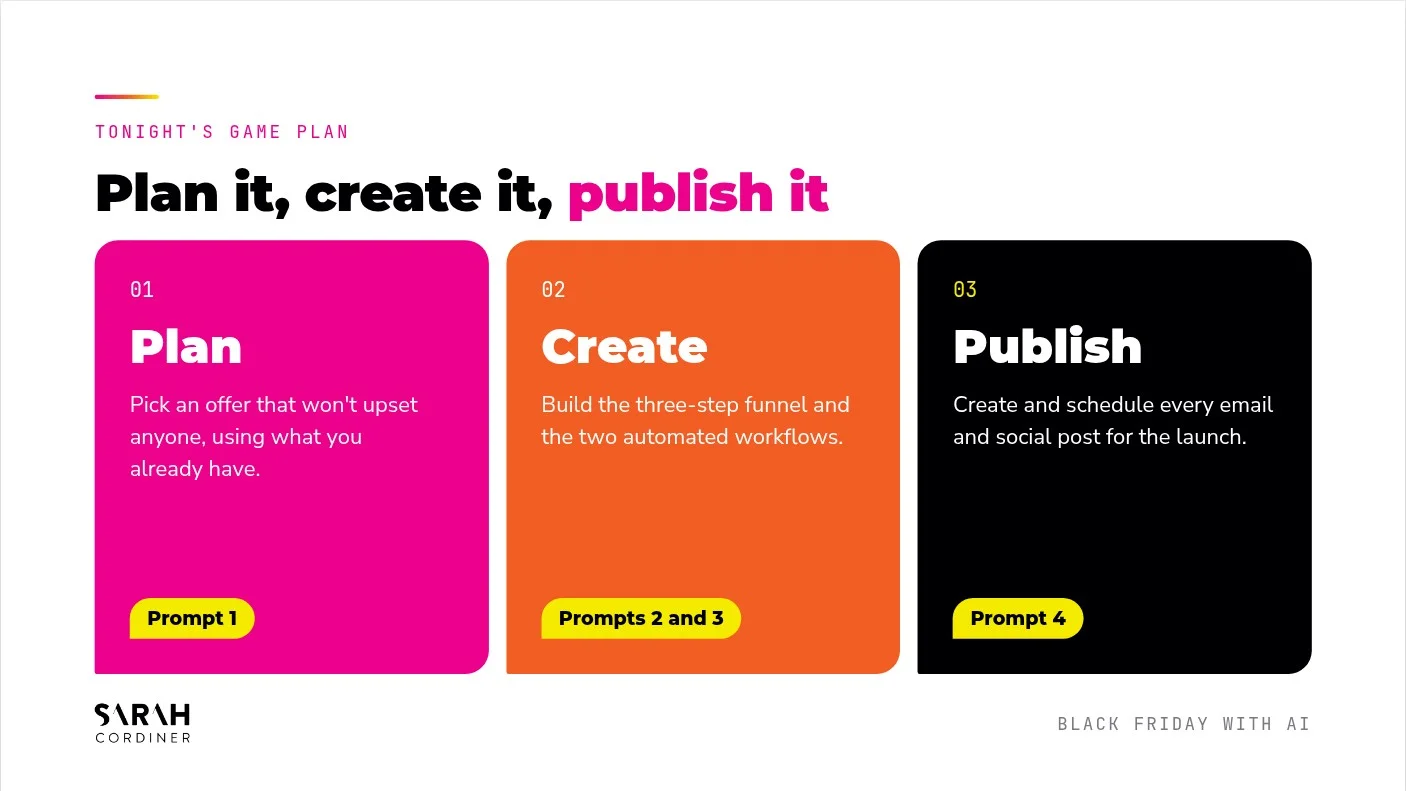
- Plan: protect your existing customers, reuse your assets and choose one clear outcome. Prompt 1 gives you ten ideas.
- Create: set up the product or session, then the three-page funnel with Prompt 2 and the two workflows with Prompt 3.
- Publish and promote: use Prompt 4 to prepare the email campaign, social captions and images. Review, test and approve before publication or scheduling.
Start with the person you can help, not a discount
At this time of year, people are reassessing things. Their career. Their business. Their health. Their money. The goals they set at the beginning of the year that have not happened yet.
So the question I want you to start with is: “Why did I start my business and what am I here to do to help people?” What part of someone’s life can your work meaningfully improve?
For me, November through February is a useful runway to think about, rather than treating Black Friday as the only day we can sell something. There is Cyber Monday, Christmas, Boxing Day and the New Year too. That does not guarantee demand for every business. It gives us a reason to put a relevant, useful offer in front of the right people.
In 2026, Black Friday is Friday 27 November and Cyber Monday is Monday 30 November. Your own offer still needs its own genuine closing date, time and time zone.
You do not have to join in. I’ve opted out of Black Friday before because my membership was already a great deal every day. You can promote something you already sell at full price, or decide this campaign is not right for you. These steps work for an ordinary product launch too.
What AI should I use?
If you already use Tekmatix, start with its inbuilt Ask AI. That is the first option to look at if you do not already have an external AI and do not want another subscription. I run my business on Tekmatix.
The prompts below should also work as instructions for Claude, ChatGPT, GrokBot or another AI you use. Choose the one that already knows your business best. The actual building and publishing it can do depends on its supported tools, your plan, the connected software and the permissions you give it. A prompt on its own does not create access.
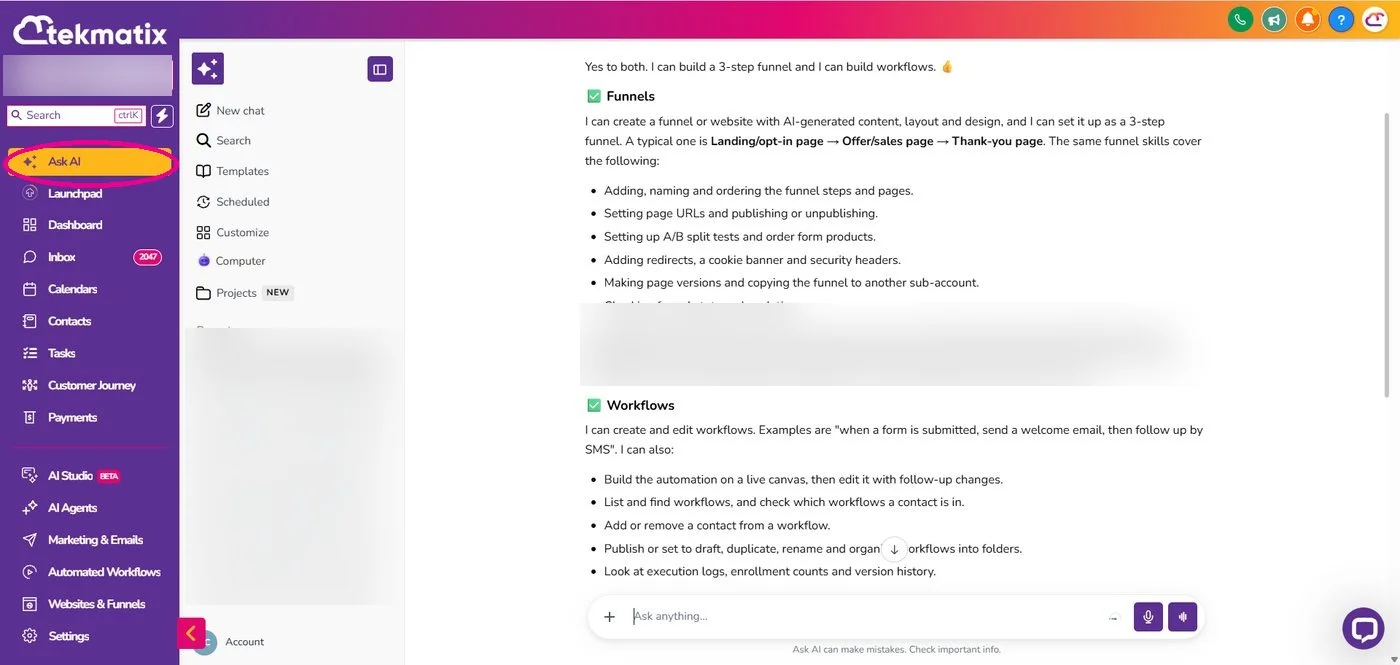
*Tekmatix AI usage applies as a billable consumable. You can find out more about pricing on our public page: tekmatix.com/pricing.
Give your AI the foundations, once
Before this task, your AI should have access to three current documents:
- Your strategic plan: your priorities, business goals and the people you want to help.
- Your company dossier: what you sell, who it is for, your prices, delivery and important facts.
- Your brand style guide: your real logo, colours, fonts, images and writing voice.
It should also be able to find your current public terms, product details and relevant procedures. If those already live in your connected systems, let the AI retrieve them. Do not spend the afternoon copying information between tools.
If you are starting with a completely new AI account, ask it to inspect your website and approved documents first, then identify the gaps. It must not guess your pricing, availability or terms.
Connections and browser control are different things
A connector gives your AI a supported set of actions, such as reading a product or creating a draft. It might not cover every job. A supported browser connection can sometimes handle work that needs clicks in the actual software.
Use the official connections available in your chosen tool and give only the permissions required. Complete sign-ins securely. Do not paste passwords or API tokens into an ordinary chat, and do not assume a connected AI has permission to email everyone or spend money.
There is a foundation-building phase. I described it in the webinar as piling, cement mixing and trudging through the mud. Sometimes one skill needs another document or a missing connection before the job becomes smooth. That does not mean you are failing.
Step 1: Protect the customers who already trusted you
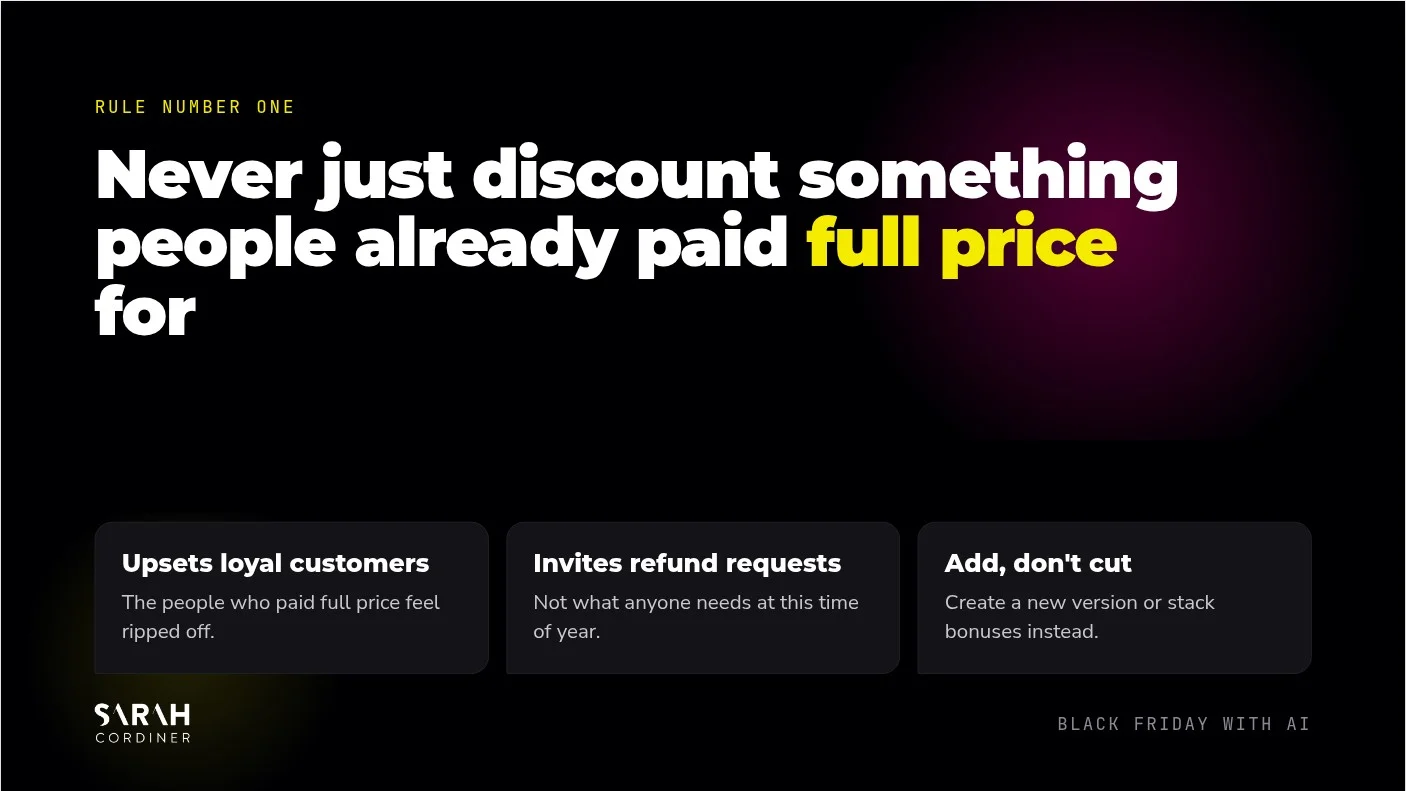
“Please do not ever just outright discount something.” That is my starting rule for this kind of offer.
Have you ever saved up for a lovely item of clothing, walked past it a hundred times, finally bought it, then seen it at 50% off the following week? Is that annoying or is that annoying?
Think about that feeling before you reduce the price of something your loyal customers recently bought. We do not want a sour taste in the mouths of the people who supported us.
Instead, create a genuinely different version: a new bundle, a different scope, extra bonuses or a new get-it-done session. Be clear about what is different. You can also thank existing customers with a genuine loyalty benefit.
I wrote about this on 6 May 2025 in how to create special offers without upsetting your paying customers. The customer relationship still comes first.
Step 2: Choose an offer that reuses what you already have
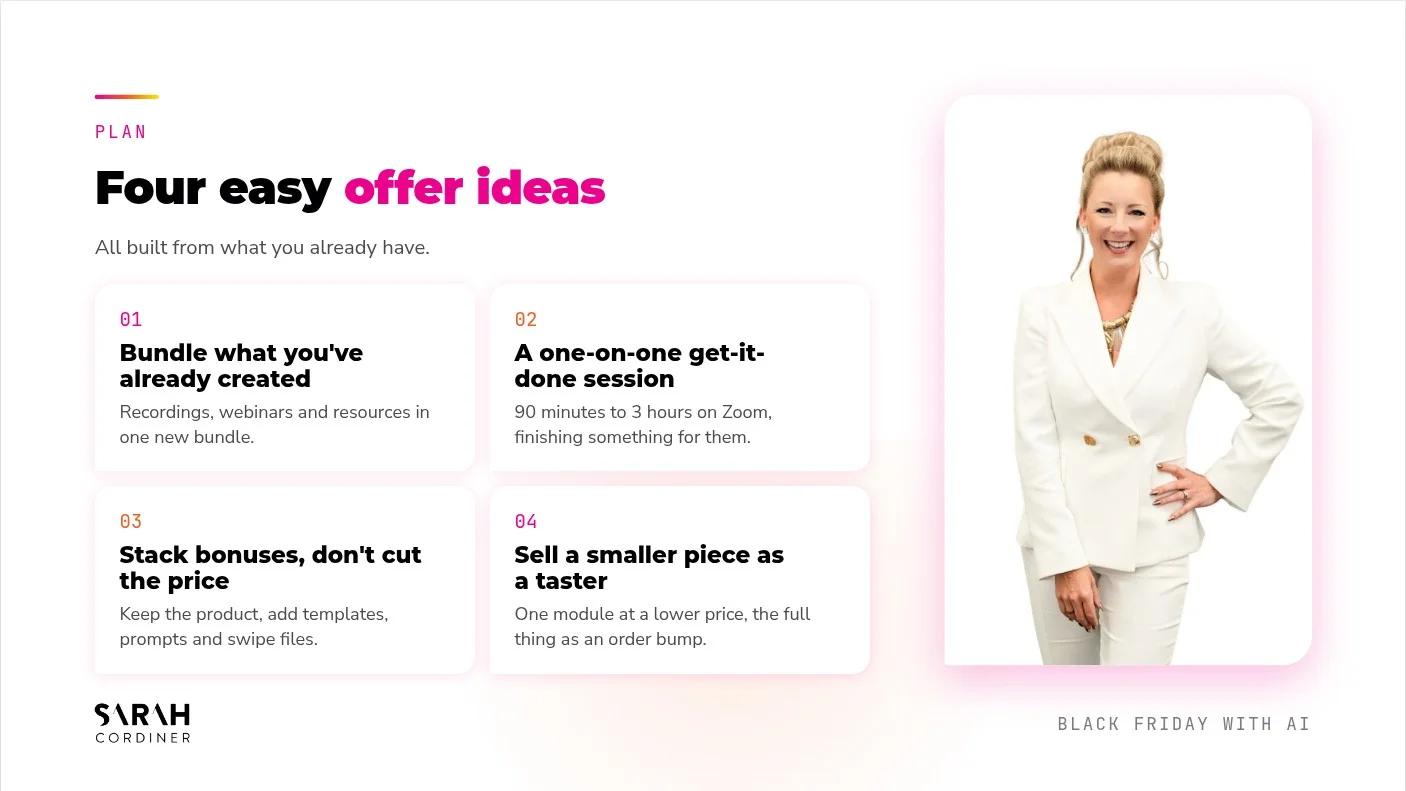
Option A: Bundle your recordings, workshops and resources
Look at the ebooks, guides, resources, webinar recordings, presentations and workshops you have already created. Could a useful selection solve one clear problem together?
Here is a teaching example, not my current pricing: imagine ten workshops that genuinely sell individually for $100 each. That is $1,000 separately. You might create a new $297 bundle and offer existing customers a further 10% loyalty coupon. The bundle is a different product, and the claimed individual values must be true.
No new filming. No giant new course. Your AI can find the resources in your portal, prepare the bundle and propose the product setup. You review the price, currency, access, coupon eligibility and expiry before activating it.
Do check the recordings. If a lesson is out of date, update it, label it clearly or leave it out. A big pile of old content is not automatically a useful offer.
Option B: Sell a finished outcome, not a vague call
A private 90-minute, two-hour or three-hour get-it-done session can be a very simple service offer. But do not stop at “book a coaching call”. Tell people what you will finish together.
- Map the next course using your course creation framework.
- Set up an advertising campaign together, ready for the client’s approval.
- Organise a wardrobe around the client’s upcoming events.
- Set up useful AI skills for a specific business job.
“It’s so much of an easier way to sell outcomes than it is to just sell a call.” Define what is realistic in that time. Set the duration, availability, price, booking rules and what the client needs to bring. Then let the AI prepare the calendar and funnel.
Option C: Stack relevant bonuses
Keep your product price and add things that make the outcome easier: a checklist, template, prompt pack, resource or workshop recording. Consider giving the new bonuses to existing buyers first.
Offer stacking means spelling out what people receive and what each part helps them do. It does not mean inventing inflated values. Only say an item is sold separately for a particular price if that is true.
Option D: Sell a smaller taster
Sell a clearly defined part of a larger program, such as Module One, rather than discounting the whole membership. List exactly what is included and what is not.
Your full members still get everything. The taster buyer gets a smaller product for a smaller price. That is a different scope, not the same thing suddenly being sold more cheaply.
Step 3: Make the value obvious and the intangible visible
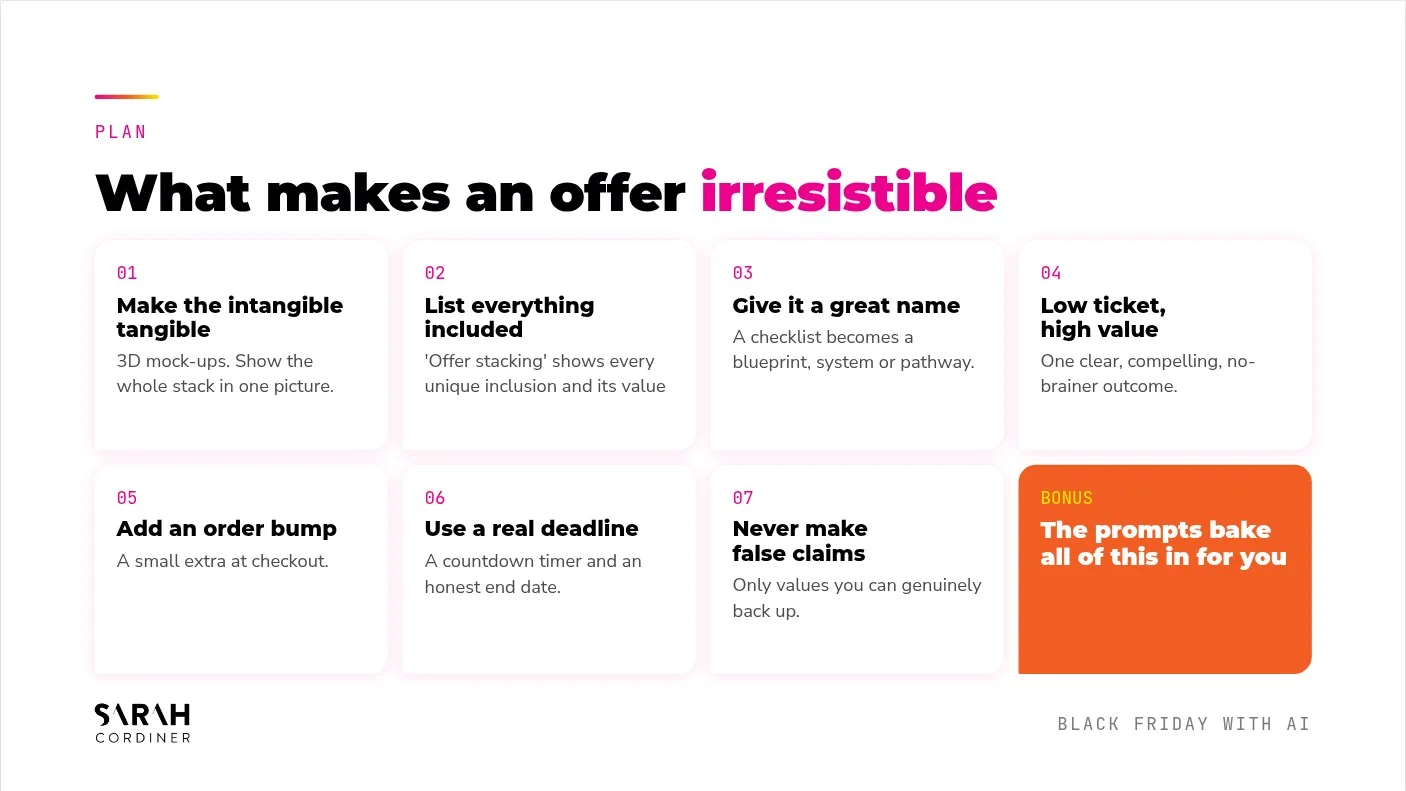
Instead of saying, “I’ll help you create your course”, you might explain that the session includes Sarah’s 10-step course creation framework, the planning template and the checklist used to finish the outline. Now the buyer can see the process and the things they will receive.
Useful names for genuine methods include framework, blueprint, system and model. Do not give a checklist a grand name if it does not actually help somebody do the thing.
Then show the digital items. A checklist can appear inside a phone mock-up. An e-guide can be shown as a 3D book. Put the relevant image beside the inclusion, as well as showing the whole stack together.
This is what I mean by making the intangible tangible. It helps people understand what their money buys. Do not imply you are shipping a physical book if it is a digital download.
Prompt to copy into Ask AI, GrokBot, Claude or ChatGPT: make the intangible tangible
Taking everything you know about me and access to all of the data and systems you already have, create visual mock-ups for the offer we chose. Log into my Tekmatix account and find the actual included resources and my approved brand assets in the media library or connected folders.

Show the checklist inside a phone and the e-guide as a 3D book mock-up, if those items are genuinely included. Create a whole-offer stack image and individual images beside each inclusion for the sales page. Use the real resource covers and accurate contents. Do not add items that buyers will not receive, invent testimonials or create a fake photograph of me. Make it clear that digital items are digital, not physical products being shipped.

Keep the text readable on mobile and use my brand colours, fonts and real logo. Return the draft images with descriptive filenames and alt text for review. Do not publish them yet.
Step 4: Name the offer for what people actually search
This is an important distinction I made during the live session: give the included methodology a good name, but make the product title explicitly say what it is.
“Sarah’s transformational framework” tells a new customer very little. “How to plan your online course in a 90-minute session” tells them what it does.
Think about the question they would type into Google or ask an AI. “How do I run Facebook ads?” “How do I create my course?” Match the actual problem, not a clever seasonal title.
One real example I shared was the search phrase “software for pole dancers” bringing someone to my business website. It was a useful reminder to use the audience’s actual language, not just the terms I would have guessed myself.
Ask your AI to review connected Google Search Console queries and website analytics alongside your audience’s questions. Search Console reports Google Search performance. Analytics reports website activity and acquisition information where available. Neither gives you a complete view of private questions people ask inside every AI service, and neither guarantees a top ranking.
If connecting a tool confuses you, use my favourite learning method: give the AI a screenshot and ask, “What do I click next?” Remove private information from screenshots first.
Prompt to copy into Ask AI, GrokBot, Claude or ChatGPT: name your offer for the question people ask
Taking everything you know about me and access to all of the data and systems you already have, help me name this offer so the title says exactly what it is and matches the problem my audience is searching for.

Log into my Tekmatix account and review relevant approved conversations, comments, DMs, support questions and consultation transcripts. Retrieve the evidence yourself. Review my connected Google Search Console and Google Analytics if available. Use the real queries and page behaviour those tools actually report. Do not claim to know private searches inside AI services.

What is the literal search term, query or question my audience would use to find this product? Give me five clear product-title options, a recommended page title, meta description and useful FAQ questions. Explain which evidence supports each option and separate evidence from guesses. Keep any proprietary framework name inside the offer, not in place of a clear product title. If a connection is missing, show me the supported secure setup steps. Prepare recommendations only, not live website changes.
Step 5: Decide the goal, price and real deadline
Is this primarily an income-generating activity or a lead-generation activity? Decide before choosing a price.
For a quick seasonal purchase, I generally prefer a lower-priced first offer with one useful outcome. In my experience, offers under about $150 can be easier for a broad audience to decide on than a high-ticket commitment. A higher-ticket offer may need a sales conversation and can be the next step instead.
For lead generation, I gave $9, $11 and $27 as example prices. These are illustrations, not universal conversion rules. Your costs, currency, audience, delivery capacity and margin matter. Do not undercharge for a service you cannot sustainably deliver.
An order bump is a small, relevant optional extra at checkout. Think of the little “would you also like this?” purchase, not another complicated decision. It must be clearly priced and genuinely optional.
Use a real deadline. Do not invent scarcity, reset a supposedly final countdown or promise financial outcomes. Only claim values and savings you can support.
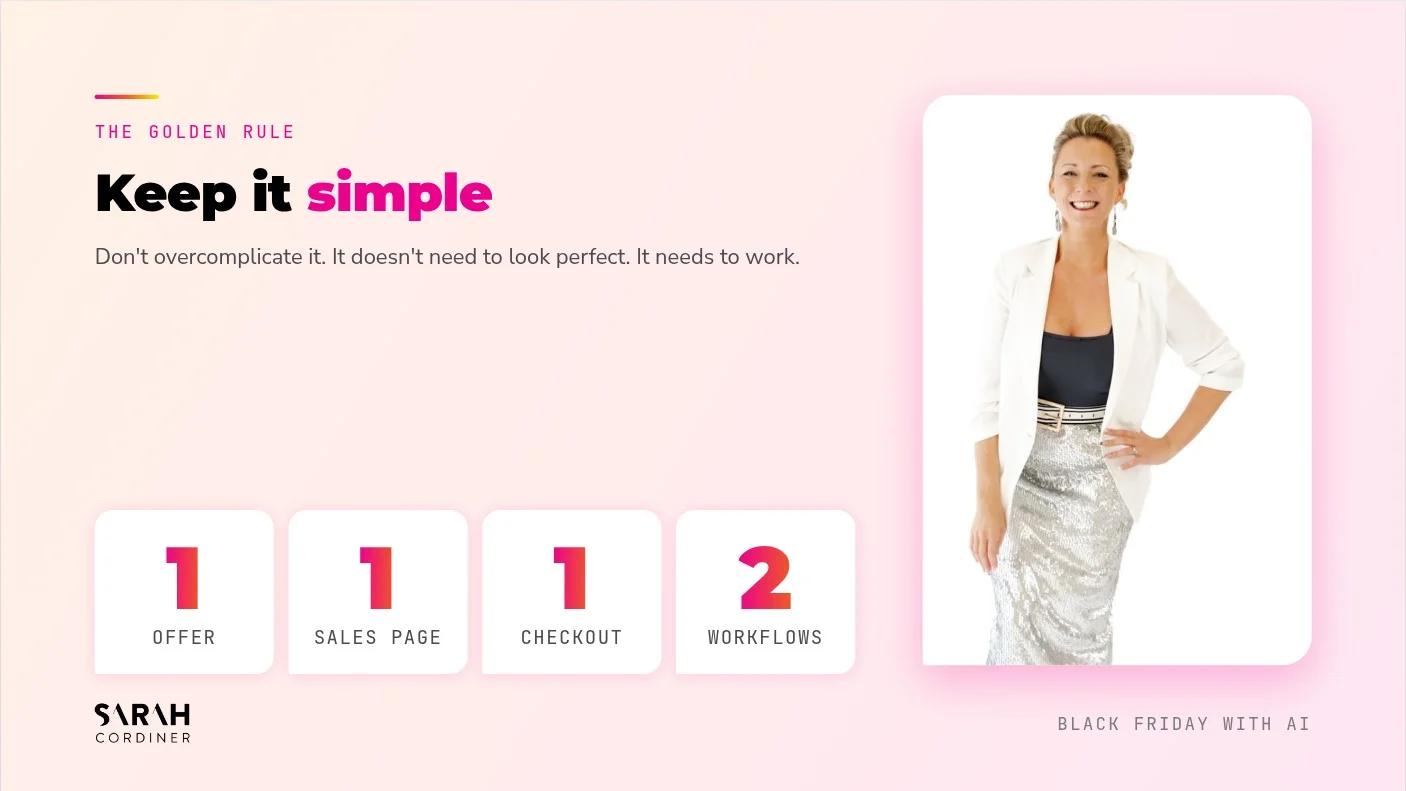
“Attention diluted is results diluted.” Pick one offer. You do not need to create ten things just because AI gave you ten ideas.
Prompt 1: Plan ten ideas, then pick one
Now put the teaching into the AI that knows you best. This is the updated version of the offer-planning prompt from my slides, with the search-led naming rule from the live training included.
Prompt to copy into Ask AI, GrokBot, Claude or ChatGPT: plan your offer ideas
Taking everything you know about me and access to all of the data and systems you already have, I'd like your help with my Black Friday offer. Use my existing strategy, company dossier, audience knowledge, products, services and branding.

Log into my Tekmatix account through the approved connection and review my course portal, products, resources, recordings, workshops, customer conversations, support questions and consultation transcripts that you have permission to access. Retrieve the information yourself rather than asking me to find it or paste it into this chat. Use my other approved connected systems where relevant. Do not expose customer names or personal details in the output.

We've got Black Friday and Cyber Monday coming up, followed by Christmas and New Year. Confirm this year's dates. Suggest 10 offers I could put together using what I already have. Include bundles of existing resources, trainings, recordings, workshops, products or services, and a special one-on-one get-it-done appointment of one to three hours where we finish something specific for the client. Include other suitable ideas based on what I do and who I help.

Here are my rules:
- Never just discount something I have already sold at full price. Make each offer a different version, a new bundle, an offer stack with bonuses, a smaller taster or a new get-it-done session, so existing customers do not feel ripped off.
- Reuse and repackage what I already have, with minimum extra work for me. Flag outdated resources rather than presenting them as current.
- Make each offer accessible in price, high in genuine value and focused on one clear, compelling outcome. Check delivery effort, costs and capacity before recommending a price.
- Distinguish income generation from lead generation. If my current strategy does not settle the objective, show how the recommendation changes for each and ask me to choose.
- Suggest a small, relevant order bump and a loyalty coupon idea for existing customers, with clear eligibility and expiry.
- Do not invent values, testimonials, savings, demand, deadlines or financial outcomes.

For each offer, give me a clear, searchable product title that says exactly what it helps someone do, not a cute seasonal name. Use available Google Search Console queries, website analytics and audience questions as evidence. Label title ideas as hypotheses if search evidence is unavailable. A framework or blueprint inside the offer may have a distinctive name, but the product title must be clear.

Show what is included, the bonus stack, the customer outcome, assets already available, anything missing, suggested price and currency, delivery effort, order bump and existing-customer benefit. Tell me which idea you recommend for my objective and why, without promising a payday. Give me a comparison table and wait for me to choose one. Do not launch or change live systems.
Then say: prepare the one you chose
Choose one idea, tell the AI which one, then use this follow-up. “Go and do it” should mean preparing the build for review, not skipping your launch checks.
Prompt to copy into Ask AI, GrokBot, Claude or ChatGPT: choose one offer and prepare the build
Taking everything you know about me and access to all of the data and systems you already have, let's go with the offer I just selected. Can you go and prepare all of that for me now?

Log into my Tekmatix account using the approved connection, find the assets and prepare the product, bundle or session and the build plan. Reuse the decisions in this conversation. Confirm the final price, currency, delivery capacity, eligibility, public terms and genuine closing date and time in my business time zone. Flag any decision that is still missing.

Follow the next funnel and workflow prompts. Show me preview links, tests and an approval checklist. Do not publish, activate workflows, send, schedule, charge, refund or spend until I explicitly approve the specific action.
Prompt 2: Create your product and three-step funnel
A funnel is simply the connected pages that take someone from understanding the offer to buying it and knowing what to do next.
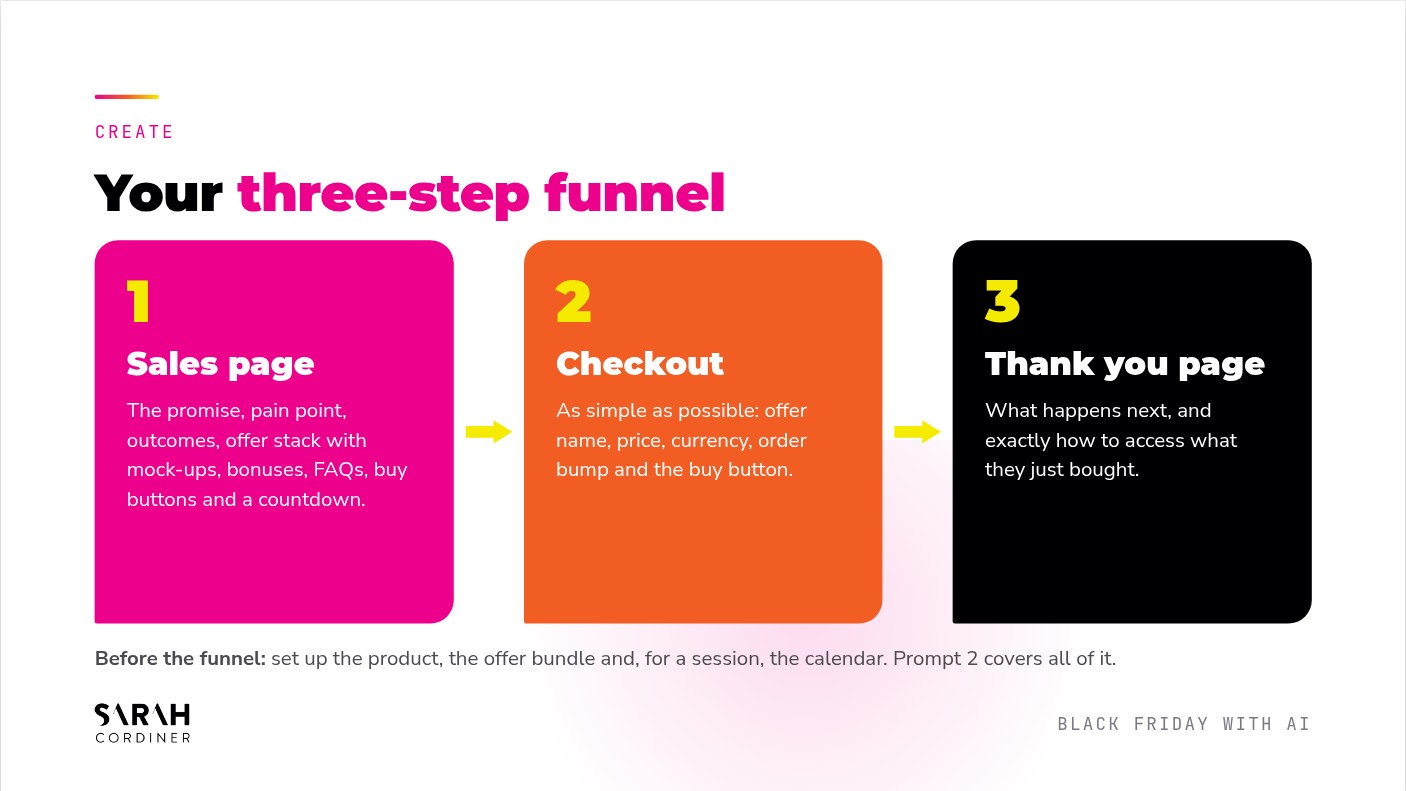
- Sales page: what it is, who it helps, the outcome, inclusions, visuals, genuine value, FAQs and buy buttons.
- Checkout: the correct product, price, currency, optional order bump, public terms and payment.
- Thank you page: confirmation and exactly how to access the purchase or book the session.
The checkout product is what someone pays for. The offer or bundle is what grants access to the right resources. A session also needs the correct calendar. Those pieces must match.
We no longer have to learn every page-builder control to get a first draft. We can say, “Go and make me that, please.” But a draft is not proof that payment, access or the mobile layout works.
Prompt to copy into Ask AI, GrokBot, Claude or ChatGPT: build your three-step funnel
Taking everything you know about me and access to all of the data and systems you already have, please now build the Black Friday offer we just chose inside my Tekmatix account. Log in using the approved connection and retrieve the resources, prices, terms and brand assets from my account and other approved systems rather than asking me to paste them here. Work in draft or preview mode.

1. Set up the offer. Find all the resources that go into this offer in my portal. Create the product and agreed price and currency for the checkout. In Offers, create a new offer and bundle the correct resources into it. Keep the checkout product and the access bundle correctly linked. If the offer includes a one-on-one get-it-done session, create the calendar appointment with the agreed duration, my actual availability, booking rules and meeting details. Check for existing products first to avoid duplicates.

2. Build a three-step funnel in my brand colours, fonts, logo and voice:
- A sales page with a clear search-led title, the problem, the honest promise and outcomes, who it is for, the full offer stack with accurate mock-up images and genuine values, bonuses, FAQs, buy buttons near the top and bottom, public terms and a countdown only to the real offer deadline.
- A simple checkout with the exact offer name, price, currency, applicable tax information, the optional order bump and the buy button. Include a checkbox agreeing to my current public terms. Keep marketing consent separate and do not preselect extra purchases.
- A thank you page that confirms the successful purchase, tells buyers exactly what happens next, asks them to check their email for access and gives the correct access or booking instructions. Do not display a success message for a failed payment.

3. Add the search-led SEO title, meta description, social sharing image, favicon and appropriate structured data. Use my existing approved tracking setup on every step, subject to my consent settings. Do not install new trackers or expose private data. Check every button and link, the deadline time zone and the mobile layout.

Only use claims, values and testimonials that are true and supportable for my business. Do not invent anything. Send me the draft preview links, product-to-bundle mapping, calendar link if relevant and a list of anything missing. Wait for my approval before anything goes live. Save the reviewed process as a reusable skill or SOP for future offers, keeping offer-specific prices and dates separate.
Prompt 3: Build the two workflows every paid offer needs
A workflow is the set of automatic actions that happens after something occurs. It stops you having to manually notice every purchase, send every access email and chase every unfinished checkout.
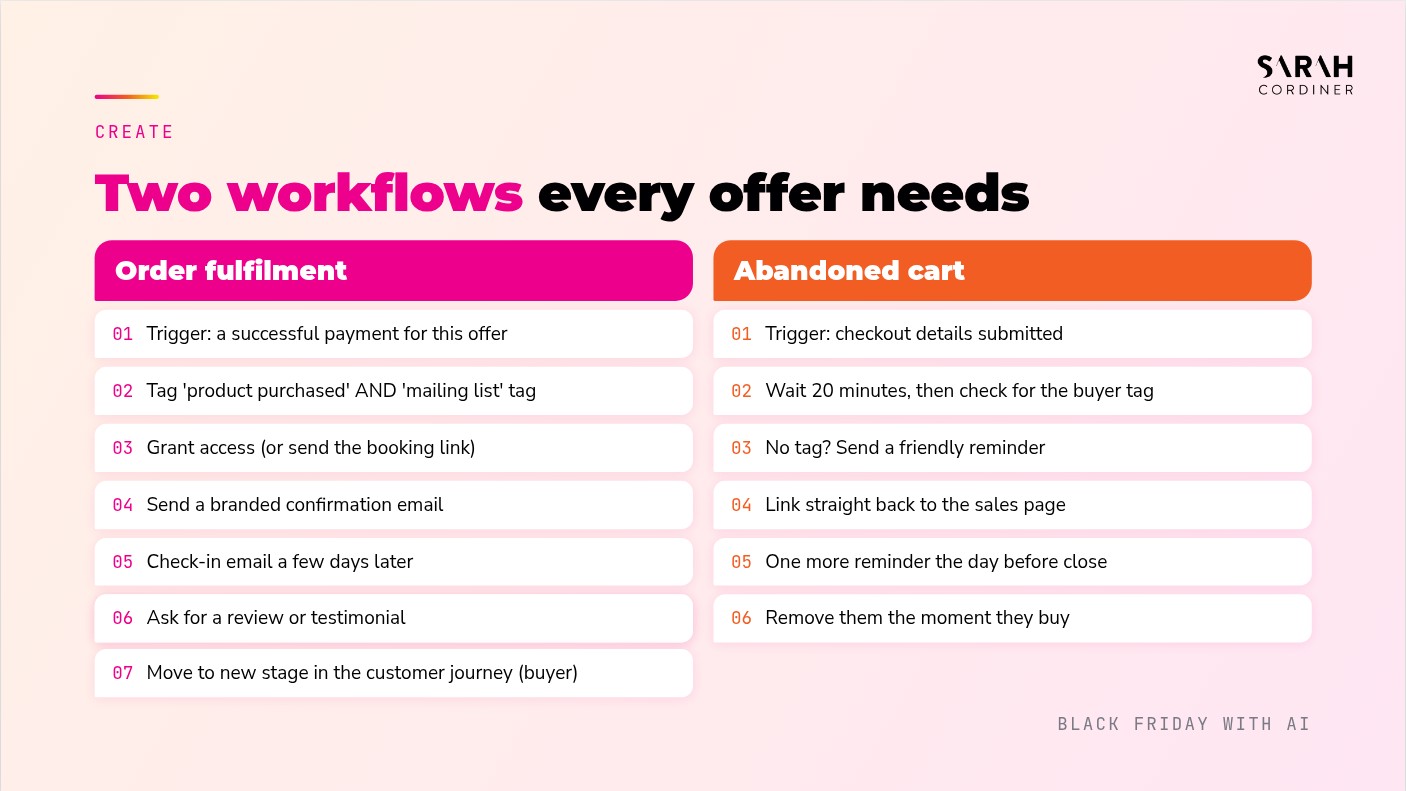
Workflow 1: Order fulfilment
This is the automatic delivery process after a successful purchase. It should:
- Recognise a successful payment for the exact product.
- Add a product-specific purchase tag.
- Apply your mailing-list classification where consent allows it, without overriding an unsubscribe or email DND.
- Move the buyer into the right customer-journey stage.
- Grant the correct course or bundle access, or give the right booking link.
- Send a branded confirmation with secure access instructions.
- Optionally check in later and request a review at a suitable time.
I use the tag mailing list to identify subscribers. Your own system may use a different tag. A purchase tag and a marketing-consent record are different things, so do not treat one as proof of the other.
The human check: Payment Status must be Success
This is the lesson I said I learned the hard way. Do not just see the words “Payment Received” and assume the workflow is safe.
In the trigger panel I demonstrated, check these three things:
- Trigger: Payment Received.
- Product filter: the exact Global product for this offer.
- Payment status filter: Success.
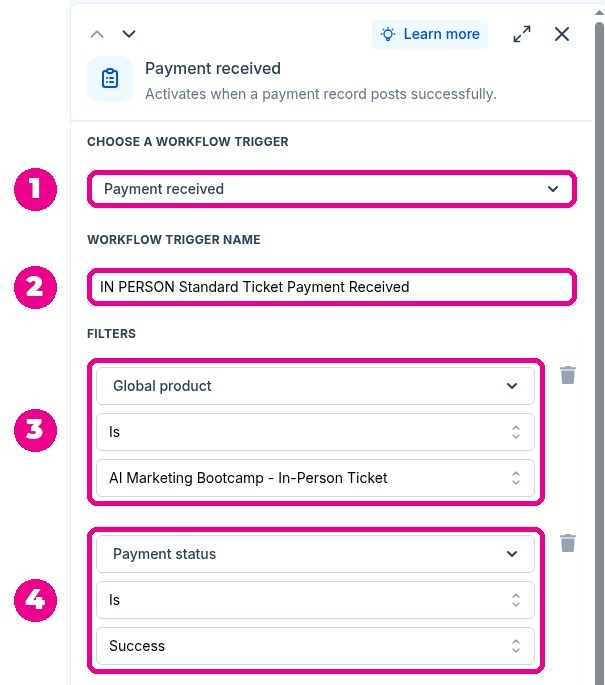
A failed payment or incomplete payment attempt must not grant access. Check your actual software’s current labels and behaviour, then test it. I want a human to look at those filters, not simply trust that the AI has done it.
Workflow 2: Abandoned cart
Someone starts buying, then the phone rings, a child needs them or the cat causes chaos. An unfinished checkout is not always rejection. Sometimes life just interrupts.
- Notice checkout details submitted for this exact offer.
- Wait 20 minutes.
- Check whether the person has successfully purchased and has the correct product-specific buyer tag.
- If they have bought, stop. If they have not and are eligible to receive the reminder, send a friendly link back.
- Optionally remind them again the day before the real offer closes, only if that date is still ahead.
- Remove them immediately when they buy and re-check before every message.
The tone can be as simple as: “Oopsie, I noticed you didn’t finish buying your thing. Here’s the link if you wanted to go back and grab that.” Keep it friendly, not accusatory.
Precise product tags also help you avoid promoting something to people who already bought it, or prepare a relevant thank-you for that group later.
Prompt to copy into Ask AI, GrokBot, Claude or ChatGPT: build your fulfilment and abandoned cart workflows
Taking everything you know about me and access to all of the data and systems you already have, please build the two automated workflows for my new Black Friday offer inside my Tekmatix account. Log in through the approved connection, retrieve the selected product, offer bundle, calendar, existing email template, current terms and customer-journey stages yourself, and keep both workflows inactive while we review and test them.

Workflow 1: Order fulfilment
- Trigger: Payment Received, filtered to the exact global product for this offer AND Payment Status = Success. Show me both filters. A payment attempt or failed payment must not grant access.
- Add a product-specific tag such as 'has purchased' followed by the exact offer name. Do not use one generic buyer tag for every product.
- Add my 'mailing list' classification, or the tag used by my mailing-list smart list, only where the person has the required marketing consent. A purchase is not permission to override an unsubscribe or email DND setting.
- Move the contact or opportunity into the correct buyer stage of my overall customer journey. If there is no suitable journey, propose one for my review rather than creating competing pipelines.
- Grant access to the exact offer or bundle in my portal. If a one-on-one session is included, provide the correct calendar booking link.
- Prepare a warm branded confirmation email with the secure access or login link and exactly what to do next. Do not email a password.
- Prepare a check-in a few days later and a later review or testimonial request, using appropriate eligibility and consent rules.

Workflow 2: Abandoned cart
- Trigger: someone submits checkout details for this exact offer but has not completed the purchase.
- Wait 20 minutes, then check the successful-purchase record and the product-specific buyer tag.
- If they have bought, stop. If they have not bought and are eligible to receive the reminder, add the offer-specific abandoned-cart tag and prepare a friendly reminder with a link back to the sales page and checkout.
- If they still have not bought, prepare one more reminder the day before the real offer closing time, only if that date is still in the future. Do not send a late or expired-offer reminder.
- Re-check purchase status before every reminder. Remove them from this workflow immediately when they buy. Respect unsubscribes, DND and applicable marketing-consent rules.

Use my existing email template and branding. Make every email mobile responsive and readable in light and dark mode. Before running tests, explain the test method and prevent messages going to real customers. Use approved test mode or isolated test contacts where supported. Ask before any live payment, refund or external test send.

Test a successful purchase, a failed payment, an abandoned checkout, a buyer who purchases during the wait, and an unsubscribed or otherwise ineligible contact. Show the trigger filters, resulting tags, journey stage, access, emails and suppression results. Ask a human to verify the success filter. Do not activate either workflow until I approve. Save the reviewed workflow rules as a reusable skill or SOP.
I covered the wider setup on 19 October 2026 in how to automate purchases and opt-ins. For this launch, the product filter, success filter and tested access are the non-negotiables.
Prompt 4: Prepare your emails, images and daily social promotion
People cannot get help from your thing if they do not know it exists. Publishing a sales page is not the same as promoting an offer.
For big launches, especially events where someone must commit to a date, I recommend starting around 90 days ahead. Where possible, give yourself at least 30 days of promotion. If you are starting later, begin today rather than giving up.
When I ran my bootcamps, I could promote for six months, email every other day and post three times a day, and still hear, “I had no idea this was on.” People are not seeing everything you publish, post or send.
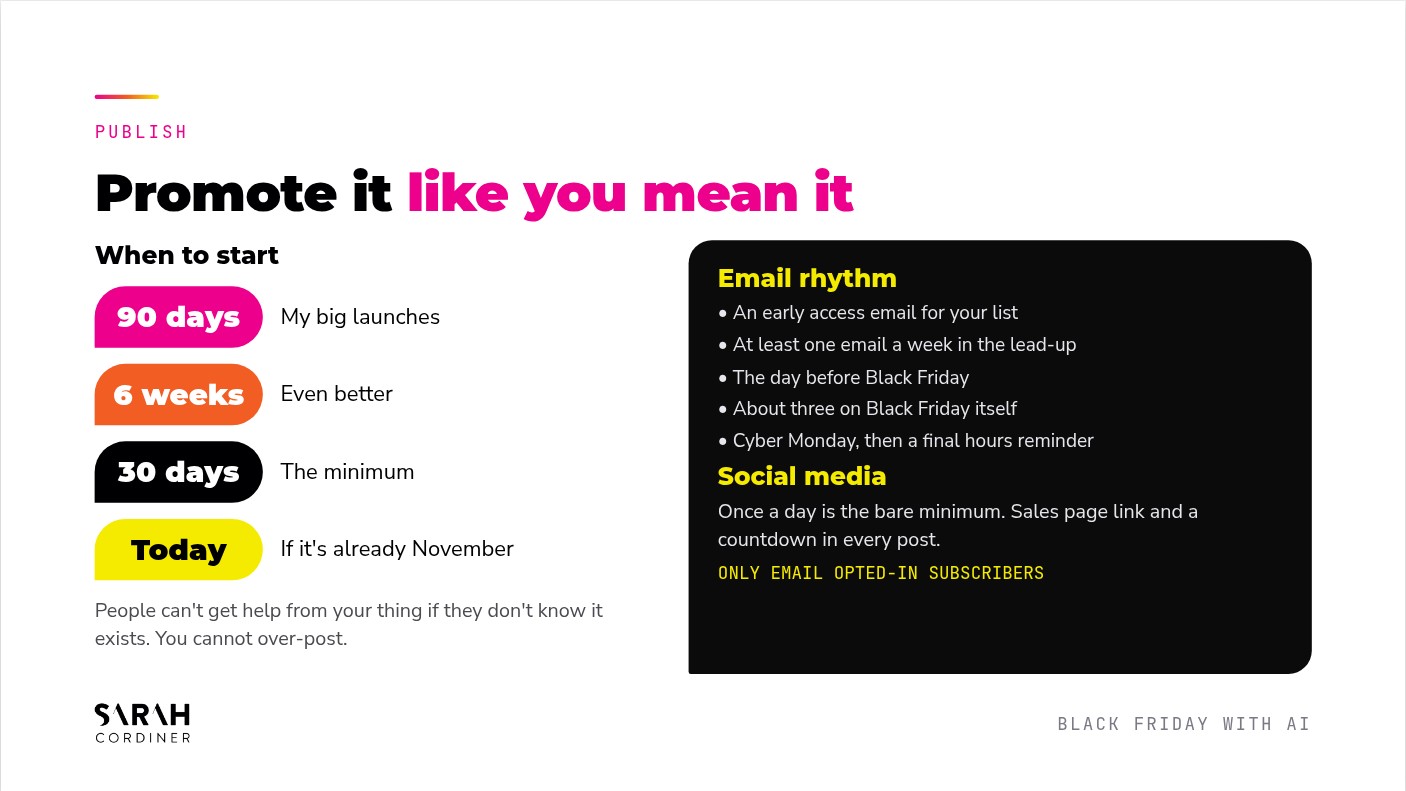
A practical promotion rhythm
- Email: early access for your list, at least weekly in the lead-up where time allows, the day before Black Friday, up to three distinct messages on Black Friday, Cyber Monday and a final-hours reminder if those dates fit your offer.
- Social: a useful daily post during the campaign, with a clear link and accurate countdown where relevant.
- Audience: only email eligible opted-in subscribers, not every person in your contact database. Honour unsubscribes and stop inappropriate sales reminders after purchase.
This is not an instruction to bombard people with identical messages. Change the angle: a useful tip, what is inside, who it is for, an honest answer to a question, a genuine testimonial or behind-the-scenes work.
I use a spider’s-web analogy. Each relevant piece of helpful content is another route by which someone might discover your work. It is not a guarantee that an algorithm or AI service will recommend you.
Give the AI a safe photo library
Create a Pictures of Me folder in your Tekmatix media library, or use an approved connected folder of photographs and B-roll. Tell the AI to use those assets. It should not keep asking for the same photographs or make up a fake version of your face.
The prompt should prepare everything in the correct brand account, then show you the content, audience and schedule before anything goes out. Do not leave approval until after scheduling.
Prompt to copy into Ask AI, GrokBot, Claude or ChatGPT: prepare your complete email and social promotion
Taking everything you know about me and access to all of the data and systems you already have, please go inside my Tekmatix account and prepare the promotion for my new Black Friday offer. Log in through the approved connection and retrieve my sales page, product details, current email template, opted-in mailing-list smart list, connected social profiles, brand guide, approved testimonials and media assets yourself.

Work out today's date in my business time zone, this year's Black Friday and Cyber Monday dates, and the real closing date and time of my offer. Plan only future dates. If the runway is shorter than ideal, adapt the plan instead of scheduling into the past or overwhelming the list. Check existing campaigns and posts for clashes or duplicates.

Emails:
- Read the sales page and write the full campaign in my voice using my existing email template and branding.
- Propose early access for my list, at least one email a week in the lead-up where time allows, one the day before Black Friday, up to three distinct emails on Black Friday, a Cyber Monday email and a final-hours reminder where those dates match the genuine offer deadline.
- Give each email a useful subject beginning with 'How to' and preview text. Use a clear button to the sales page and an unsubscribe link. Keep the message helpful, accurate and readable on mobile in light and dark mode.
- Prepare campaigns as drafts for my opted-in mailing-list smart list only, never my whole contacts database. Honour unsubscribes and DND. Where appropriate, exclude purchasers from sales reminders and send only the relevant buyer information.

Social media:
- Prepare at least one caption and image per day of the promotion for my connected profiles, adapted to each platform and in my voice and branding.
- Include a clear call to action and sales-page link. Use a countdown only when it is accurate and relevant to the real deadline.
- Mix offer stack images, practical tips, sneak peeks, behind-the-scenes content, real existing testimonials and short reels from approved videos. Do not invent testimonials or duplicate the same post endlessly.
- Use approved photographs from my 'Pictures of Me' folder in the Tekmatix media library or my approved connected photo and B-roll folder. If suitable images are missing, flag that. You may draft appropriate supporting product graphics, but do not generate a fake version of my face.

Before anything is sent, scheduled or published, give me an approval table with every email and post, the correct brand account, audience or profile, proposed date, time and time zone, subject, copy, image and destination link. Show previews and checks. Save everything as drafts and wait for my explicit approval of the specific schedule and content. Do not spend on ads. Save this reviewed promotion process as a reusable skill or SOP.
Keep the human connection in your marketing
“Your human content needs to be human connection.” Let AI help you distribute and prepare the assets, but let people hear from you too.
A simple phone video while you are walking or chatting can be enough. Explain the problem, the outcome and who the offer helps. You do not need to turn every conversation into a studio production.
Where your chosen tools support video editing, let AI help with captions and distracting gaps. Check that it has not changed your meaning, and only use music you have the right to use.
Prompt to copy into Ask AI, GrokBot, Claude or ChatGPT: prepare a short human promo video
Taking everything you know about me and access to all of the data and systems you already have, prepare the short promo video I have just provided for the offer we chose. Retrieve the approved offer details and brand assets from my Tekmatix account and connected media folders.

If your tools support video editing, add accurate readable captions, remove distracting pauses without changing what I mean, and use only music I have the right to use. Keep the natural human feel. Prepare suitable versions for my chosen social profiles and a caption with the correct sales-page link. If you cannot edit the file, tell me which supported editing connection is needed and draft the edit brief instead.

Show me the finished preview, check the captions and mobile readability, and wait for approval. Do not post, schedule, upload to an ad account or spend.
When your AI says “I can’t do that”
I’ve had an AI complete a big build, then tell me the next day it cannot do something similar. Please do not immediately assume you are doing something wrong.
I often say, “You’re a very clever bot. I believe in you. Try again.” Then I ask what is actually missing: the login, the supported connector, the browser connection or permission for that specific action.
Sometimes there is a genuine limitation. A different plan, unsupported action, unavailable tool or security restriction will not disappear because we repeat ourselves. Diagnose the problem. Do not bypass a refusal, denied approval or security control.
Prompt to copy into Ask AI, GrokBot, Claude or ChatGPT: when your AI says it cannot do the job
Taking everything you know about me and access to all of the data and systems you already have, please check whether you can complete this task using the supported tools and permissions I have already approved. You may have done a similar job before, so show me what is different now rather than assuming it is impossible.

If you need access to my Tekmatix account or another approved system, tell me which official connector, secure login or supported browser connection is missing. Tell me exactly what to click so I can complete the authorised setup securely. Never ask me to paste a password or API token into ordinary chat.

If a tool failed, show me the actual error and the supported next step. If your plan or tools genuinely do not support the task, explain the limitation and offer a safe draft or another supported approach. Do not bypass a security restriction, a denied permission or an approval gate. Once the authorised access is working, continue the approved work and show me the result.
Before you launch: test like an actual buyer
It does not need to look perfect. It needs to work. Go through the buyer journey, rather than only looking at the sales page.
Use the supported test or sandbox mode first. If a controlled live purchase or refund is necessary, authorise that separately and understand any fees. Keep test messages away from real customers.
- Sales page on desktop and mobile: headings, images, inclusions, buy buttons, terms and real deadline.
- Checkout: correct product, price, currency, taxes where applicable, optional bump and working payment.
- Successful purchase: correct tag, customer-journey stage, confirmation and exact access or booking link.
- Failed payment: no successful-purchase tag, no access and no misleading success message.
- Abandoned checkout: correct 20-minute wait and eligible reminder for the right product.
- Purchase during the wait: the reminder is suppressed and the buyer exits the abandonment workflow.
- Consent: unsubscribed, DND and other ineligible contacts do not receive marketing they should not receive.
- Emails: readable on desktop and mobile, in light and dark mode, with working buttons and unsubscribe links.
- Schedule: no past dates, no clashes, no wrong brand account and no reminders after the real close.
I once tested an email in light mode and thought it looked perfect. Then a lovely reader told me they could not read it in dark mode. Check both. That little test can save a very avoidable problem.
Fixes can be conversational. Stay in the same AI thread and say, “Where you said this, change it to that”, or, “This looks wrong on mobile. Please redo it for mobile resizing.” Then re-test what changed.
Prompt to copy into Ask AI, GrokBot, Claude or ChatGPT: check the whole buyer journey
Taking everything you know about me and access to all of the data and systems you already have, audit the draft Black Friday offer we have built. Log into my Tekmatix account through the approved connection and inspect the actual sales page, checkout, product, bundle or calendar and both workflows.

Prepare a test matrix for desktop and mobile pages, all links, price and currency, genuine deadline and time zone, optional order bump, terms, successful payment, failed payment, access or booking instructions, confirmation email, abandoned checkout and immediate suppression after purchase. Include email readability on desktop and mobile in light and dark mode.

Use isolated test contacts and supported test mode only within the permissions I have approved. Ask before any live charge, refund, external email or workflow activation. Confirm specifically that the exact product and Payment Status = Success filters are present and that a failed payment grants no access. Show evidence of each result, not just a claim that everything is fine.

List anything broken, fix the drafts within the approved scope and re-test. Give me preview links, screenshots and a final launch approval checklist. Leave live publication and scheduling for my separate approval.
Save the work as a reusable skill
Once it is reviewed and tested, say, “Can you save this as a skill so that every time I ask you to create workflows for my products later, you have the process?” Do the same for the funnel and promotion.
That turns today’s build into a reusable procedure, rather than another prompt you have to hunt for. Keep current rules, terms and brand assets in one source of truth. Prices, dates and product IDs still need checking for each new offer.
Your final launch decision
- Choose one useful offer, with an honest existing-customer benefit.
- Confirm the searchable name, price, currency, inclusions and actual deadline.
- Review the product, access bundle or calendar and all three pages.
- Check the specific product and successful-payment filters yourself.
- Pass the successful, failed and abandoned purchase tests.
- Review the complete emails, social assets, audiences and proposed schedule.
- Approve publication, workflow activation and the exact promotion you want released.
After launch, keep learning from real questions, purchases and feedback. If you carry the offer into the Christmas or New Year period, update the genuine terms and dates honestly. Do not keep a supposedly final Black Friday countdown running forever.
Be the most helpful person in the room
At the end of the webinar, we talked about what to give away and what people still pay for. My approach is educational marketing. “I always give away all of the steps.”
I want to be the most helpful person in someone’s inbox and on their feed. That includes people who cannot currently afford paid support. Give them something genuinely useful, not just another teaser.
Use real audience questions as the starting point. Let the AI find what you have already taught, then add your current expert view. That is far more useful than endless posts saying, “Buy my thing.”
Prompt to copy into Ask AI, GrokBot, Claude or ChatGPT: turn real questions into useful promotion
Taking everything you know about me and access to all of the data and systems you already have, help me be the most helpful person in my audience's feed and inbox while promoting this offer.

Log into my Tekmatix account and retrieve relevant approved emails, social comments, DMs, support questions and call transcripts. Review connected search evidence and my existing published content. Find up to 50 genuine audience questions around the problem this offer solves, grouping duplicates and removing names and personal details. Separate real evidence from suggested questions.

Recommend the most useful questions for this campaign. Find what I have already taught about them, then ask me for my current expert view only where something is missing or outdated. Turn the approved advice into practical how-to blog and social drafts that give people the actual steps, with a relevant invitation to the offer. Do not invent my views or withhold the useful answer just to force a sale. Show the drafts for approval before publishing or sending.
People still value help applying the steps to their own context, confidence they are doing it correctly, current guidance, feedback and community. That is where the human support matters.
Frequently asked questions
How do I create a Black Friday offer with AI?
Use four prompts: generate ideas from your existing assets, build the product and three-step funnel, create fulfilment and abandoned cart workflows, and prepare the email and social promotion. Test everything and approve the launch before publishing or scheduling.
Should I discount an existing course or membership?
My recommendation is to protect the customers who paid full price. Create a genuinely different bundle, bonus stack, smaller taster or get-it-done session instead of simply reducing the price of the same product.
What should I call my Black Friday offer?
Use a clear title that says what the product helps someone do and reflects real audience questions or search evidence. A distinctive framework name can sit inside the offer, but it should not replace a clear searchable product title.
Can Ask AI build my funnel and workflows?
It may be able to complete those jobs where the required actions, connections and permissions are supported. Start with the AI that knows your business, ask it to inspect the actual account, and require previews and test evidence rather than assuming every tool has the same capabilities.
What payment filter stops access being granted after a failed payment?
In the purchase workflow demonstrated here, use Payment Received with the exact Global product filter and Payment status set to Success. Verify the actual configuration and run a failed-payment test to confirm it grants no access.
How long should an abandoned cart workflow wait?
The example in this guide waits 20 minutes, then checks the exact product purchase before sending an eligible reminder. Re-check before later messages and remove the person immediately when they buy.
When should I start promoting my offer?
For a big date-based launch I recommend around 90 days where possible, with at least 30 days as a useful planning target. If you have less time, start now and adapt the schedule. Use only future dates and an honest closing time.
Do I need another AI subscription if I already use Tekmatix?
Start by checking the inbuilt Ask AI and the tools and permissions available in your account. You may not need a separate external AI for the job. AI usage is billable, so check the current public pricing and the capabilities you need.
What if my AI cannot complete the build?
Ask it to identify the actual limitation, missing authorised connection or tool error. Use secure setup and supported tools. If the task is genuinely unsupported, have it prepare a safe draft or clear handoff instead of bypassing restrictions.
Does AI mean I can skip checking the buyer journey?
No. Check the pages on desktop and mobile, test successful and failed payments, verify access and booking instructions, test abandoned cart suppression, and read the emails in light and dark mode before approving launch.
Want help applying this to your business?
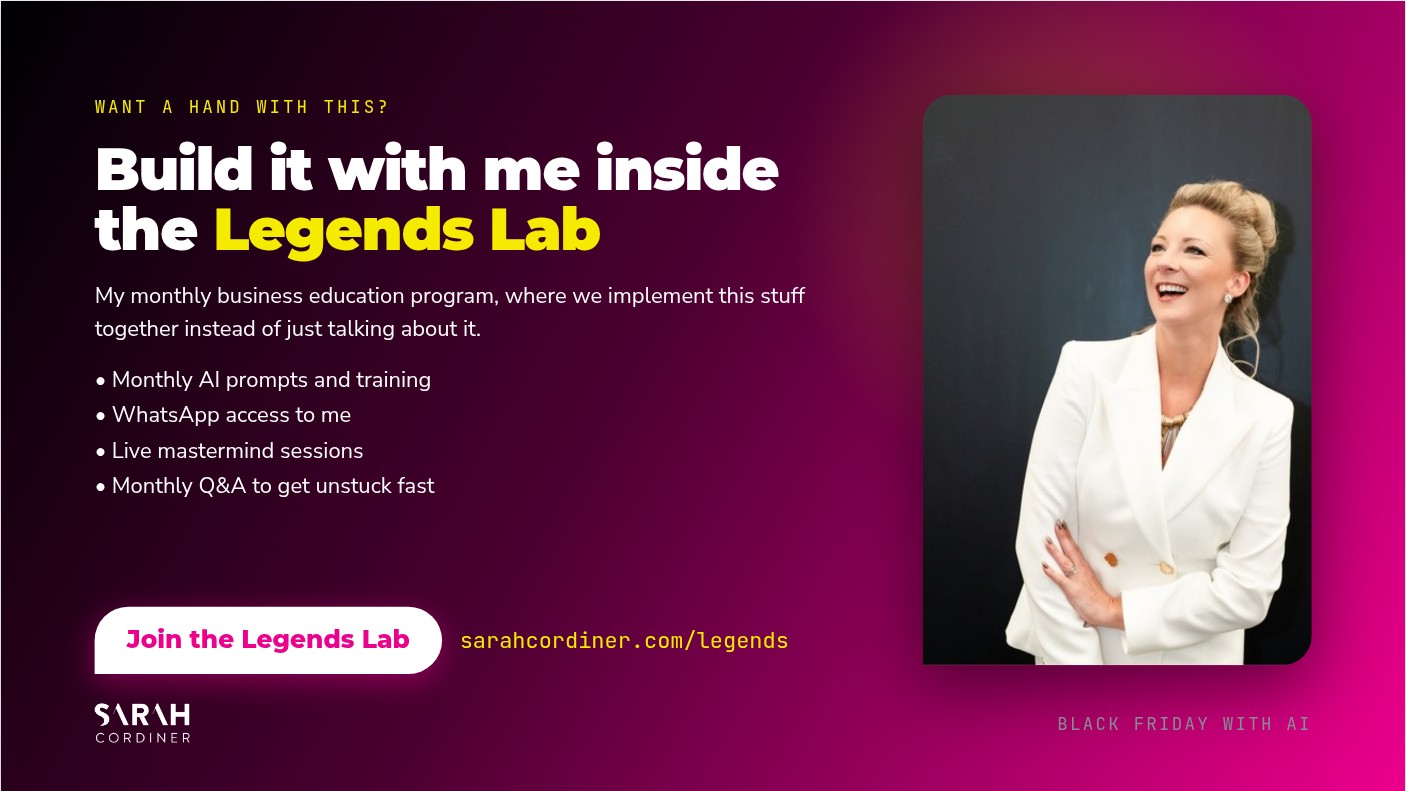
You now have the actual steps and prompts. If you want help applying them to your offer, getting unstuck and working alongside other business owners doing the same thing, that is what we do inside the Legends Lab.
Or start with my free 50+ AI tips and prompts.
Pick one useful thing. Let your AI help you get it done. Keep the customer experience at the centre.
Sarah x
How Sarah Cordiner Can Help You Scale Your Business with Tech, AI, and Automation
Tech doesn't have to be hard or scary. I help you make it easy to learn, fun to implement, and even better to see the amazing results that you can get with some simple tech tools and strategy.
Here are all of the different ways that I can help you scale your business, streamline your operations, and make your bottom line full of joy using tech, AI, and automation (as well as traditional methods) as your secret weapon.
One platform. Your whole business. Finally talking to each other.
"What tech do you use, Sarah?" I get asked this every single week. The honest answer? Almost all of it lives in one place: Tekmatix. It's the all-in-one AI business platform I founded, and it runs my websites, funnels, courses, emails, bookings, payments and AI agents. Here's everything it does, who it's for, and the handful of other tools I love.
No lock-in contracts / Cancel anytime / Australian owned and female owned
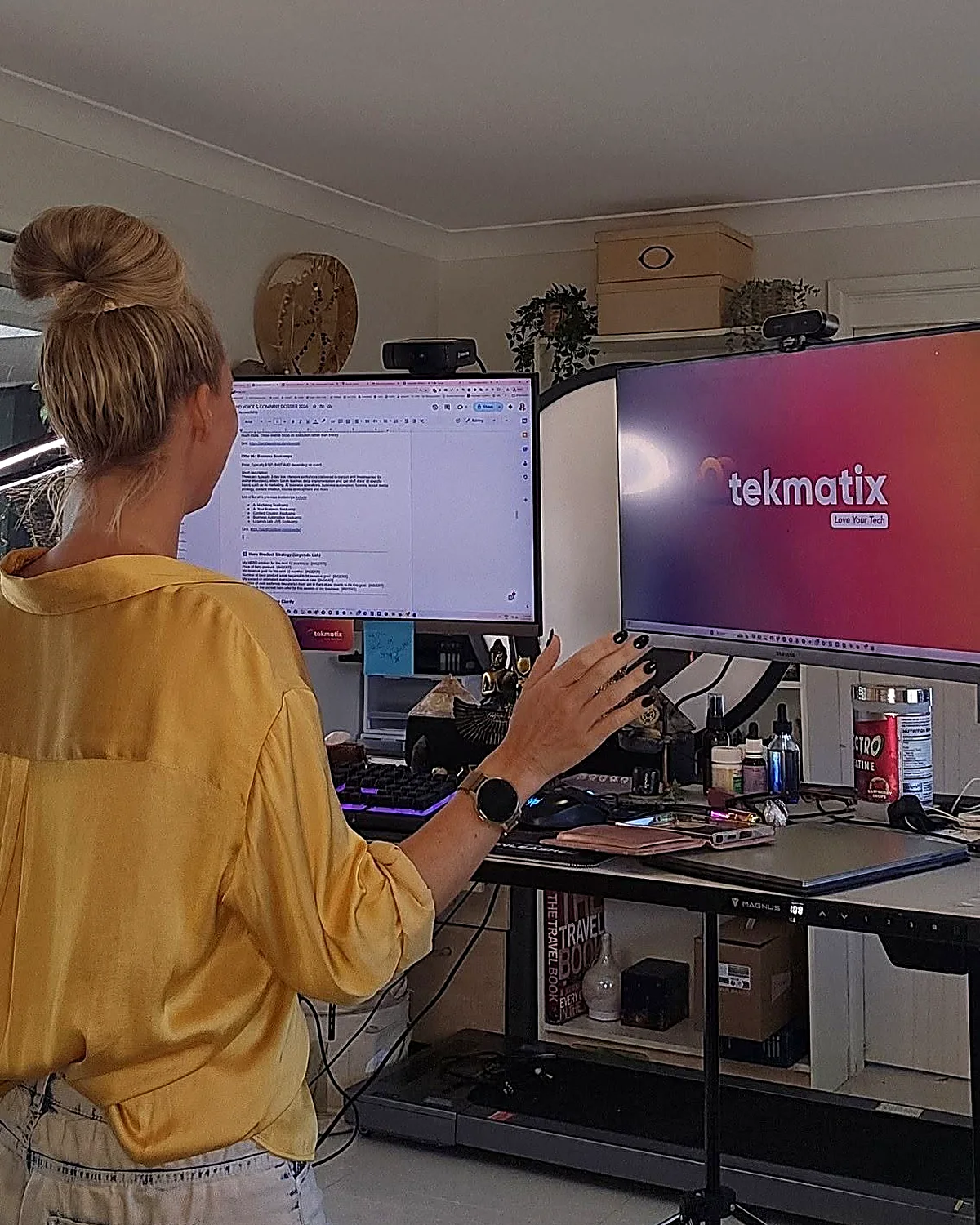
I run my business on it.
- 5.0 on Google from 100+ reviews
- 98% recommended on Facebook
- 1,000+ businesses in 30+ countries
- Award-winning 24/7 support
- 3 free live training calls every weekday
- Replace $500 to $1,000+ a month in subscriptions
Eight logins. Eight bills. Zero of them talking.
Most business owners I meet are paying for a website here, an email tool there, a booking app, a course platform, a CRM they never open... and then paying someone to glue it all together with duct tape and Zapier.
- 1Leads fall through the cracks because your forms, inbox and CRM live in different places.
- 2Every new tool means another login, another bill and another thing to learn.
- 3You can't see what's actually working because your data is scattered across ten dashboards.
Everything your business runs on, under one roof.
Tekmatix is an all-in-one CRM, marketing, sales, course and AI platform. Here's what's inside, grouped by the job it does for you. Tap a category to filter, or scroll the lot.
AI that does the work
Hand the repetitive stuff to AI that already knows your contacts, calendar and offers.
- AI Employees that answer chats, DMs and enquiries 24/7
- Voice AI receptionist that answers your phone and books calls
- AI booking bot on your website chat widget
- AI Studio to build apps and tools by describing them (vibe coding)
- Ask AI assistant built into your account
- AI website and funnel builder plus content and image AI
- Connects to Claude and ChatGPT via MCP, so your AI can work inside Tekmatix
Get found and grow your list
Everything you need to get seen, capture leads and build your audience.
- Unlimited websites with free hosting and your own domains
- Unlimited funnels, landing pages, sales pages and opt-ins
- 100+ ready-made templates for sites and funnels
- Blogging with unlimited posts
- Social media planner with auto-posting
- Forms and quizzes, unlimited
- Surveys with conditional logicPro
- Reviews and reputation management, incl. Google Business Profile
- Link-in-bio pages and QR codes
Nurture and convert
Turn strangers into clients with automated follow-up that never forgets.
- CRM with unlimited contacts and full client records
- Unified inbox for email, SMS, Facebook and Instagram DMs
- Email marketing with automated newsletters
- SMS and phone, incl. missed-call text back
- Unlimited workflows and automations
- Sales pipelines so you see every deal
- Booking calendars for individuals, teams and groups, with 2-way sync
- Advanced reporting on ads, calls, courses and lead sourcesPro
Sell and get paid
Take money online, in person and on autopilot. Payments go straight to your Stripe or PayPal.
- Checkouts with upsells and order bumps
- Invoicing: one-off, recurring and payment plans
- Tap to pay on your phone (EFTPOS)
- Request payments by SMS
- Products and e-commerce, digital and physical, plus coupons
- Proposals, quotes and contracts with e-signaturesPro
- Affiliate program with unlimited affiliatesPro
- Event management with QR code ticketingPro
Courses, memberships and community
Built especially for course creators, educators and coaches. (It's where I teach my own students.)
- Unlimited courses and memberships
- Unlimited students and video hosting
- Assessments and quizzes inside your courses
- Student mobile app in your branding
- Communities and groups, unlimitedPro
- Course certificatesPro
Run the business
The behind-the-scenes admin, organised and in one place for your whole team.
- Project management and Kanban boards
- Task manager with deadlines and tracking
- Unlimited staff users with permission controls
- Admin mobile app for Apple and Android
- Business card scanner
- Integrations with Zapier, Make, WordPress, Google and more
- Up to 5 sub-accounts for your other businessesMax
Want to see it with your own eyes?
Start a 7-day free trial and a Tekspert will jump on a free set-up call with you.
If you sell your expertise or your services, it's built for you.
Solo operators, growing teams and multi-business owners all run on Tekmatix. Here's where it shines brightest.
Coaches, course creators and educators
Your website, sales pages, checkout, courses, membership, community and email, all connected. Tekmatix was made especially for you.
Consultants, speakers and experts
Bookings, proposals, contracts, invoices and follow-up that makes you look like a big firm, even if it's just you.
Health, allied health and NDIS providers
Online bookings, reminders, reviews and client records for clinics, therapists and practitioners.
Tradies and local service businesses
Missed-call text back, quotes, tap to pay and review requests, so you win the job while you're still on the tools.
Studios, salons and personal trainers
Class bookings, memberships, payments and reminders that cut the no-shows and the admin.
Agencies, associations and multi-business owners
Pipelines, staff permissions, reporting and (on Max) up to 5 sub-accounts to run several brands from one login.
Honest moment: if you only need one simple tool and you're genuinely happy juggling logins, you probably don't need Tekmatix yet. But the minute you're copying leads from one app to another, or paying for five subscriptions that don't talk to each other, it's time.
Most software gives you a login. We give you a team.
I'm an educator first, so Tekmatix was built education-first. Every plan comes with real humans, real training and real templates to get you up and running fast.
Free one-on-one set-up call
A Tekspert jumps on a call with you to set up your account and connect your integrations.
Award-winning live chat
Stuck at 11pm? Real support, any time of day or night.
3 free live training calls
Drop in, share your screen and get your questions answered live.
Starter kit and training library
Ready-made templates and automations, a step-by-step help centre, video tutorials and a free Tekmatix training course.
Rather someone just did it for you?
Teksperts are available by the hour, plus fixed-price done-for-you set-up and migration from your old platforms.
Simple pricing that doesn't punish growth.
Unlimited contacts on Starter and Pro, so your bill doesn't jump every time your list grows. Pay in AUD or USD, monthly or yearly (pay yearly and get a month free).
Everything you need to market, sell and deliver, in one place.
- Unlimited contacts, staff users and courses
- Websites, funnels, CRM, email and bookings
- Payments, invoicing and tap to pay
- AI Agents, AI booking bot, AI Studio and Ask AI
- 24/7 live chat and a free set-up call
Everything in Starter, plus the tools to build a community and scale.
- Communities, groups and course certificates
- Event management with QR ticketing
- Your own affiliate program
- Proposals, contracts and e-signatures
- Unlimited surveys and advanced reporting
Everything in Pro, plus more AI, more accounts and a strategist in your corner.
- Up to 5 sub-accounts
- AI Employee Growth plan included: 1,000 AI conversation replies and 100 voice AI minutes a month
- Monthly 60-minute strategy call with a senior Tekspert
- Early access to Tekmatix Labs
Just starting out? The Launch plan is $75 AUD ($50 USD) a month for up to 1,000 contacts. No lock-in contracts.
Explore the Launch planEmails, SMS, phone calls and AI usage are pay-as-you-go and billed in USD, so you only pay for what you use. See the full rates at tekmatix.com/rebilling. Prices current as at September 2026. Always check tekmatix.com/pricing for the latest.

I didn't set out to start a software company. I started the toolbox I needed.
After 20+ years in business and more than 280,000 students, I kept seeing the same thing. Brilliant people with brilliant expertise, drowning in tech. Paying for ten tools, using two of them, and spending their evenings on YouTube trying to make them talk to each other.
So I put everything a business needs into one platform, then wrapped it in the thing I know best: education and support. Tekmatix runs my own websites, courses, funnels, emails and AI agents every single day. I wouldn't recommend it if I didn't use it.
Sarah x
Want me to teach you how to get the most out of it?
Inside the Legends Lab I show you step by step how to use tech, AI and automation to grow your business, with live calls, workshops and templates you can copy.
Non-techie people love their tech again.
Tech is hard for non-techie people, and they really get that and make it fun.
Yesterday I felt overwhelmed. Now I feel excited and empowered.
I have used a number of top CRM systems. This is up there with the very best.
Solved problems I have had for weeks, in 50 minutes. Wonderful.
The other tools I use and actually recommend.
Tekmatix is the engine. These are the extras that plug in around it for AI, video, design, content and admin. Tap a category to filter.
Some of these are affiliate links, which means I may earn a small commission at no extra cost to you. Thanks for supporting the brand!
Wondering where the email, booking, course, funnel and CRM tools are? I don't need them any more. Tekmatix does all of that, so I'd rather you didn't pay for them twice.
See what Tekmatix covers ↑Tech stack FAQs.
Still wondering if Tekmatix is right for you? Here are the straight answers.
What is Tekmatix?
Tekmatix is an all-in-one AI business platform. It brings your website, funnels, CRM, email marketing, bookings, payments, courses, memberships, communities, social media scheduling and AI agents together in one connected account, so everything talks to each other.
Do I need to be techy to use it?
No. Tekmatix was built for non-techie business owners. You get a free set-up call, 24/7 live chat, three free live training calls every weekday, a help centre, video tutorials and ready-made templates to get started.
Is there a free trial?
Yes. The Starter and Pro plans come with a 7-day free trial. The Max plan starts with a demo, so the team can make sure it's the right fit.
Can I pay in Australian dollars?
Yes. You can pay your subscription in AUD or USD. Usage charges for emails, SMS, calls and AI are pay-as-you-go and always billed in USD. See tekmatix.com/rebilling for rates.
Will my price go up as my list grows?
No. Starter and Pro include unlimited contacts, so your plan price doesn't increase as your business grows. You also get unlimited courses, students and staff users.
Can you move me off my current platforms?
Yes. Tekmatix Teksperts offer fixed-price migration and done-for-you set-up services, or can help you integrate the tools you want to keep. See tekmatix.com/services.
Can I run courses, memberships and communities in it?
Yes. Tekmatix was made especially for course creators, educators and coaches. Courses and memberships are included on every plan, and communities and certificates come with Pro and Max.
Which plan should I choose?
Starter suits most service businesses and solo experts. Pro is best if you run courses with a community, events, contracts or an affiliate program. Max is for people running more than one business or who want more AI and a monthly strategy call. Not sure? See all the Tekmatix features.
Stop juggling your tech. Start loving it.
One login. One bill. One platform that runs your marketing, sales, courses and AI, with a real team behind you. Try it free for 7 days and see how much simpler business gets.
7-day free trial on Starter and Pro / Free set-up call / Cancel anytime
See you inside. Sarah x