How To Deliver Your Online Course
How To Deliver Your Online Course
Hi
I love you.
Huh? We don’t really know each other that well do we……
When I first started my teaching career, I did my teaching practice in an all-male prison in the UK.
One of the subjects I taught in the prison was communication skills.
In one lesson, I was demonstrating how critical our choice of delivery is in any form of communication.
And so, after a moment of calm silence and turning my back on my class, I suddenly spun around, whacked my hands down loudly on the table and screamed “I LOVE YOU!!” in the loudest, angriest and most aggressive manner that I could muster.
12 fully grown, criminal men all jumped out of their skin.
I had delivered to my class what is quite literally the nicest words in the English language, but had delivered it in a manner that left even the baddest men in town feeling like they just woke up with a snake around their necks.
You see, delivery is powerful.
We could have the most amazing online course content on planet earth; but if we deliver it in a manner that makes your learners want to watch paint dry instead, then everything is lost.
How you choose to communicate and transfer your content from you to your learner is an extremely important consideration, and Step 7 of my course creation process.
Here are what the other 6 steps are just as a reminder:
- Step 1: Pick The Perfect Topic For Your Online Course and
- Step 2: Ensure Your Course Idea has High Market Demand
- Step 3: Select Your Course Type, Business Model & Pricing
- Step 4: Craft Your Learning Outcomes
- Step 5: Select and Gather Your Course Content
- Step 6: Put Your Modules and Lessons in Order
Let’s get stuck in to delivery.
Step 7: Determine the Most Engaging and Effective Delivery Methods for Each Lesson.
CLICK TO WATCH THE VIDEO: >> https://youtu.be/rcHOvzpL8Dg
As you have seen from my prison situation, the choices you make in this step will determine how successful your students are going to be at completing your course, whether they like it or not and whether they even get anything positive out of it.
Everyone is Different
How do you like to consume content?
- ebook on your electronic device? (visual learner)
- A physical book that you can hold, annotate and smell? (Yea, I’m a book sniffer!) (visual-kinesthetic learner)
- Video you can watch? (visual-audio learner)
- Audio podcast you can listen to? (audio learner)
- A printable workbook that you can fill in? (Kinesthetic learner)
- A social learning area where you can chat with others? (social or heart-centered learner)
- A one-on-one coaching call with an expert?
Do you like to go from A-Z when you are learning something new, without missing any of the steps along the way? (Analytical learner)
Or do you like to just skip to the bits you need and happy to ignore the rest? (Global learner)
The fact is, everyone likes to learn in different ways, and so when you are selecting your online course delivery methods, the best strategy is to ‘think of everyone’….
Deciding on the best way to deliver your content
You need to be aware of the different principles of adult learning, learning preferences and all of the different ways that you can deliver your training to really make sure that your training is as engaging as possible.
- Will you have videos, reading content, activities, audio content?
- What type of visuals and downloadable resources will you have?
- Will you have community learning areas?
You need to make sure that you have a balance of visual, audio and practical methodologies so that everyone is engaged and provided with the optimum learning experience.
A mixed-method approach is always best
The great thing about choosing your delivery is that you can be as creative as you wish, provided that you select a variety of delivery methods.
Choosing one single methodology for delivering your content will serve only one learning preference, and completely exclude the rest.
My personal preference is to deliver all of my teaching content via ‘talking head‘ and ‘screencast’ videos, I then add in text content, worksheets, activities etc at appropriate points around them.
**But you do need to always create what is best for your learners – and often the best way to find that out is to simply ask them.
Different Content Delivery Methods & Utilising the Delivery Features of Your Online School
Content is WHAT you are teaching.
Delivery is HOW you teach it, and HOW you transfer the knowledge and skills from you to the student.
There are endless ways to do this and no right or wrong.
There is no special combination that you ‘should’ use or how much of each type of delivery method that you ‘should’ include.
**Note: Unless you are teaching an accredited or licenced training – in which case, please ensure you following the training package guidelines that apply.
Here are some different types of content that you could use to present and ‘transfer’ your expertise to your learner that is available within your online school (this is a screen shot from Thinkific) however all of the learning platforms are extremely similar.
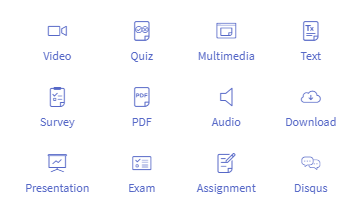
I will explain each of the lesson (delivery) ‘types’ in more depth below.
The Use Of Activities And Practical Exercises
Don’t overuse practical activities – only use them if they are essential steps for the learner to achieve a learning outcome.
Don’t just put exercises in for the sake of it.
Aim to give your students results as much as possible rather than just information.
Don’t use assessments, exams or tests unless it’s essential.
VIDEO
Videos are the most engaging way to teach an online course.
Nothing replaces human contact and the eye-to-eye personal presence that comes from classroom teaching – however, using video is the next best thing.
Humans like to look into the face of the human that is talking to them – so PLEASE be brave and go with putting your face on the camera in your course – it is the best experience for your learners.
The other great thing about having your face on the screen is that nobody can plagiarise your content and pretend it’s theirs – when it’s clearly YOUR FACE doing the talking!
So it’s good for IP protection too!
Simply record your video and upload it to YouTube, other social media and/or your online school.
Here are some different ways that you can record video:
- Talking head – your head/face on the screen talking to the viewer
- Green screen – this allows you to replace your background with anything – slides, video, photos, whatever you like.
- Webcam – great for if you are also filming your screen at the same time as having your head/face speaking on screen too.
- Screen cast – this is when you use video recording/editing software on your computer to record your computer screen. There are lots of different software tools you can use for this, I use Camtasia. I like this one because you buy it one-off and have it for life at no extra costs and you can download it on 2 devices. I like to have one on my desktop computer and one on my laptop for when I’m on the road.
- Mobile phone – smart phones now are excellent for recording tutorial videos. I use my mobile phone for pretty much all of my course filming now.
QUIZ:
You could make fun quizzes so that your learners can test their knowledge at the end of your modules; or to ensure that your students have understood your course content.
You can create multiple choice questions with one or multiple correct answers.
These ‘formative assessments’ help reinforce what you’re teaching as you go along. Quizzes are also used to determine if you are teaching the content effectively.
If your learners are getting the answers wrong it could be your teaching or delivery methods that need tweaking, rather than an issue with the students’ competence.
MULTIMEDIA:
This type of lesson is when you ‘embed’ an external website URL into the INSIDE of your online course.
This can be great for embedding live webinars, videos that are hosted on other platforms, websites, surveys – basically anything with a URL so that they can access it without having to leave your learning area.
TEXT:
This is one of my favourite lesson ‘types’ in learning platforms as it is one of the most versatile. These lessons have a window that looks a little like a Word document (to you as the course creator), and allows you to add videos, images, text, hyperlinks and more, all in one single scrolling screen lesson. This is the lesson type that I use the most so that I can add a range of accompanying support content with each video.
SURVEY:
You can use surveys for all sorts of purposes such as collecting student information and evaluations before and after the course to learn more about them, what they want to get out of your course, what they learned, how they feel about your course and more.
I personally prefer to use Google Forms to do all of my surveys and then insert it into my course as a ‘multimedia’ lesson so that they can take the survey right from inside their learning area.
PDF:
You can save any document as a PDF and load it into your online school so that your learners can view it on their screen, even if they don’t have a PDF viewer on their computer.
This is useful for not breaking the online student experience as they don’t have to download it to view it – it just shows the PDF pages on their screen when they start that lesson. You can also choose whether or not to allow downloads of the PDFs too.
AUDIO:
The audio delivery method is perfect for learning on the go and many students love to have the option to just ‘listen’ to their training as they are commuting to work, at the gym or doing the housework.
You could use this type of delivery method for sharing music, meditations, podcast episodes, language demos and much more. Simply save your file as an ‘MP3’ and press upload!
You can also extract the audio from your videos so that students have the option to listen to your tutorials rather than just watching the videos.
DOWNLOAD:
When learners have paid for a course, their sense of having ‘got value’ is significantly increased when they have something that they can physically hold, touch or use. Not to mention, your kinesthetic learners will be hugely served.
This makes having file or document downloads in your course a popular option.
You can have students download any type of file or document, including worksheets, workbooks, guides, templates, videos, optional course material, audio files, images and much more.
You can also add a video, text and images to your download lessons to teach the learner what they need to do with their download.
This means that you can first have a video to explain what the download is and how your students should use it, and then give them the download button in the exact same location.
EXAM:
If you want to test your learners like timed exams, have retake limitations and varied question types, you can use professional exam tools such as Brillium which can integrate with a lot of online learning platforms.
This is good if you are teaching a licensed or accredited program that requires assessments for successful completion.
I wouldn’t recommend giving your students ‘exams’ unless they are essential for an accredited outcome – nobody likes an exam and it can detract from the learning experience if it’s not critical. Use quizzes instead if you want to test learning without the pressure.
ASSIGNMENT:
Assignment lessons are great for any type of homework that you would like a student to submit to you for approval.
Now It’s Your Turn To Choose
Now that you have an idea of some of the different types of lessons/delivery methods available to you, go back to your Course Plan.
In the column titled ‘Lesson Type’, now write in what type of lesson each of your lessons will be – eg ‘Talking Head Video’, ‘Screencast video’, ‘Download’, ‘Text + video’ etc.
In my ‘Concept To Course’ program I take you through the delivery methods of your course and ensure that you have picked the right ones for your unique course topic and target market.
If you want to make sure that you get your delivery right (no screaming ‘i love yous’!), then make sure you grab one of the limited places today.
So there you go, you’re now another step closer to completing your course!
Tomorrow, we enter the ‘championship rounds’ as we begin the final 3 steps with Step 8: Filming, Recording and Editing your Online Course.
Talk to you tomorrow!
Sarah x
………………………………….
More info about the ‘Concept To Course’ program:
This is a 30 day coaching program, hosted online, with personal daily support and live calls from me along with pre-recorded tutorial videos, workbooks, templates and swipe copy.
I personally work hand in hand with up to 30 participants over a period of 30 days to help you get your online course planned, created and PUBLISHED on your own online school!
MODULE 1: Plan & Profit
Ensure your course is profitable. In this module you will learn:
- How To Plan Your Online Course Topic
- How To Ensure Your Course Will Sell
- What Type Of Course You Should Create
- How To Pick The Perfect Topic For Your Online Course
- How To Define Your Target Student
- How To Find Your Target Student
- How To Create a Course That Sells
- How To Conduct Your First Market Test + Swipe Copy
- How To Niche Your Topic For Higher Market Demand
- How To Check Your Market Demand
- Online Course Pricing & Profitability
MODULE 2: Course Content & Delivery
Create your course content and structure; and learn how to deliver your course in a way that your students will love. In this module you will learn:
- How To Determine The Size & Length of Your Course
- Guidelines for Course Length by Course Type
- How In Depth Should Your Course Content Go?
- How To Gather Your Course Content
- How To Organise and Structure Your Course Content
- How To Craft Your Magnetic And Specific Learning Outcomes
- The Difference Between Course Aims, Objectives and Outcomes
- How To Construct Excellent Learning Outcomes
- How To Use Accredited Course Frameworks To Help You With Course Design, Content And Integrate Industry Standards
- How to Title Your Online Course, Your Modules and Lessons
- How To Conduct Market Research To Ensure Your Course Will Sell (Part 2)
- The Different Content Delivery Methods
- The Different Content Delivery Features of Your Online School
- How To Use Activities And Practical Exercises
- How To Create and Complete Your Online Course Outline
- PowerPoint Slide Tips
- How To Create Your Learner Workbooks, Slides & Document Handouts
- Filming Delivery Tips – Your Video Structure & Presentation
- What You Must Know About Adult Learning & Engagement
- The 7 Principles of Adult Learning
- How To Maximise Your Learner Completion Rates
MODULE 3: Online course technology, equipment and filming.
Set-up your online school, email marketing and online course tech + launch your course. In this module you will learn:
- Your List of Course Creation Technology & Equipment – Visual Chart
- How Your Tech Fits Together and What It All Does
- The Three Main Ways To Host And Sell Your Online Courses – and Which One You Should Use
- How To Set-Up Your Online School (With Live and Recorded Demos)
- How To Set-Up Your Email Marketing Software
- How To Set-Up Your Online Course Email Automation Sequences + Swipe Copy
BONUS MODULE 4: Online course launches and course marketing.
In this module you will learn:
- How To Write Your Online Course Landing Page/Sales Page + Template
- How To Launch Your Online Courses + Examples of Different Types of Course Launches
- Step By Step Overview of My ‘Enrolment Deadline Launch’ For a High Ticket Program
- Email Guide for Launch + Swipe Copy
- Critical Functions of Your Website
- Your Long-Term Online Course Content Marketing Strategy
MORE INFO ABOUT: >> ‘Concept To Course: 3 Day Course Creation Group Coaching Program’.
It ALSO includes:
- My personal unlimited support, guidance and advice DAILY for 30 days
- Lifetime access to the accompanying online tutorials, demo videos, workbooks, templates (including all future upgrades)
- Lifetime access to the secret Facebook group where I personally support and coach you daily, answering all questions and providing livestreams to help you through anything you need
- Group progression. We all step through each module TOGETHER and you’ll be as supported by me as you will by your fellow course creation colleagues
- Re-join future intakes as many times as you wish for free
- LIVE Q&A call with me every week to have all of your questions answered, live demonstrations and walkthrough
MORE INFO ABOUT: >> ‘Concept To Course: 3 Day Course Creation Group Coaching Program’.
How Sarah Cordiner Can Help You Scale Your Business with Tech, AI, and Automation
Tech doesn't have to be hard or scary. I help you make it easy to learn, fun to implement, and even better to see the amazing results that you can get with some simple tech tools and strategy.
Here are all of the different ways that I can help you scale your business, streamline your operations, and make your bottom line full of joy using tech, AI, and automation (as well as traditional methods) as your secret weapon.
My FAVOURITE Business Software in the WORLD: Tekmatix all-in-one business platform..
Tekmatix is an AI-powered all-in-one business platform, CRM and course creation platform.
If you run a business, you need tech, and Tekmatix is everything you need, all in one place.
Here is just SOME of what you get when you have Tekmatix:
- AI Employees, Bots and AI Voice Receptionists
- Websites & Funnels
- Courses and memberships
- CRM & Client Records
- Tap and Pay (EFTPOS) on your phone
- Unified inbox - all your emails and DMs in one place
- Calendar appointment booking
- Social media scheduler
- Kanban boards
- Task manager
- Automations & AI workflows
- Project management
- Communities
- Email marketing
- SMS & phone
- Invoices and quotes
- Contracts, Agreements, Propsals and signed docs
- Affiliate program
- Forms & quizzes
- Blogging
- Sales pipeline management
- Ecommerce & physical goods
- Mobile App
...and MUCH MORE!
You also get:
- FREE onboarding call
- 24/7 FREE clive chat support
- FREE daily live training calls
- The most awarded all-in-one business platform in based Australia - with customers in over 18 countries
....and the largest GHL-based platform in Australia... (and WAY MORE than 'just a whitelabel').....
We've built funnels, automations and websites specifically for small-medium businesses, course creators, coaches, speakers, membership site owners and service providers GLOBALLY.
All the hard work done for you.
We even have a FREE TRIAL available for you to check it out with no obligation;
....and our plans are available in AUD and USD.
GET A FREE DEMO CALL AND TRIAL HERE: Tekmatix.com