How to Use GrokBot to Run Your Business: 35 GrokBot Prompts to Copy
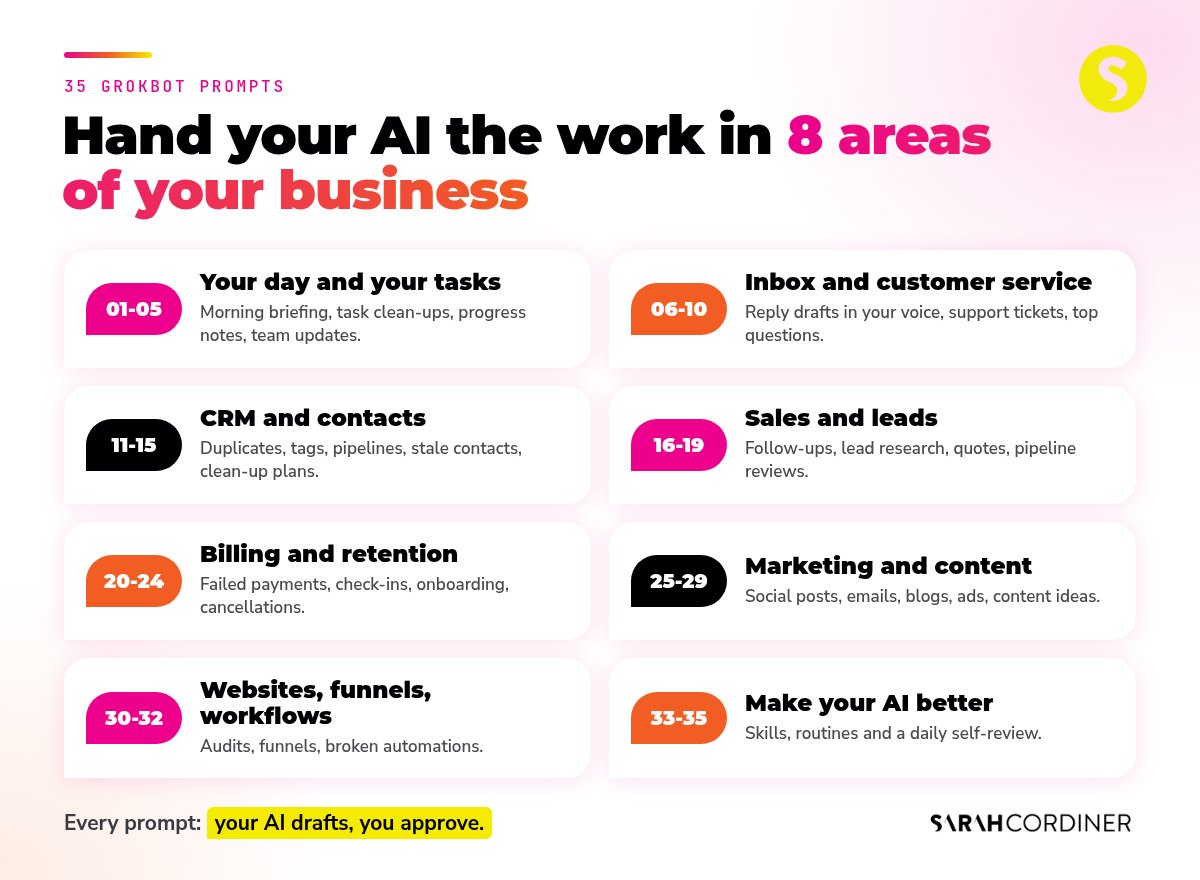
Quick answer: To use GrokBot to run your business, connect it to the systems your business already runs on, give it one clear job at a time, check what it does, then save the jobs that work as skills and routines. Below are 35 GrokBot prompts you can copy today, grouped by the part of your business they take off your plate: your day, your inbox, your CRM, sales, billing, marketing, your website and your AI itself.
I run a team of GrokBot agents across my businesses. They draft my emails, tidy my CRM, follow up my leads, chase failed payments kindly, prepare my content and brief me every morning. I didn’t hire a developer and I didn’t learn to code. I just talk to them.
Most of that work happens inside Tekmatix. I run my courses, memberships, CRM, emails, funnels and websites on Tekmatix, and my AI logs into my Tekmatix account to fetch the data and do the work, so I don’t have to.
TL;DR
- GrokBot (you will also see it written Grok Bot) is an AI agent you talk to in plain language. Connected to your tools, it does real work, not just answers questions.
- The fastest way to learn how to use GrokBot is to give it one job, check the result, then save it as a skill.
- Every prompt below opens the same way and sends your AI into your Tekmatix account to fetch the data itself, instead of you copying and pasting.
- Every prompt ends at a checkpoint where you approve before anything is sent, published, deleted or paid.
- If you want my full setup, my GrokBot Masterclass has 114 skills and agent prompts, and it is included in the Legends Lab.
What’s in this post
- What is GrokBot?
- What AI should I use?
- How to use GrokBot in 5 steps
- Before you copy a prompt: the guardrails
- Prompts 1 to 5: your day and your tasks
- Prompts 6 to 10: your inbox and customer service
- Prompts 11 to 15: your CRM and contacts
- Prompts 16 to 19: sales and leads
- Prompts 20 to 24: billing, onboarding and retention
- Prompts 25 to 29: marketing and content
- Prompts 30 to 32: websites, funnels and workflows
- Prompts 33 to 35: make your AI better every day
- Where to learn the full GrokBot setup
- More real GrokBot examples from my business
- GrokBot FAQs
What is GrokBot?
GrokBot is an AI agent you talk to in a chat, by typing or by voice. The big difference between GrokBot and a normal AI chatbot is that it doesn’t stop at answering. Once you connect it to your apps, it can log in, read the data, do the work and report back.
It can also save the way you like a job done as a skill, so you only explain it once. And it can run jobs on a schedule as routines, so the work keeps moving while you are doing something else.
That’s why the prompts in this post look a bit different to the ones you might be used to. They are not “write me a caption” prompts. They are “go and do this job in my business, then check with me” prompts.
What AI should I use?
The prompts below should work in Ask AI, Claude, ChatGPT, GrokBot, or any other AI you use.
If you don’t already have an external AI and you don’t want another subscription, start with Ask AI, the AI assistant built into Tekmatix. You will find it in your Tekmatix dashboard. Tell it what you want in plain language, or by voice, and it carries out the work inside your account.
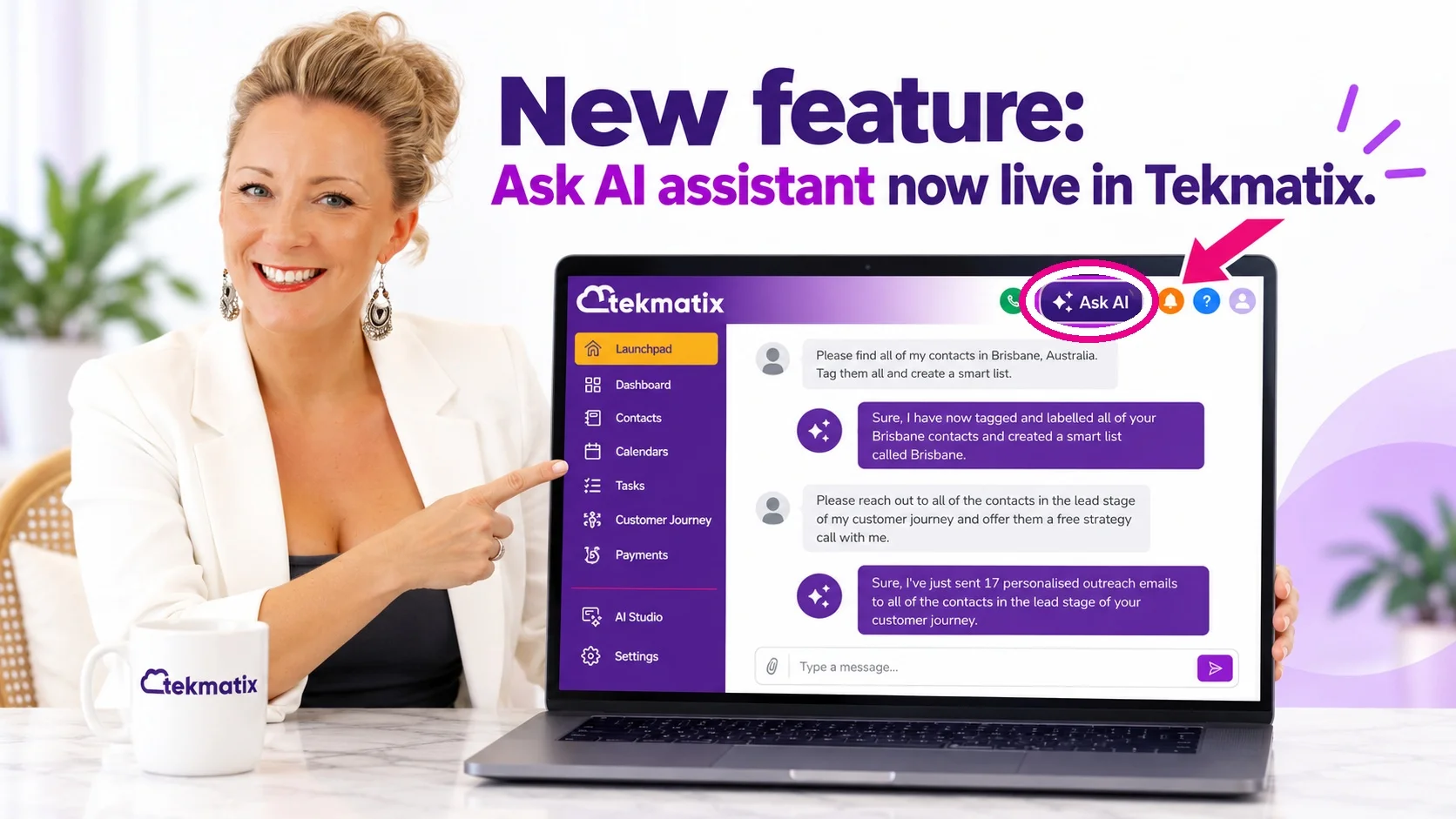
*Tekmatix AI usage applies as a billable consumable. You can find out more about pricing on our public page: tekmatix.com/pricing.
If you already use GrokBot, Claude or ChatGPT, connect it to your Tekmatix account so it can log in, fetch the data and do the work for you. I explained what the Tekmatix AI assistant can now do in my post on how the Tekmatix AI assistant can now do any work for you, published on 10 November 2026.
How to use GrokBot in 5 steps
Here is the exact order I recommend. Skip a step and you will spend more time fixing than saving.
1. Connect it to where your business lives
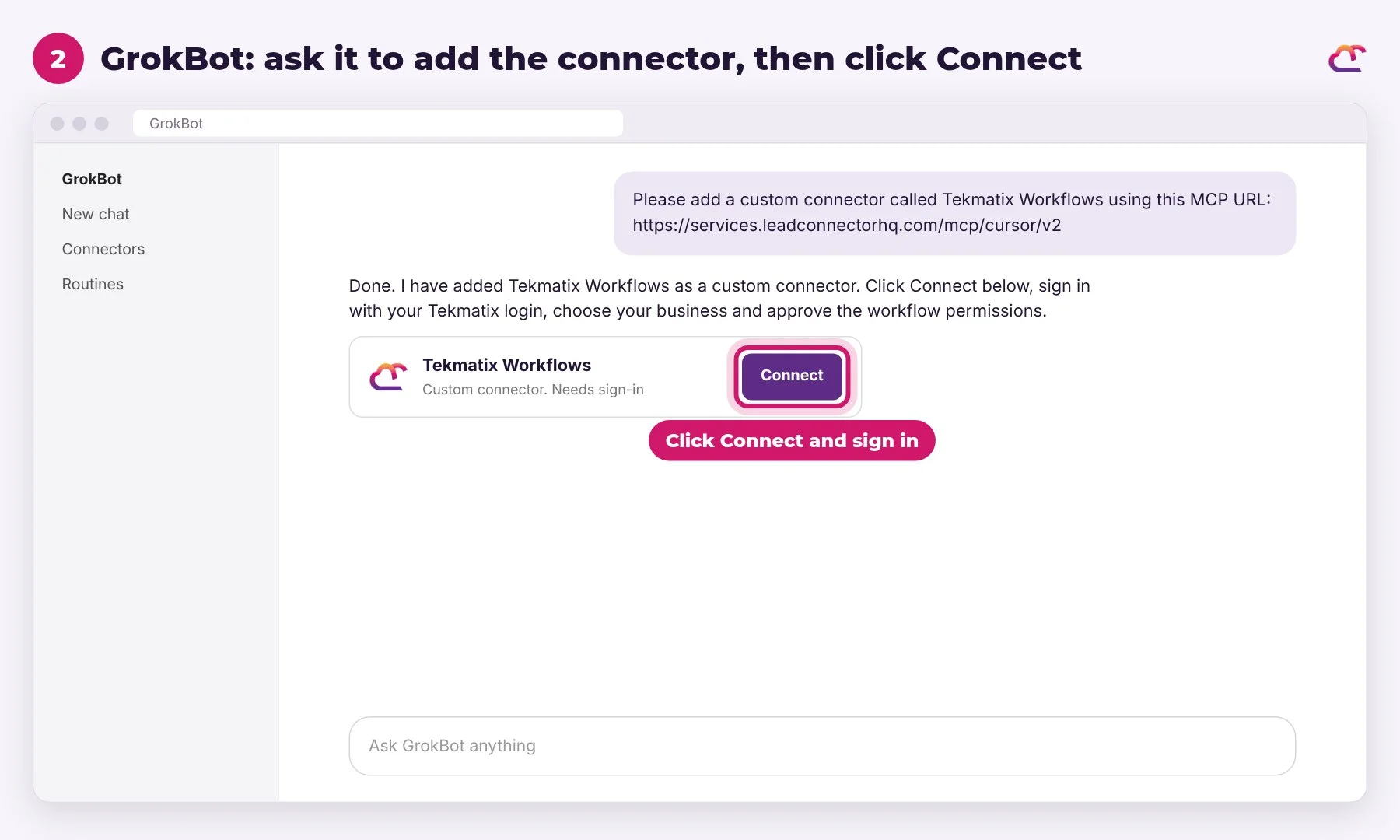
Your AI can only work with what it can reach. For me, that’s Tekmatix, my email, my calendar, my Google Drive and my payment account. Connecting GrokBot to your Tekmatix account is a quick job: ask GrokBot to add the connector, then click Connect and sign in.
2. Give it one job, not a wish list
Pick one repeatable job, like your morning briefing or your follow-ups. Tell it what good looks like, what not to touch and when to check with you.
3. Run it once and check the result
Treat the first run like a new team member’s first day. Look at what it did, tell it what to change, and run it again.
4. Save it as a skill
Once a job comes out right, ask GrokBot to save the method as a skill. I explained how I build these in my guide to creating an AI skills library, published on 6 October 2026.
5. Turn it into a routine, then give it a job title
When a skill works every time, schedule it. When one area of your business has a few skills, give that work its own agent with a clear job title. That’s how one AI becomes a team. I walked through the bigger picture in how to turn AI into a real business team, published on 7 October 2026.
Before you copy a prompt: the guardrails
Every prompt below has guardrails built in. Please keep them.
- Your AI drafts, you approve. Nothing gets sent, published, deleted, refunded or paid without your yes.
- Look before you change. For anything in bulk (tags, contacts, tasks), ask for the list first and save a copy before changes are made.
- Your material only. Content comes from your own recordings, emails and expertise, not generic AI filler.
- Never invent facts. If your AI can’t verify something, it should ask you, not guess.
- Privacy first. Customer names, emails and money stay out of group chats and public places.

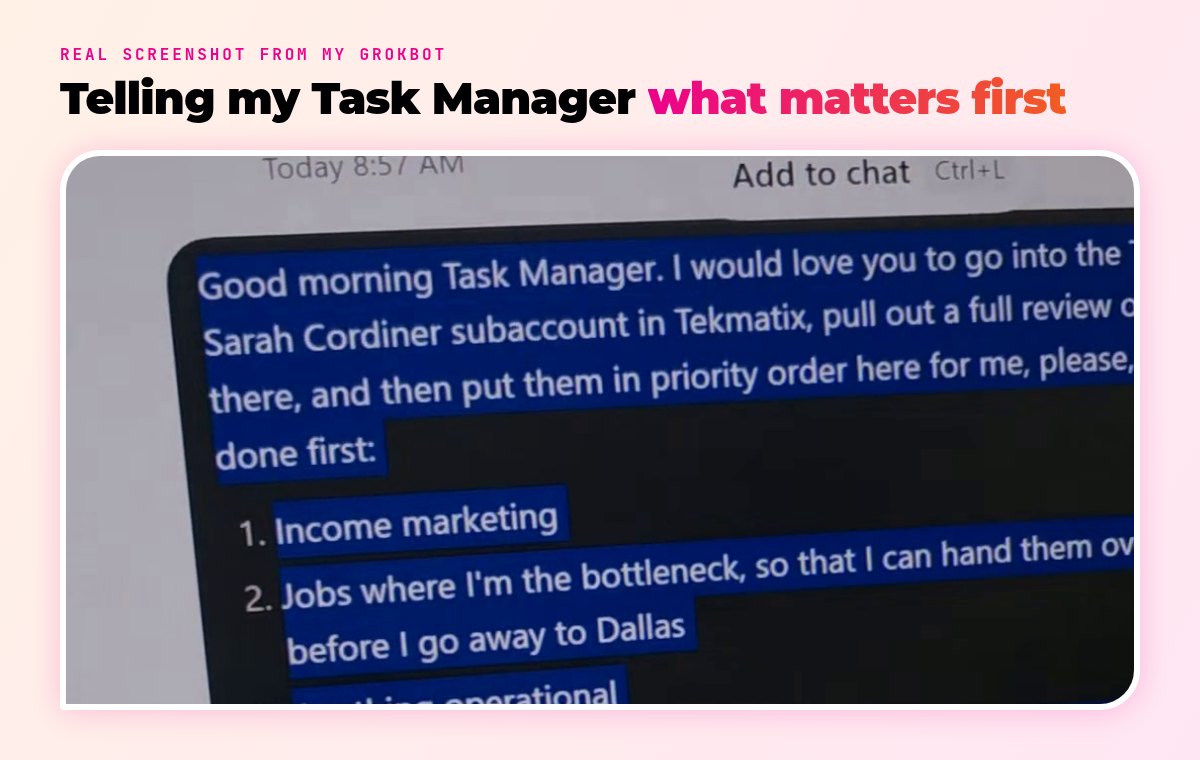
Every prompt opens with the same line: “Taking everything you know about me and access to all of the data and systems you already have”. That tells your AI to use what it already knows about your business, instead of asking you to explain it all again.
Prompts 1 to 5: your day and your tasks
Start here. These are the prompts I recommend to everyone first, because they give you back time on day one.
Prompt 1: Your morning briefing
Start every day knowing your top three jobs, in about two minutes.
Prompt to copy into Ask AI, GrokBot, Claude or ChatGPT
Taking everything you know about me and access to all of the data and systems you already have, log into my Tekmatix account. Look at every open task assigned to me, the emails and conversations from the last 24 hours that are waiting on me, and my calendar for the next 7 days. Rank everything in this order: urgent problems, lead generation, immediate income, quick wins, then strategic work. Give me my Top 3 priorities for today at the top, then the full list underneath. Don’t change anything.
Prompt 2: Clean up your old tasks
Clear out the dead tasks so the important ones stop getting buried.
Prompt to copy into Ask AI, GrokBot, Claude or ChatGPT
Taking everything you know about me and access to all of the data and systems you already have, log into my Tekmatix account and review every open task that is more than 30 days old. Sort them into four groups: clearly done (show me the evidence), no longer relevant, still needed, and unclear. Save a list of the current tasks first so nothing is lost. Show me the groups and only close the ones I approve.
Prompt 3: Count your team’s open tasks
A gentle daily nudge for your team that nobody has to remember to send.
Prompt to copy into Ask AI, GrokBot, Claude or ChatGPT
Taking everything you know about me and access to all of the data and systems you already have, log into my Tekmatix account. Count the open tasks for each team member, plus any that are unassigned. Draft a short, friendly message for my team chat listing each person and their count, and ask everyone to complete or update their tasks today. No task titles or customer names in the message. Show me the draft before you post it.
Prompt 4: Add progress notes to every task you touched
Open any task and see exactly where it is up to, without chasing anyone.
Prompt to copy into Ask AI, GrokBot, Claude or ChatGPT
Taking everything you know about me and access to all of the data and systems you already have, log into my Tekmatix account. For every task you worked on today, add a short progress note that starts with today’s date. Say what was done, what is still outstanding, and whether you need a decision from me. Keep the original task description and don’t change any due dates. If you need a decision, create a separate task for me with the exact question.
Prompt 5: Write a team update that makes sense
Plain-English updates your team can read cold and act on.
Prompt to copy into Ask AI, GrokBot, Claude or ChatGPT
Taking everything you know about me and access to all of the data and systems you already have, log into my Tekmatix account and look at the work done in my account today. Write my team a short chat update. Start with one plain sentence saying what the update is about, then say exactly what was done and for whom. If a decision is needed, name the person who needs to answer and ask the exact question. No jargon. Keep the paragraphs short and show me before you post it.
If you love the morning briefing, you will love the full version. I shared it in how to create a CEO Command Centre using AI, published on 3 November 2026.
Prompts 6 to 10: your inbox and customer service
Your inbox is where hours quietly disappear. Let your AI read it first and hand you drafts.
Prompt 6: Draft replies to your inbox in your voice
Open your inbox to ready-to-go drafts instead of a wall of unread mail.
Prompt to copy into Ask AI, GrokBot, Claude or ChatGPT
Taking everything you know about me and access to all of the data and systems you already have, log into my Tekmatix account and read every unread email and conversation from the last 24 hours. For each one, tell me in one line what it needs: a reply, a decision, a payment, or nothing. Then draft a reply for every one that needs it, in my voice, with short spaced paragraphs. Don’t repeat their question back to them. Acknowledge them briefly, then give the answer or the next step. Save drafts only. Don’t send anything.
Prompt 7: Learn how you write
Teach your AI to sound like you, not like a robot.
Prompt to copy into Ask AI, GrokBot, Claude or ChatGPT
Taking everything you know about me and access to all of the data and systems you already have, log into my Tekmatix account and analyse the emails and messages I have sent over the last 6 months. Find the 20 situations I reply to most often, and for each one give me the pattern, how I usually answer, and a reusable reply template in my voice. Then write a one-page style guide on how I write: tone, length, greetings, sign-offs, and phrases I use or never use. Patterns only. Don’t quote private emails word for word.
Prompt 8: Find the top 20 questions your audience asks
Turn your real conversations into content and better answers.
Prompt to copy into Ask AI, GrokBot, Claude or ChatGPT
Taking everything you know about me and access to all of the data and systems you already have, log into my Tekmatix account and go through my emails, my social media comments and DMs, my support tickets and my call transcripts from the last 3 months. Find the top 20 questions my audience and customers ask. For each one, tell me how often it comes up, the exact words people use, and whether I already have a good answer, a blog post or a video for it.
Prompt 9: Triage your support tickets
See which tickets need a human today and which ones your AI can draft.
Prompt to copy into Ask AI, GrokBot, Claude or ChatGPT
Taking everything you know about me and access to all of the data and systems you already have, log into my Tekmatix account and review every open support ticket and conversation. Group them by topic, flag anything urgent or from an unhappy customer, and tell me which ones have been waiting longest. For the simple ones, draft a warm, helpful reply. For anything about money, refunds or cancellations, don’t promise anything. Draft a short acknowledgement and flag it for me. Drafts only.
Prompt 10: Make sure real people are in your CRM
No more who-is-this moments when someone you know gets in touch.
Prompt to copy into Ask AI, GrokBot, Claude or ChatGPT
Taking everything you know about me and access to all of the data and systems you already have, log into my Tekmatix account. For every real person who emailed or messaged me this week (not newsletters or notifications), check whether they exist as a contact. If they don’t, list them. For each one, write a short note explaining who they are, how they came to contact me and what they asked about. Show me the list and the notes before you create anything.
Want your AI to sound exactly like you? I shared the full method in how to train AI to draft email replies in your voice, published on 18 September 2026.
Prompts 11 to 15: your CRM and contacts
This is the unglamorous work every business needs and nobody wants to do. Your AI will happily do it all day.
Prompt 11: Find duplicate contacts
One clean record per person, with their full history in one place.
Prompt to copy into Ask AI, GrokBot, Claude or ChatGPT
Taking everything you know about me and access to all of the data and systems you already have, log into my Tekmatix account and find duplicate contacts: the same email, or the same name with the same phone number or company. List each group of duplicates and tell me which record has the most history. Don’t merge anything yet. Show me your recommended merge for each group and wait for my yes.
Prompt 12: Tidy up your tags
Make your tags something your team and your automations can trust.
Prompt to copy into Ask AI, GrokBot, Claude or ChatGPT
Taking everything you know about me and access to all of the data and systems you already have, log into my Tekmatix account and list every tag in my account with how many contacts have it. Find tags that look like duplicates or misspellings of each other, tags nobody has used in 12 months, and tags that no workflow or smart list relies on. Recommend which to merge, rename or retire, and tell me which workflows could be affected. Change nothing until I approve.
Prompt 13: Check your pipeline tells the truth
Know that every contact is sitting in the right stage.
Prompt to copy into Ask AI, GrokBot, Claude or ChatGPT
Taking everything you know about me and access to all of the data and systems you already have, log into my Tekmatix account and review every opportunity in my pipelines. Flag anything that hasn’t moved in 30 days, anything in a stage that doesn’t match what has actually happened (for example, they have paid but are still sitting in a lead stage), and any opportunity with no follow-up task. Give me a table of the fixes you’d make and wait for my approval.
Prompt 14: Plan a safe database clean-up
A clear clean-up plan before you delete or untag a single contact.
Prompt to copy into Ask AI, GrokBot, Claude or ChatGPT
Taking everything you know about me and access to all of the data and systems you already have, log into my Tekmatix account and analyse my contact database. Tell me the total number of contacts, how many have an email or phone number, duplicate emails, misspelt or invalid emails, role addresses like info@ and admin@, contacts with no tags, and a breakdown by date added and last activity. Then write a step-by-step clean-up plan, safest steps first, with the workflows and smart lists each step could affect. Analysis only. Change nothing.
Prompt 15: Find the contacts who have gone quiet
Spot past customers and warm leads you’ve accidentally forgotten.
Prompt to copy into Ask AI, GrokBot, Claude or ChatGPT
Taking everything you know about me and access to all of the data and systems you already have, log into my Tekmatix account and find contacts who bought from me or booked a call in the last 2 years but haven’t opened an email, replied or bought anything in the last 6 months. Exclude anyone who has unsubscribed. Group them by what they last bought or did, and suggest one helpful, low-pressure way to reconnect with each group. Don’t send anything.
Prompts 16 to 19: sales and leads
Most businesses don’t have a lead problem. They have a follow-up problem.
Prompt 16: Follow up every enquiry
Fewer deals lost to I forgot to follow up.
Prompt to copy into Ask AI, GrokBot, Claude or ChatGPT
Taking everything you know about me and access to all of the data and systems you already have, log into my Tekmatix account and find every contact who enquired, booked a call or asked for a quote in the last 30 days and hasn’t heard back from us since. For each one, check their conversation history and draft a short, warm, personal follow-up with one clear next step. Show me the list and the drafts before you send anything.
Prompt 17: Research your leads and write personal emails
Personal outreach at a volume no human could research by hand.
Prompt to copy into Ask AI, GrokBot, Claude or ChatGPT
Taking everything you know about me and access to all of the data and systems you already have, log into my Tekmatix account and find contacts who filled in a form, asked for a demo or started a trial in the last 12 months but never became paying customers. Exclude anyone unsubscribed, anyone who is already a customer under another email, and anyone my team is already talking to. For the first 10, research their business from their public website and write a short, personal email about how I could genuinely help them. Never invent facts. Drafts only.
Prompt 18: Price a service properly
Quotes you can send with confidence, built from real costs.
Prompt to copy into Ask AI, GrokBot, Claude or ChatGPT
Taking everything you know about me and access to all of the data and systems you already have, log into my Tekmatix account and help me price a done-for-you service. Use the task list for the service from my records or from what I’ve told you in this chat. Estimate the hours for each task, add 30% for the emails, calls and admin that never get tracked, multiply by my real hourly staff cost, and tell me the minimum price to hit my target margin. If you can’t verify the task list, the cost or the margin, ask me first. Show your working.
Prompt 19: Review your sales pipeline
Know which deals to chase this week and which ones to let go.
Prompt to copy into Ask AI, GrokBot, Claude or ChatGPT
Taking everything you know about me and access to all of the data and systems you already have, log into my Tekmatix account and review every open opportunity and quote. For each one, tell me how long it has been open, the last time we spoke to them, and the most likely next step. Rank them by value and likelihood of closing. Draft a follow-up for the top 5 and tell me which ones look like they have gone cold. Don’t send anything.
Prompts 20 to 24: billing, onboarding and retention
Money conversations are where most of us procrastinate. Your AI doesn’t. Keep it warm, kind and approved by you.
Prompt 20: Chase failed payments kindly
Failed payments followed up consistently, without the awkward conversations.
Prompt to copy into Ask AI, GrokBot, Claude or ChatGPT
Taking everything you know about me and access to all of the data and systems you already have, log into my Tekmatix account and find every customer with a failed or overdue payment. Skip anyone whose card is still being automatically retried. For the rest, check they genuinely still owe the money: not paid another way, no dispute, and no special arrangement in their notes. Then draft a warm, kind reminder for each with one clear link to pay. No guilt and no threats. Show me the drafts first and add a note to each contact once sent.
Prompt 21: Design a failed-payment process
A professional collections process designed in an afternoon.
Prompt to copy into Ask AI, GrokBot, Claude or ChatGPT
Taking everything you know about me and access to all of the data and systems you already have, log into my Tekmatix account and design an automated failed-payment process for my business. Include what triggers it, the reminder schedule, what each reminder says, when and to whom it escalates, what happens to the customer’s access, and what gets recorded on the contact each time. Write it as a proposal with a list of the decisions I need to make. Don’t build anything yet.
Prompt 22: Check in with your customers
Customers who feel looked after stay longer.
Prompt to copy into Ask AI, GrokBot, Claude or ChatGPT
Taking everything you know about me and access to all of the data and systems you already have, log into my Tekmatix account and pick 5 active customers who haven’t heard from us in the last 90 days. For each one, check their recent notes, calls and conversations, and look at their public website. Draft a warm, personal check-in email that mentions something real about their business, suggests 2 ideas that would genuinely help them get more from what they already have, and offers a quick chat. If anyone has an open complaint, skip them and tell me why. Drafts only.
Prompt 23: Invite new customers to onboarding
Nobody waits more than a day for a warm welcome.
Prompt to copy into Ask AI, GrokBot, Claude or ChatGPT
Taking everything you know about me and access to all of the data and systems you already have, log into my Tekmatix account and find every contact who started a trial or became a paying customer in the last 14 days and hasn’t booked an onboarding call on my calendar. Exclude anyone unsubscribed or cancelled. Draft a warm, personal invitation for each one to book their call, explaining what we’ll cover. Show me the list and the drafts first. After I approve and they’re sent, tag each contact and add a note.
Prompt 24: Reply to a cancellation request
Keep the customers who just needed a different option, and look after the ones who leave.
Prompt to copy into Ask AI, GrokBot, Claude or ChatGPT
Taking everything you know about me and access to all of the data and systems you already have, log into my Tekmatix account and read the latest message from the customer who has asked to cancel, plus their contact history. Tell me the most likely reason they want to leave. Draft a warm reply that thanks them, offers the one option that best fits their reason, offers a quick chat, and then explains how to cancel. Never guilt-trip them and never cancel anything yourself. Draft only.
I run my courses and memberships on Tekmatix too, and my AI looks after them for me. Here is what my GrokBot Course Manager did to a real lesson, which I first shared on 21 October 2026.
Prompts 25 to 29: marketing and content
Your AI should never make up your content. It should turn what you already know, say and get asked into content.
Prompt 25: Write an educational social post
A useful post your audience actually wants to read.
Prompt to copy into Ask AI, GrokBot, Claude or ChatGPT
Taking everything you know about me and access to all of the data and systems you already have, log into my Tekmatix account and look at the top questions my audience has asked in my emails, comments, DMs and support tickets this month. Pick one and write an educational social media post that answers it. Start with the painful old way, then show the easier new way, add 2 to 4 bullet points, and end with one call to action. 80 to 160 words, in my voice. Put any links in the first comment only, never in the caption. Save it as a draft in my social planner. Don’t schedule it.
Prompt 26: Turn one recording into a month of content
Every good conversation becomes content instead of a forgotten recording.
Prompt to copy into Ask AI, GrokBot, Claude or ChatGPT
Taking everything you know about me and access to all of the data and systems you already have, log into my Tekmatix account and find the transcript of my most recent workshop, webinar or call recording. Turn it into a content plan for the next 4 weeks: one blog post outline, 8 social posts, 2 short video ideas with hooks, and one email. Every piece must come from what I actually said in the recording, not generic AI content. Drafts only.
Prompt 27: Draft an email from your master template
An on-brand email ready to review, without touching the email builder.
Prompt to copy into Ask AI, GrokBot, Claude or ChatGPT
Taking everything you know about me and access to all of the data and systems you already have, log into my Tekmatix account, copy my master email template and create a new email draft from the notes I’ve given you in this chat. Keep the header, footer and branding exactly as they are and only replace the main body, written in my voice. Give me 2 subject lines that start with How to, plus preview text. Save it as a draft. Don’t send or schedule it.
Prompt 28: Write a blog post that ranks
Blog posts written for Google and AI search, from your own expertise.
Prompt to copy into Ask AI, GrokBot, Claude or ChatGPT
Taking everything you know about me and access to all of the data and systems you already have, log into my Tekmatix account and look at the questions my audience asks most often in my emails, comments and support tickets. Pick the one with the most search potential that I haven’t already written about on my blog. Write a blog post outline with a How to title, a short quick answer at the top, clear headings, an FAQ section and where my own stories and examples should go. Outline only.
Prompt 29: Build a complete ad pack
Ready-to-launch campaigns in minutes, with you fully in control of the money.
Prompt to copy into Ask AI, GrokBot, Claude or ChatGPT
Taking everything you know about me and access to all of the data and systems you already have, log into my Tekmatix account and write a complete Facebook and Instagram ad pack for the offer we’re working on. Include the target audience and exclusions, 3 different hooks, the full primary text, a headline, a brief for the image, and a launch checklist. Use only real facts and results from my account. Don’t create, upload or spend anything. I’ll approve it and set the budget myself.
My GrokBot also creates, publishes and manages my Facebook ads, with me approving the budget. I shared how I get GrokBot to manage my Meta ads on 21 October 2026.
Prompts 30 to 32: websites, funnels and workflows
This is where people’s jaws drop. Your AI can check and build the tech you used to pay someone for.
Prompt 30: Audit your website
A professional website audit in under an hour.
Prompt to copy into Ask AI, GrokBot, Claude or ChatGPT
Taking everything you know about me and access to all of the data and systems you already have, log into my Tekmatix account and audit my website. Check every link and image for errors, look at every page on desktop and mobile, compare any prices with my pricing page, and list every typo, inconsistent number, outdated date or claim, and missing SEO title or description. Give me a prioritised fix list. Change nothing.
Prompt 31: Build a sales funnel
A sales page, checkout and follow-up, built while you make a cuppa.
Prompt to copy into Ask AI, GrokBot, Claude or ChatGPT
Taking everything you know about me and access to all of the data and systems you already have, log into my Tekmatix account and build a sales funnel for the product we’re working on, at the price I’ve confirmed. Include a sales page in my branding and voice, a checkout connected to my payment account, a thank-you page, an email that delivers what the buyer is meant to receive, and an abandoned cart follow-up. Use my brand colours and logo. Save everything as a draft and show me before you publish anything.
Prompt 32: Find workflows that are misfiring
Stop customers getting the wrong email from a forgotten automation.
Prompt to copy into Ask AI, GrokBot, Claude or ChatGPT
Taking everything you know about me and access to all of the data and systems you already have, log into my Tekmatix account and list every published workflow. For each one, tell me what triggers it, what it sends, when it last fired, and whether anything looks wrong or out of date: old offers, old dates, broken links, or people getting emails they shouldn’t (like buyers still getting abandoned cart emails). Recommend which to fix or pause. Don’t change anything until I say yes.
Nervous about letting AI near your automations? Start with an audit. I shared exactly how in how to get AI to audit your messy workflows and CRM, published on 11 November 2026.
Prompts 33 to 35: make your AI better every day
These three prompts are the difference between using AI and having an AI team.
Prompt 33: Save what works as a skill
Do the job once, then never explain it again.
Prompt to copy into Ask AI, GrokBot, Claude or ChatGPT
Taking everything you know about me and access to all of the data and systems you already have, look at the task we just finished together in my Tekmatix account. Write it up as a reusable skill: when to use it, what access it needs, the steps in order, how to check the result, what to send me at the end, and what always needs my approval. Save it so you follow it exactly the same way next time.
Prompt 34: Turn a proven job into a routine
Let the work happen on a schedule while you get on with your day.
Prompt to copy into Ask AI, GrokBot, Claude or ChatGPT
Taking everything you know about me and access to all of the data and systems you already have, take the skill we’ve already tested together and suggest a schedule for it to run on its own, using the data in my Tekmatix account. Tell me how often it should run, what time in my time zone, what it should send me, and what it should do if the data is missing. Don’t set up the routine until I approve the plan.
Prompt 35: Get your AI to review its own day
Your AI gets a little better every day and needs a little less of you.
Prompt to copy into Ask AI, GrokBot, Claude or ChatGPT
Taking everything you know about me and access to all of the data and systems you already have, log into my Tekmatix account and review everything we worked on today. Save any new fact about my business that you should remember. If you found a better way to do a task, update the instructions for that task. If I asked you to do the same kind of job more than twice, suggest turning it into a skill. Then tell me in 3 lines what you saved and what you improved.
Where to learn the full GrokBot setup
These 35 prompts will get you started. If you want my whole system, step by step, this is where to go.
The GrokBot Masterclass
My GrokBot Masterclass is the most up-to-date GrokBot training for business I have made. I refilmed it in October 2026.
- All 114 of my skills and agent prompts, ready to paste
- A 9-phase implementation guide, in the right order
- 15 agent roles you can hire, starting with a Chief of Staff that helps build and train the rest of your team
- How your agents keep working on their own cloud computer, even with your laptop shut
You don’t need to be technical. You don’t learn GrokBot, you just talk to it.
It’s $149 AUD as one payment, with 12 months of access and updates. (Your GrokBot subscription isn’t included.)
Or get it included in the Legends Lab
The GrokBot Masterclass is included in the Legends Lab, my business coaching program and membership. Inside, I show you how to build and train AI agents in GrokBot, Claude and ChatGPT that do real jobs in your business, with live monthly masterminds and Q&A calls with me. It’s $149 AUD a month with no lock-in, so you can cancel any time.
Want to see your AI run your business for you?
Every prompt in this post sends your AI into Tekmatix, because that’s where I run my CRM, emails, funnels, websites, courses and memberships. If you would like to see how it works for your business, book a free demo call with the Tekmatix team.
More real GrokBot examples from my business
If you want to see what this looks like in real life, these are the posts where I have shown my GrokBot agents at work:
- On 21 October 2026, I shared the 13 things I got done in one day with GrokBot that would otherwise have taken weeks.
- Also on 21 October 2026, I wrote up the 20 human jobs that AI did for me in a week, with the prompts to copy.
- On 21 October 2026, I showed how GrokBot now manages my courses inside my course portal.
- On 21 October 2026, I shared how GrokBot manages my Meta ads.
- On 18 September 2026, I shared how to train AI to draft email replies in your voice, which works with GrokBot.
GrokBot FAQs
How do I use GrokBot for my business?
Connect GrokBot to the tools your business runs on, such as your CRM, email and calendar. Give it one clear job, check the first result, then save the method as a skill and schedule it as a routine. Sarah Cordiner connects her GrokBot agents to her Tekmatix account so they can fetch data and do the work there.
What are the best GrokBot prompts to start with?
Start with a morning briefing, an inbox reply-drafting prompt and a follow-up sweep for enquiries that haven’t heard back. They save time on day one and are low risk because your AI only drafts and you approve.
Is GrokBot the same as Grok Bot?
Yes. You will see it written as GrokBot and as Grok Bot. It is an AI agent you talk to in chat that can connect to your apps, do real work, save skills and run routines on a schedule.
Do these prompts work in ChatGPT, Claude or Ask AI?
Yes. The prompts work in Ask AI inside Tekmatix, Claude, ChatGPT, GrokBot or any AI that can connect to your Tekmatix account. Tekmatix AI usage is billed as a consumable.
Is it safe to let GrokBot work in my CRM?
It can be, with guardrails. Ask for a list before any bulk change, save a copy before changes are made, and keep sending, publishing, deleting and payments behind your approval. Every prompt in this post ends at a checkpoint where you approve.
Where can I learn to set up GrokBot properly?
Sarah Cordiner’s GrokBot Masterclass includes 114 skills and agent prompts and a 9-phase implementation guide. It costs $149 AUD, or it is included in the Legends Lab membership.
Pick one prompt today. Just one. Give it to your AI, make a cuppa, and see what is waiting for you when you get back.
Sarah x
How Sarah Cordiner Can Help You Scale Your Business with Tech, AI, and Automation
Tech doesn't have to be hard or scary. I help you make it easy to learn, fun to implement, and even better to see the amazing results that you can get with some simple tech tools and strategy.
Here are all of the different ways that I can help you scale your business, streamline your operations, and make your bottom line full of joy using tech, AI, and automation (as well as traditional methods) as your secret weapon.
One platform. Your whole business. Finally talking to each other.
"What tech do you use, Sarah?" I get asked this every single week. The honest answer? Almost all of it lives in one place: Tekmatix. It's the all-in-one AI business platform I founded, and it runs my websites, funnels, courses, emails, bookings, payments and AI agents. Here's everything it does, who it's for, and the handful of other tools I love.
No lock-in contracts / Cancel anytime / Australian owned and female owned
I run my business on it.
- 5.0 on Google from 100+ reviews
- 98% recommended on Facebook
- 1,000+ businesses in 30+ countries
- Award-winning 24/7 support
- 3 free live training calls every weekday
- Replace $500 to $1,000+ a month in subscriptions
Eight logins. Eight bills. Zero of them talking.
Most business owners I meet are paying for a website here, an email tool there, a booking app, a course platform, a CRM they never open... and then paying someone to glue it all together with duct tape and Zapier.
- 1Leads fall through the cracks because your forms, inbox and CRM live in different places.
- 2Every new tool means another login, another bill and another thing to learn.
- 3You can't see what's actually working because your data is scattered across ten dashboards.
Everything your business runs on, under one roof.
Tekmatix is an all-in-one CRM, marketing, sales, course and AI platform. Here's what's inside, grouped by the job it does for you. Tap a category to filter, or scroll the lot.
AI that does the work
Hand the repetitive stuff to AI that already knows your contacts, calendar and offers.
- AI Employees that answer chats, DMs and enquiries 24/7
- Voice AI receptionist that answers your phone and books calls
- AI booking bot on your website chat widget
- AI Studio to build apps and tools by describing them (vibe coding)
- Ask AI assistant built into your account
- AI website and funnel builder plus content and image AI
- Connects to Claude and ChatGPT via MCP, so your AI can work inside Tekmatix
Get found and grow your list
Everything you need to get seen, capture leads and build your audience.
- Unlimited websites with free hosting and your own domains
- Unlimited funnels, landing pages, sales pages and opt-ins
- 100+ ready-made templates for sites and funnels
- Blogging with unlimited posts
- Social media planner with auto-posting
- Forms and quizzes, unlimited
- Surveys with conditional logicPro
- Reviews and reputation management, incl. Google Business Profile
- Link-in-bio pages and QR codes
Nurture and convert
Turn strangers into clients with automated follow-up that never forgets.
- CRM with unlimited contacts and full client records
- Unified inbox for email, SMS, Facebook and Instagram DMs
- Email marketing with automated newsletters
- SMS and phone, incl. missed-call text back
- Unlimited workflows and automations
- Sales pipelines so you see every deal
- Booking calendars for individuals, teams and groups, with 2-way sync
- Advanced reporting on ads, calls, courses and lead sourcesPro
Sell and get paid
Take money online, in person and on autopilot. Payments go straight to your Stripe or PayPal.
- Checkouts with upsells and order bumps
- Invoicing: one-off, recurring and payment plans
- Tap to pay on your phone (EFTPOS)
- Request payments by SMS
- Products and e-commerce, digital and physical, plus coupons
- Proposals, quotes and contracts with e-signaturesPro
- Affiliate program with unlimited affiliatesPro
- Event management with QR code ticketingPro
Courses, memberships and community
Built especially for course creators, educators and coaches. (It's where I teach my own students.)
- Unlimited courses and memberships
- Unlimited students and video hosting
- Assessments and quizzes inside your courses
- Student mobile app in your branding
- Communities and groups, unlimitedPro
- Course certificatesPro
Run the business
The behind-the-scenes admin, organised and in one place for your whole team.
- Project management and Kanban boards
- Task manager with deadlines and tracking
- Unlimited staff users with permission controls
- Admin mobile app for Apple and Android
- Business card scanner
- Integrations with Zapier, Make, WordPress, Google and more
- Up to 5 sub-accounts for your other businessesMax
Want to see it with your own eyes?
Start a 7-day free trial and a Tekspert will jump on a free set-up call with you.
If you sell your expertise or your services, it's built for you.
Solo operators, growing teams and multi-business owners all run on Tekmatix. Here's where it shines brightest.
Coaches, course creators and educators
Your website, sales pages, checkout, courses, membership, community and email, all connected. Tekmatix was made especially for you.
Consultants, speakers and experts
Bookings, proposals, contracts, invoices and follow-up that makes you look like a big firm, even if it's just you.
Health, allied health and NDIS providers
Online bookings, reminders, reviews and client records for clinics, therapists and practitioners.
Tradies and local service businesses
Missed-call text back, quotes, tap to pay and review requests, so you win the job while you're still on the tools.
Studios, salons and personal trainers
Class bookings, memberships, payments and reminders that cut the no-shows and the admin.
Agencies, associations and multi-business owners
Pipelines, staff permissions, reporting and (on Max) up to 5 sub-accounts to run several brands from one login.
Honest moment: if you only need one simple tool and you're genuinely happy juggling logins, you probably don't need Tekmatix yet. But the minute you're copying leads from one app to another, or paying for five subscriptions that don't talk to each other, it's time.
Most software gives you a login. We give you a team.
I'm an educator first, so Tekmatix was built education-first. Every plan comes with real humans, real training and real templates to get you up and running fast.
Free one-on-one set-up call
A Tekspert jumps on a call with you to set up your account and connect your integrations.
Award-winning live chat
Stuck at 11pm? Real support, any time of day or night.
3 free live training calls
Drop in, share your screen and get your questions answered live.
Starter kit and training library
Ready-made templates and automations, a step-by-step help centre, video tutorials and a free Tekmatix training course.
Rather someone just did it for you?
Teksperts are available by the hour, plus fixed-price done-for-you set-up and migration from your old platforms.
Simple pricing that doesn't punish growth.
Unlimited contacts on Starter and Pro, so your bill doesn't jump every time your list grows. Pay in AUD or USD, monthly or yearly (pay yearly and get a month free).
Everything you need to market, sell and deliver, in one place.
- Unlimited contacts, staff users and courses
- Websites, funnels, CRM, email and bookings
- Payments, invoicing and tap to pay
- AI Agents, AI booking bot, AI Studio and Ask AI
- 24/7 live chat and a free set-up call
Everything in Starter, plus the tools to build a community and scale.
- Communities, groups and course certificates
- Event management with QR ticketing
- Your own affiliate program
- Proposals, contracts and e-signatures
- Unlimited surveys and advanced reporting
Everything in Pro, plus more AI, more accounts and a strategist in your corner.
- Up to 5 sub-accounts
- AI Employee Growth plan included: 1,000 AI conversation replies and 100 voice AI minutes a month
- Monthly 60-minute strategy call with a senior Tekspert
- Early access to Tekmatix Labs
Just starting out? The Launch plan is $75 AUD ($50 USD) a month for up to 1,000 contacts. No lock-in contracts.
Explore the Launch planEmails, SMS, phone calls and AI usage are pay-as-you-go and billed in USD, so you only pay for what you use. See the full rates at tekmatix.com/rebilling. Prices current as at September 2026. Always check tekmatix.com/pricing for the latest.

I didn't set out to start a software company. I started the toolbox I needed.
After 20+ years in business and more than 280,000 students, I kept seeing the same thing. Brilliant people with brilliant expertise, drowning in tech. Paying for ten tools, using two of them, and spending their evenings on YouTube trying to make them talk to each other.
So I put everything a business needs into one platform, then wrapped it in the thing I know best: education and support. Tekmatix runs my own websites, courses, funnels, emails and AI agents every single day. I wouldn't recommend it if I didn't use it.
Sarah x
Want me to teach you how to get the most out of it?
Inside the Legends Lab I show you step by step how to use tech, AI and automation to grow your business, with live calls, workshops and templates you can copy.
Non-techie people love their tech again.
Tech is hard for non-techie people, and they really get that and make it fun.
Yesterday I felt overwhelmed. Now I feel excited and empowered.
I have used a number of top CRM systems. This is up there with the very best.
Solved problems I have had for weeks, in 50 minutes. Wonderful.
The other tools I use and actually recommend.
Tekmatix is the engine. These are the extras that plug in around it for AI, video, design, content and admin. Tap a category to filter.
Some of these are affiliate links, which means I may earn a small commission at no extra cost to you. Thanks for supporting the brand!
Wondering where the email, booking, course, funnel and CRM tools are? I don't need them any more. Tekmatix does all of that, so I'd rather you didn't pay for them twice.
See what Tekmatix covers ↑Tech stack FAQs.
Still wondering if Tekmatix is right for you? Here are the straight answers.
What is Tekmatix?
Tekmatix is an all-in-one AI business platform. It brings your website, funnels, CRM, email marketing, bookings, payments, courses, memberships, communities, social media scheduling and AI agents together in one connected account, so everything talks to each other.
Do I need to be techy to use it?
No. Tekmatix was built for non-techie business owners. You get a free set-up call, 24/7 live chat, three free live training calls every weekday, a help centre, video tutorials and ready-made templates to get started.
Is there a free trial?
Yes. The Starter and Pro plans come with a 7-day free trial. The Max plan starts with a demo, so the team can make sure it's the right fit.
Can I pay in Australian dollars?
Yes. You can pay your subscription in AUD or USD. Usage charges for emails, SMS, calls and AI are pay-as-you-go and always billed in USD. See tekmatix.com/rebilling for rates.
Will my price go up as my list grows?
No. Starter and Pro include unlimited contacts, so your plan price doesn't increase as your business grows. You also get unlimited courses, students and staff users.
Can you move me off my current platforms?
Yes. Tekmatix Teksperts offer fixed-price migration and done-for-you set-up services, or can help you integrate the tools you want to keep. See tekmatix.com/services.
Can I run courses, memberships and communities in it?
Yes. Tekmatix was made especially for course creators, educators and coaches. Courses and memberships are included on every plan, and communities and certificates come with Pro and Max.
Which plan should I choose?
Starter suits most service businesses and solo experts. Pro is best if you run courses with a community, events, contracts or an affiliate program. Max is for people running more than one business or who want more AI and a monthly strategy call. Not sure? See all the Tekmatix features.
Stop juggling your tech. Start loving it.
One login. One bill. One platform that runs your marketing, sales, courses and AI, with a real team behind you. Try it free for 7 days and see how much simpler business gets.
7-day free trial on Starter and Pro / Free set-up call / Cancel anytime
See you inside. Sarah x