How To Create an Online Course – The 10 Major Steps

How To Create an Online Course – The 10 Major Steps
When starting any new project, it’s always helpful to start with a bird’s eye view of ‘the big picture’ so that you can prepare for what’s to come – and creating an online course is no different.
In this article, I will give you an overview of the 10 major steps involved in creating your own online course.
Gone are the days when you could just ‘promise’ your prospective clients that you are worth investing in – now you have to PROVE it to them.
And there is no better way of demonstrating your expertise, than by creating an online course.
By teaching your topic, you are leaving no shadow of a doubt that you know what you’re talking about, you’re good at what you do and that you are an expert in your field.
All of the leaders and influencers in their industries have some kind of flagship online education program that has helped establish their credibility and loyal following.
One of the fastest and most impactful ways to get your knowledge out to a global marketplace, making a bigger impact and diversifying your income, is to download that knowledge lying dormant in your brain and turn it into a credibility-building, income-generating, impact-making online course.
In this article, you’ll find an overview of the 10 major stages of online course creation.
While this is by no means an exhaustive list of all the things that need to be planned, prepared for and executed to create a successful online course, it provides you with the ‘stratospheric overview’ of the major milestones of online course creation so that you know what to expect and what the journey will look like before you get started.
1. Pick the Perfect Course Topic
Your course topic must be something that you LOVE. If you are not passionate about your topic, it will be obvious if you don’t love your topic and will make your training about as engaging as a cardboard sandwich.
Don’t feel like you have to teach a degree-level profession. Think about your skills, talents and life experiences that you have been through…. Cooking your favourite dishes, interior design, writing non-fiction, overcoming the death of a loved one…. The list is endless but your life and existence gives you all the clues and answers – even if you don’t have a specific profession.
In short, if you love your topic, you are good at your topic and you have experience (formal or life) in it, then you have a topic that will work for you.
In my online course “How To Create Profitable Online Courses“, I take you through some deep exercises on discovering and selecting your perfect online course topic.
2. Ensure Your Course Idea has High Market Demand
Hands up who wants to spend weeks of their life creating an online course, for absolutely nobody to buy it? Nope. Didn’t think so.
Once you have picked your online course topic, the next step is to conduct a number of market research tests to see if it has market demand or not.
Competition is good
Many Edupreneurs make the mistake of thinking that if there is a lot of competition in their online course topic area, then they should change their course idea. Don’t let a scarcity mindset put you off. I feel like books such as ‘Blue Ocean Strategy‘ (which I love by the way), have made some people too afraid of highly popular online course niches – when in fact, the more popular they are, the better the sign of your course idea being a strong one.
A lot of topic competition in your area shows that there is a high chance of there being a strong market demand for that course idea and is therefore well worth investigating further.
I provide numerous market-testing strategies in my book ‘Edupreneur: How To Monetise Your Expertise’, as well as market-testing tutorials in my course “How To Create Profitable Online Courses” – but the main three things you want to be checking for are:
- Are people talking about it?
- Are people asking lots of questions about it?
- Is there a gap in what the competition is offering?
If your answer to the above three questions is ‘yes’ and your idea is similar but different to what is already out there, then you have a course idea that has a chance of being a best-seller.
3.Create Magnetic and Specific Learning Outcomes
Many Edupreneurs underestimate the importance of learning outcomes. If you don’t do this for your online courses you could severely risk your reputation and your bottom line – let alone make the course creation process a frustrating one.
Would you hand over your money to someone for a product you don’t understand and you have no idea what it will do for you? Of course not.
Just because you know what your course will give your students, it does not mean that they will know.
If your students don’t know HOW your course is going to help them, they are unlikely to enrol in it.
Learning outcomes clearly explain, with measurable verbs, what the learner will be able to do, know and feel by the end of your course.
- What skills will they be able to demonstrate?
- What new knowledge will they have obtained?
- What feelings will they have moved away from or to?
Having clear learning outcomes also ensures that only the RIGHT students are joining your course – which means higher completion and satisfaction rates and lower refund requests.
In my course “How To Create Profitable Online Courses“, I teach how to develop quality learning outcomes, that not only promote the benefits of your course to your students, clearly describe what they will get out of it, but also compel them to enrol in your course. The course also includes a ‘learning outcomes cheat sheet’ – a huge document that helps you quickly and easily create masterful learning outcomes for your online course.
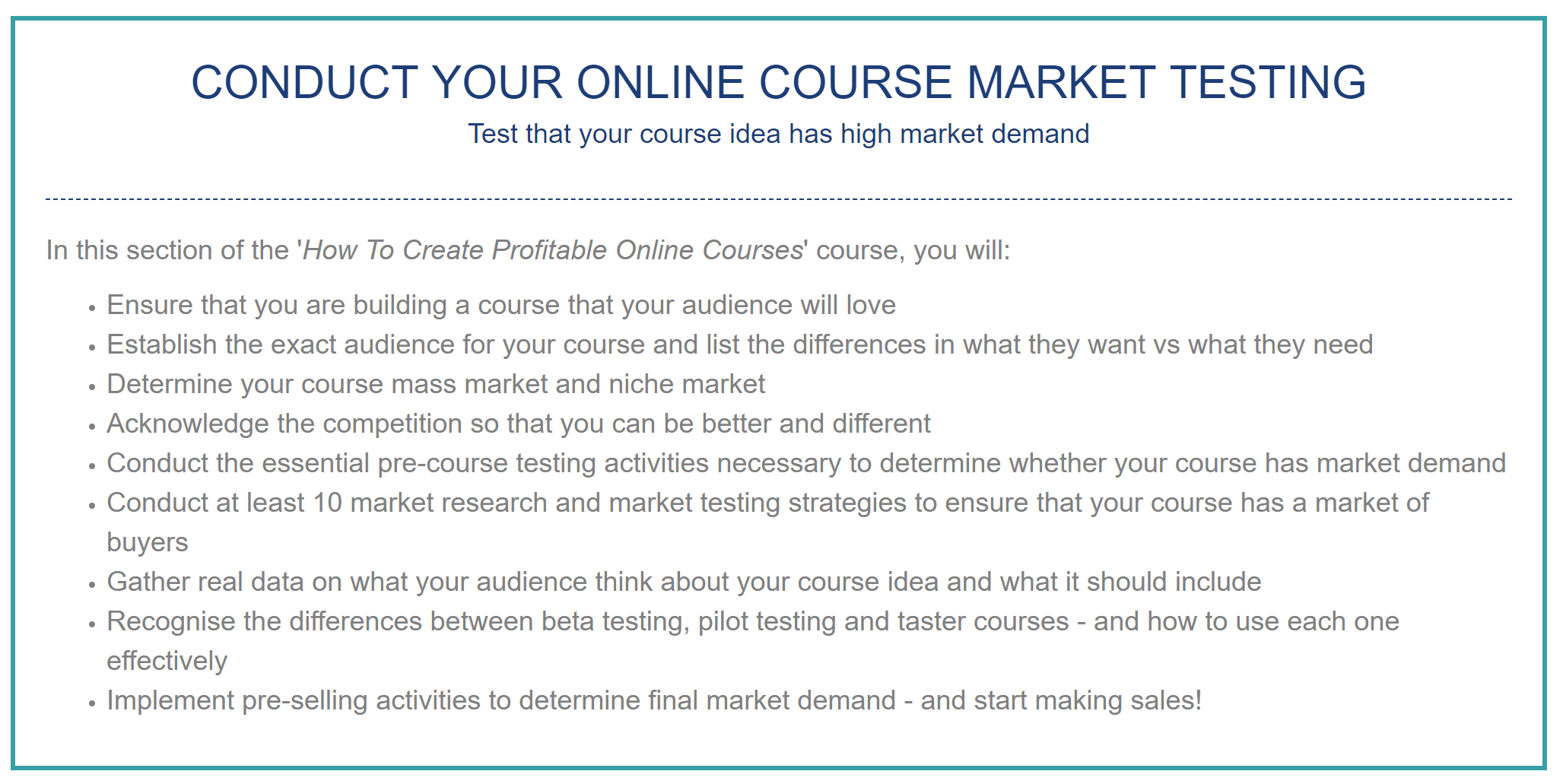
If you look a the description of my course, you’ll see how I have written up what my students get when they enrol.
Here’s a screenshot of one of my modules to give you an example (note the verbs at the start of each outcome – these make it clear about precisely what you are going to get):
4. Select and Gather your Course Content
Creating your content for your online course.
This is the stage where Edupreneurs start to risk falling into ‘The Hole of Eternal Procrastination’.
The main reason we get stuck here is often because of the sheer volume of information we have in our heads or all around us in books, on our hard drives, in our notepads and so on. The art at this stage is not just about what we should include in our course, but what we need to leave out of it.
This is where the research you will have conducted in the market testing phase and your learning outcomes, now come to serve you again. As you are sorting through your piles of content, throw out anything that does not directly relate to achieving a learning outcome.
Secondly, make sure that every learning outcome does have content aligned to it.
Only include content that meets a learning outcome, answers the questions your students have about your topic, or fills a gap that is not met by your competitors.
5. Put Your Modules and Lessons in Order
This is the stage where you need to create your course plan.
This is the stage where you now take a look at all of your content and start grouping together your similar themes, tips and ideas into modules and then ordering the lectures/lessons within those modules into the most progressive and logical manner so that they form a flowing sequence of lessons.
Putting all of this down into an easy to follow course plan will help you finalise the preparation of your content, select your delivery methods, slide in supporting resources, help keep you organised when you start filming and index your videos later.
Having an online course plan is also a requirement if you are planning to offer your program into the corporate or Government space – most clients in this field will reject a training or funding proposal without a detailed curriculum outline.
There are a number of techniques that I teach to help you conduct this grouping process and course plan writing stage which you can get in my online course ‘How to Create Profitable Courses’.
You can also take my free ‘Create Your Course Plan’ Challenge if you just want to learn the basics and are ready to learn how to create a simple course plan outline.
6. Determine the Most Engaging and Effective Delivery Methods for Each Lesson
Now it’s time to decide on the best way to deliver your content.
You need to be aware of the different principles of adult learning, learning preferences and all of the different ways that you can deliver your training to really make sure that your training is as engaging as possible.
- Will you have videos, reading content, activities, audio content?
- What type of visuals will you have?
- Will you have community learning areas?
You need to make sure that you have a balance of visual, audio and practical methodologies so that everyone is engaged and provided with the optimum learning experience.
The great thing about choosing your delivery is that you can be as creative as you wish, provided that your selected methods work best for your learners. A mixed-method approach is always best.
My personal preference is to deliver all of my teaching content via ‘talking head‘ videos, I then add in text content, worksheets, activities etc at appropriate points around them.
7. Filming, Recording and Editing your Online Course
This is the production phase.
By now you should have a thorough course plan, all of your content together and know exactly how you are going to deliver each element of your online course.
Now it’s time for the fun part – getting on camera.
Of course, how you deliver your training is entirely dependant on what your audience will prefer to engage with and what method delivers your learning outcomes most effectively.
However, at present the most effective method of delivery is video.
This could be ‘talking head’ video which is when you are in the shot on camera.
You could also have ‘green screen’ talking head videos, and later in the editing phase, have your slides or key points in text appear on-screen beside your head.
‘Green screen’ filming means that you are recording with a green background behind you. When you film in front of a green background, you can have anything behind you in the editing process. It could be a video behind you, animations, text, or just a still image. I use the green screen so that I can have my PowerPoint slides up behind me in the post editing phase – this is great for the more ‘classroom’ type training you might deliver.
Green screen editing:
A green screen allows you to replace your video background with anything; powerpoint slides, videos, images, pop-up words and more:

Here is a quick tutorial video on how to remove the green screen and add images and pop-up words to your videos:
Screencasting:
Another method of delivery is called screencasting which is when you are recording your computer screen – you can choose to include a webcam type video of yourself on top of this (as I have in the video above).
You can learn how to edit your videos very easily yourself – I use a piece of software called Camtasia.
This allows you to quickly cut, edit and replace your green screen, fix your sound, add logos, text and pop-ups to your videos; save them as an ‘mp4’ and then upload them to your online learning system and/or website, social media platforms etc.
My course “How To Create Profitable Online Courses” also takes you the basics of filming and editing your own online course (even if you are a complete newbie, have no idea what you are doing with technology and have limited funds and resources!).
8. Setting up your online school
The first thing here is to recognise that there are three major ways to sell your online courses.
- plugins or software on your website.
There is a very big difference between online course marketplaces and learning management systems.
A learning management system is your own Academy that you can link to your website and fully brand as your own platform. It makes online course creation simple and easy to sell your learning products. A personal favourite of mine is Tekmatix – I personally host all of my courses on this platform.
Here is a video where I go into much more detail about online courses marketplaces vs online course LMS’s; as well as where and how to sell your online courses, how your school fits with your website and email marketing software and much more:
9. Getting the perfect pricing models and feeding into a bigger education-based business model
Online courses can certainly be profitable in their own right – however they make you a lot more money when you have carefully planned a business model around each one you publish.
Make sure you have strategised how and where your online course will fit into your overall business model.
- Is it going to just be a free lead magnet into your primary product and service?
- Is it going to be an income stream in its own right?
- Will you have off-shoots from it such as a paid keynote presentation, workshops, mentoring/coaching, immersion bootcamps and masterminds?
- Or, is it going to be your primary income stream?
Each of these will mean that your course needs to be designed slightly differently, provide a different volume of value, have different marketing methodologies and put your followers and students into very different types of ‘funnels’ (or customer journeys).
This also will considerably affect the pricing that you need to apply to your online course so that it appropriately matches the position it’s given within your business.
There is no right or wrong or even guideline price for an online course as it depends very much on what it is that you are delivering and what the market is willing to pay.
However, here are some general guidelines that I offer to start you off in the right place:
I go into much more detail on how to price your online course in my course “How To Create Profitable Online Courses“, however my recommendation for a starting point is to analyse and benchmark your idea against competing products within the marketplace – have a look at what your competitors are charging and what for, then find out how yours can be different and better. When you’ve made your course better, then price yours slightly higher.
Never price yours lower because that will just make yours looks like it has less value than your competitors.
10. Launch and Ongoing Marketing
If you think the work is over now that you’ve completed your online course think again – now the real work begins!
Too many Edupreneurs make the mistake of thinking that once the course is complete, they now have an income stream.
The launch and marketing is a whole other topic.
- Will you run early bird discount promotions?
- Do you have a content marketing plan that will sell your online courses?
- Will you run ads?
- Do you have a list to market to?
- Can you partner up with influencers?
- Will you run an affiliate program?
- How will you use social media?
The list is endless.
Make sure that you have at least an 18-month marketing plan for your online course and remember that the second you stop marketing is the second you stop selling.
You can take my online course marketing masterclass “How To Market, Promote and Sell Your Online Course” inside my Edupreneur Academy.
So there you have it – a ‘birds-eye-view’ of the major milestones in online course creation.
Hopefully, this bigger picture will help you know what to expect as you start on your own ‘Edupreneur’ journey.
If you’d like to learn the exact steps and how-to’s of creating your own online courses, you can take my ‘How To Create Profitable Online Courses’ course here: www.sarahcordiner.com/createonlinecourses.
Author: Sarah Cordiner
………………………………
WANT TO SKIP ALL OF THE LEARNING AND JUST GET ME TO DO IT FOR YOU?
I can help you create your online course plan and set up your online school in ONE DAY: >> www.sarahcordiner.com/1daysetup
If you want to ask any questions about course creation at all and stay surrounded by other online course creators and get regular tips from me, don’t forget to join my free Facebook group “Entrepreneur to Edupreneur – Course Creators” where I personally check in daily – and you can also join my email community for updates from me.
Author: Sarah Cordiner
How Sarah Cordiner Can Help You Scale Your Business with Tech, AI, and Automation
Tech doesn't have to be hard or scary. I help you make it easy to learn, fun to implement, and even better to see the amazing results that you can get with some simple tech tools and strategy.
Here are all of the different ways that I can help you scale your business, streamline your operations, and make your bottom line full of joy using tech, AI, and automation (as well as traditional methods) as your secret weapon.
One platform. Your whole business. Finally talking to each other.
"What tech do you use, Sarah?" I get asked this every single week. The honest answer? Almost all of it lives in one place: Tekmatix. It's the all-in-one AI business platform I founded, and it runs my websites, funnels, courses, emails, bookings, payments and AI agents. Here's everything it does, who it's for, and the handful of other tools I love.
No lock-in contracts / Cancel anytime / Australian owned and female owned
I run my business on it.
- 5.0 on Google from 100+ reviews
- 98% recommended on Facebook
- 1,000+ businesses in 30+ countries
- Award-winning 24/7 support
- 3 free live training calls every weekday
- Replace $500 to $1,000+ a month in subscriptions
Eight logins. Eight bills. Zero of them talking.
Most business owners I meet are paying for a website here, an email tool there, a booking app, a course platform, a CRM they never open... and then paying someone to glue it all together with duct tape and Zapier.
- 1Leads fall through the cracks because your forms, inbox and CRM live in different places.
- 2Every new tool means another login, another bill and another thing to learn.
- 3You can't see what's actually working because your data is scattered across ten dashboards.
Everything your business runs on, under one roof.
Tekmatix is an all-in-one CRM, marketing, sales, course and AI platform. Here's what's inside, grouped by the job it does for you. Tap a category to filter, or scroll the lot.
AI that does the work
Hand the repetitive stuff to AI that already knows your contacts, calendar and offers.
- AI Employees that answer chats, DMs and enquiries 24/7
- Voice AI receptionist that answers your phone and books calls
- AI booking bot on your website chat widget
- AI Studio to build apps and tools by describing them (vibe coding)
- Ask AI assistant built into your account
- AI website and funnel builder plus content and image AI
- Connects to Claude and ChatGPT via MCP, so your AI can work inside Tekmatix
Get found and grow your list
Everything you need to get seen, capture leads and build your audience.
- Unlimited websites with free hosting and your own domains
- Unlimited funnels, landing pages, sales pages and opt-ins
- 100+ ready-made templates for sites and funnels
- Blogging with unlimited posts
- Social media planner with auto-posting
- Forms and quizzes, unlimited
- Surveys with conditional logicPro
- Reviews and reputation management, incl. Google Business Profile
- Link-in-bio pages and QR codes
Nurture and convert
Turn strangers into clients with automated follow-up that never forgets.
- CRM with unlimited contacts and full client records
- Unified inbox for email, SMS, Facebook and Instagram DMs
- Email marketing with automated newsletters
- SMS and phone, incl. missed-call text back
- Unlimited workflows and automations
- Sales pipelines so you see every deal
- Booking calendars for individuals, teams and groups, with 2-way sync
- Advanced reporting on ads, calls, courses and lead sourcesPro
Sell and get paid
Take money online, in person and on autopilot. Payments go straight to your Stripe or PayPal.
- Checkouts with upsells and order bumps
- Invoicing: one-off, recurring and payment plans
- Tap to pay on your phone (EFTPOS)
- Request payments by SMS
- Products and e-commerce, digital and physical, plus coupons
- Proposals, quotes and contracts with e-signaturesPro
- Affiliate program with unlimited affiliatesPro
- Event management with QR code ticketingPro
Courses, memberships and community
Built especially for course creators, educators and coaches. (It's where I teach my own students.)
- Unlimited courses and memberships
- Unlimited students and video hosting
- Assessments and quizzes inside your courses
- Student mobile app in your branding
- Communities and groups, unlimitedPro
- Course certificatesPro
Run the business
The behind-the-scenes admin, organised and in one place for your whole team.
- Project management and Kanban boards
- Task manager with deadlines and tracking
- Unlimited staff users with permission controls
- Admin mobile app for Apple and Android
- Business card scanner
- Integrations with Zapier, Make, WordPress, Google and more
- Up to 5 sub-accounts for your other businessesMax
Want to see it with your own eyes?
Start a 7-day free trial and a Tekspert will jump on a free set-up call with you.
If you sell your expertise or your services, it's built for you.
Solo operators, growing teams and multi-business owners all run on Tekmatix. Here's where it shines brightest.
Coaches, course creators and educators
Your website, sales pages, checkout, courses, membership, community and email, all connected. Tekmatix was made especially for you.
Consultants, speakers and experts
Bookings, proposals, contracts, invoices and follow-up that makes you look like a big firm, even if it's just you.
Health, allied health and NDIS providers
Online bookings, reminders, reviews and client records for clinics, therapists and practitioners.
Tradies and local service businesses
Missed-call text back, quotes, tap to pay and review requests, so you win the job while you're still on the tools.
Studios, salons and personal trainers
Class bookings, memberships, payments and reminders that cut the no-shows and the admin.
Agencies, associations and multi-business owners
Pipelines, staff permissions, reporting and (on Max) up to 5 sub-accounts to run several brands from one login.
Honest moment: if you only need one simple tool and you're genuinely happy juggling logins, you probably don't need Tekmatix yet. But the minute you're copying leads from one app to another, or paying for five subscriptions that don't talk to each other, it's time.
Most software gives you a login. We give you a team.
I'm an educator first, so Tekmatix was built education-first. Every plan comes with real humans, real training and real templates to get you up and running fast.
Free one-on-one set-up call
A Tekspert jumps on a call with you to set up your account and connect your integrations.
Award-winning live chat
Stuck at 11pm? Real support, any time of day or night.
3 free live training calls
Drop in, share your screen and get your questions answered live.
Starter kit and training library
Ready-made templates and automations, a step-by-step help centre, video tutorials and a free Tekmatix training course.
Rather someone just did it for you?
Teksperts are available by the hour, plus fixed-price done-for-you set-up and migration from your old platforms.
Simple pricing that doesn't punish growth.
Unlimited contacts on Starter and Pro, so your bill doesn't jump every time your list grows. Pay in AUD or USD, monthly or yearly (pay yearly and get a month free).
Everything you need to market, sell and deliver, in one place.
- Unlimited contacts, staff users and courses
- Websites, funnels, CRM, email and bookings
- Payments, invoicing and tap to pay
- AI Agents, AI booking bot, AI Studio and Ask AI
- 24/7 live chat and a free set-up call
Everything in Starter, plus the tools to build a community and scale.
- Communities, groups and course certificates
- Event management with QR ticketing
- Your own affiliate program
- Proposals, contracts and e-signatures
- Unlimited surveys and advanced reporting
Everything in Pro, plus more AI, more accounts and a strategist in your corner.
- Up to 5 sub-accounts
- AI Employee Growth plan included: 1,000 AI conversation replies and 100 voice AI minutes a month
- Monthly 60-minute strategy call with a senior Tekspert
- Early access to Tekmatix Labs
Just starting out? The Launch plan is $75 AUD ($50 USD) a month for up to 1,000 contacts. No lock-in contracts.
Explore the Launch planEmails, SMS, phone calls and AI usage are pay-as-you-go and billed in USD, so you only pay for what you use. See the full rates at tekmatix.com/rebilling. Prices current as at September 2026. Always check tekmatix.com/pricing for the latest.

I didn't set out to start a software company. I started the toolbox I needed.
After 20+ years in business and more than 280,000 students, I kept seeing the same thing. Brilliant people with brilliant expertise, drowning in tech. Paying for ten tools, using two of them, and spending their evenings on YouTube trying to make them talk to each other.
So I put everything a business needs into one platform, then wrapped it in the thing I know best: education and support. Tekmatix runs my own websites, courses, funnels, emails and AI agents every single day. I wouldn't recommend it if I didn't use it.
Sarah x
Want me to teach you how to get the most out of it?
Inside the Legends Lab I show you step by step how to use tech, AI and automation to grow your business, with live calls, workshops and templates you can copy.
Non-techie people love their tech again.
Tech is hard for non-techie people, and they really get that and make it fun.
Yesterday I felt overwhelmed. Now I feel excited and empowered.
I have used a number of top CRM systems. This is up there with the very best.
Solved problems I have had for weeks, in 50 minutes. Wonderful.
The other tools I use and actually recommend.
Tekmatix is the engine. These are the extras that plug in around it for AI, video, design, content and admin. Tap a category to filter.
Some of these are affiliate links, which means I may earn a small commission at no extra cost to you. Thanks for supporting the brand!
Wondering where the email, booking, course, funnel and CRM tools are? I don't need them any more. Tekmatix does all of that, so I'd rather you didn't pay for them twice.
See what Tekmatix covers ↑Tech stack FAQs.
Still wondering if Tekmatix is right for you? Here are the straight answers.
What is Tekmatix?
Tekmatix is an all-in-one AI business platform. It brings your website, funnels, CRM, email marketing, bookings, payments, courses, memberships, communities, social media scheduling and AI agents together in one connected account, so everything talks to each other.
Do I need to be techy to use it?
No. Tekmatix was built for non-techie business owners. You get a free set-up call, 24/7 live chat, three free live training calls every weekday, a help centre, video tutorials and ready-made templates to get started.
Is there a free trial?
Yes. The Starter and Pro plans come with a 7-day free trial. The Max plan starts with a demo, so the team can make sure it's the right fit.
Can I pay in Australian dollars?
Yes. You can pay your subscription in AUD or USD. Usage charges for emails, SMS, calls and AI are pay-as-you-go and always billed in USD. See tekmatix.com/rebilling for rates.
Will my price go up as my list grows?
No. Starter and Pro include unlimited contacts, so your plan price doesn't increase as your business grows. You also get unlimited courses, students and staff users.
Can you move me off my current platforms?
Yes. Tekmatix Teksperts offer fixed-price migration and done-for-you set-up services, or can help you integrate the tools you want to keep. See tekmatix.com/services.
Can I run courses, memberships and communities in it?
Yes. Tekmatix was made especially for course creators, educators and coaches. Courses and memberships are included on every plan, and communities and certificates come with Pro and Max.
Which plan should I choose?
Starter suits most service businesses and solo experts. Pro is best if you run courses with a community, events, contracts or an affiliate program. Max is for people running more than one business or who want more AI and a monthly strategy call. Not sure? See all the Tekmatix features.
Stop juggling your tech. Start loving it.
One login. One bill. One platform that runs your marketing, sales, courses and AI, with a real team behind you. Try it free for 7 days and see how much simpler business gets.
7-day free trial on Starter and Pro / Free set-up call / Cancel anytime
See you inside. Sarah x