
27 Things I Do Before Christmas So My Business Keeps Making Money While I Rest

ONLY 34 DAYS LEFT OF 2026.
Let that sink in for a second.
What matters NOW, today?
What will help you stay afloat and also have some well-deserved time off over the Christmas period?
What implementation can you do over the next 7 days to get yourself ready for a restful holiday season?
I shared a little note about this in my Legends Lab WhatsApp group today, and I wanted to turn it into a full list for you.
If you want to prepare your business for the Christmas break and still make money, this is exactly what I do every single year. It is how I get organised, get everything systematised and automated, and clear the decks, so the business keeps running and keeps making money while I actually get a rest.
Because here is the thing. The lead-up to Christmas and the New Year is not a quiet time for sales. I wrote about this in How to Turn Q4 Into Your Biggest Sales Window With AI. People are re-evaluating their whole lives from November through to February. If you go dark for six weeks, you miss it. If you set it up properly before you stop, the sales can still trickle in while you are at the beach.
And these days, most of this work is done by AI. I just tell it what I want.
What AI should I use?
The example prompts in this post should work in Ask AI, Claude, ChatGPT, GrokBot, or any other AI you already use. If you do not already have an external AI, and you do not want another subscription, start with Ask AI, which is built into Tekmatix.
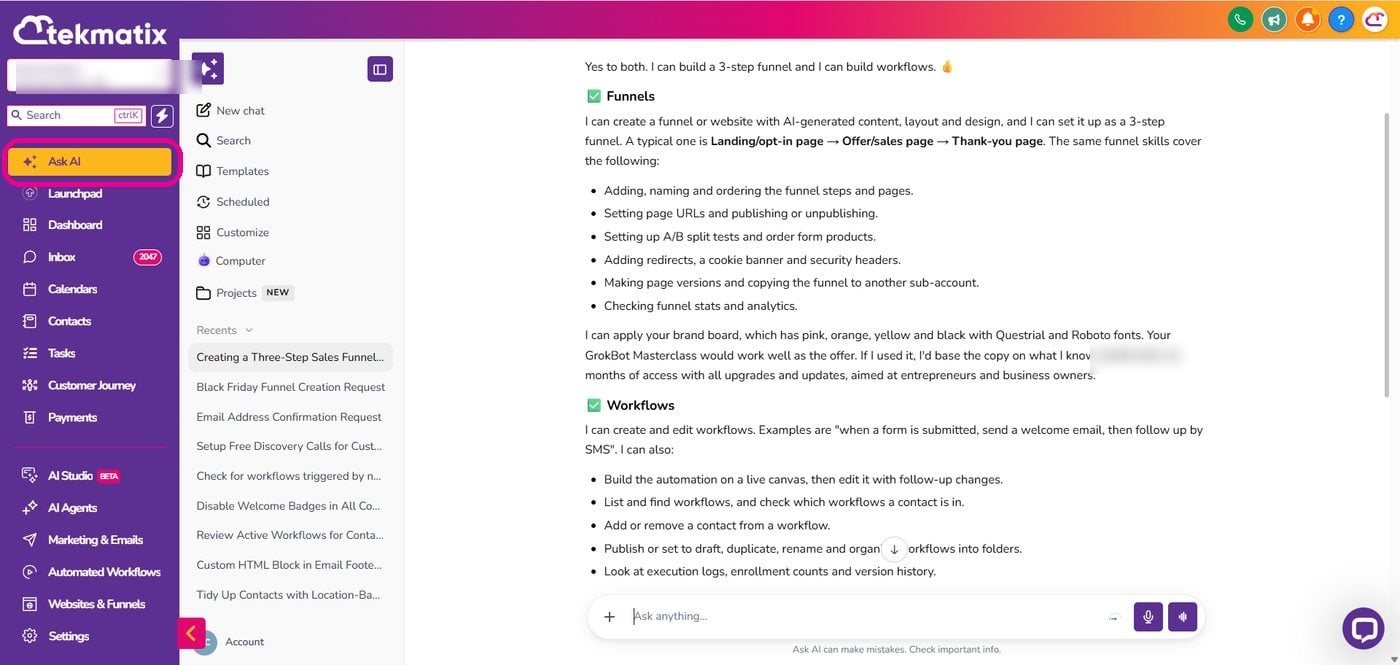
Tekmatix AI usage applies as a billable consumable. You can find out more about pricing on our public page: tekmatix.com/pricing.
Part 1: Decide what is going to make you money while you are away
1. Choose one core hero product to promote for all of December and January
This is the first thing I always do. Pick ONE thing. Not five. One.
For me, that is my membership, the Legends Lab. Every social post, every email and every ad over the break points back to that one offer.
When you only have one thing to promote, all of your content gets easier to write, your audience is not confused, and your AI has a really clear brief.
2. Put an evergreen or replay offer to work
If you have run a live workshop, masterclass or challenge this year, turn the recording into a replay offer that people can buy and watch any time.
I did this with my Concept to Course with AI workshop replay. The live event is done, but the replay keeps selling while I am not there.
3. Review your numbers for the year before you switch off
I know, BORING. But you cannot plan where the money is coming from over the break if you do not know which products made you money this year and which ones drained you.
Get your AI to pull it together for you. Ask it which offers made the most revenue, which had the best conversion, and which ones you should stop selling. If you want the maths behind it, I wrote up How to Work Out How Many People You Need to Hit a Revenue Goal.
4. Plan your January launch now, not in January
The worst feeling is coming back from holidays to a blank page and an empty pipeline.
Before I stop, I decide what I am launching or promoting in January, roughly when, and what has to be ready for it. Then the emails and content for it get loaded alongside everything else. My 10 Things I Do Every January To Set Up My Year For Success is a good one to read with this.
Part 2: Clear the decks
5. Clear my email inbox entirely
Yes. Entirely. Zero.
Today, I mostly do this by chatting with ChatGPT Dot on a phone call whilst I am going for a walk.
On that phone call, ChatGPT Dot goes through all of my emails, reads them out to me, and asks me how I want them actioned. She either replies, forwards them, adds a task to my calendar, or goes and completes the job on her own. Inbox clear.
I get my steps in, and my inbox gets done.
Prompt to copy into Ask AI, GrokBot, Claude or ChatGPT
Taking everything you know about me and access to all of the data and systems you already have, go into my email inbox and my Tekmatix conversations. Read me each unread email one at a time, give me a one-line summary and your suggested action (reply, forward, add a task to my calendar, or do it yourself), then wait for my answer. Draft any replies in my voice and show me before anything is sent. Keep going until my inbox is clear.
6. Get AI to build a 21-day priority action plan, income first
Once the inbox is clear, I get my AI to log in to my Tekmatix task manager, pull down all of my outstanding tasks, and create a priority action plan for the next 21 days. That is the list of things I should do, set up, finish, or complete before I go on break, in the order of income generation first.
Not “the most urgent”. Not “the loudest person”. The things that bring in money go first.
Prompt to copy into Ask AI, GrokBot, Claude or ChatGPT
Taking everything you know about me and access to all of the data and systems you already have, log in to my Tekmatix account and pull down every outstanding task. Create a priority action plan for the next 21 days of things I need to do, set up, finish or complete before I go on my Christmas break. Order it by income generation first. Flag anything I can delegate to you or delete. Do not change or close any tasks until I approve the plan.
7. Finish it, delegate it or delete it
Every task on that 21-day plan gets one of three labels. Finish it before the break. Hand it to someone (human or AI). Or delete it and let it go.
You will be amazed how many things on your list have been sitting there for months and actually do not matter at all.
8. Tidy your contact list so your holiday emails land
There is no point loading six weeks of emails if half of them land in spam. Before I schedule anything, I make sure my list is clean and my sending domain is healthy. Here is How to Clean Your Contact List Without Deleting Anyone and how to Keep Your Emails Out of Spam.
Part 3: Load your marketing so it runs without you
9. Write and schedule all of my social media content for the whole break
I write and schedule all of my social media content to go out across all of my channels: at least one post a day, every day, from my Tekmatix social media scheduler.
Your AI can do all of that for you. Mine writes the posts from my existing blogs and videos, in my voice, and loads them into the scheduler.
Prompt to copy into Ask AI, GrokBot, Claude or ChatGPT
Taking everything you know about me and access to all of the data and systems you already have, write one social media post a day for every day from 1 December to 31 January, promoting my hero product with helpful educational content from my existing blogs and videos. Put the call to action and link in the first comment, not the caption. Load them into my Tekmatix social planner for all of my connected channels, and show me the full calendar before you schedule anything.
10. Put the call to action and link in the comments
Every post has the call to action and link in the comments, which can all be set from the scheduler. That way the post gets seen (platforms do not love links in captions), and anyone interested still has a way to buy.
11. Write and schedule all of my email campaigns for the whole period
I also write and schedule all of my email campaigns so that they are loaded and will self-send on the dates selected throughout the whole period.
I send roughly one email every three days. That is enough to stay front of mind without burning out my list over the holidays.
12. Educational content with an upsell at the bottom of every email
Every email gives real value first. A tip, a how-to, a story, a prompt.
Then at the bottom, there is an upsell to my hero product, usually in the P.S. So sales still trickle in, even on Christmas Eve, even while I am asleep.
13. Repurpose your best content of the year
You do not need to create everything from scratch. Get your AI to find your top performing blogs, videos and emails from this year and turn them into fresh social posts, emails and short videos for the break.
14. Pre-record your videos and schedule them
If you post on YouTube or do regular videos, batch them before you go. Record a few in one sitting, get AI to help edit them, write the titles and descriptions, and schedule them to publish across the break.
15. Keep a small ad budget running on your hero product
If you run ads, do not just turn everything off. Leave a small, capped budget running on your hero product, so new people keep finding you. Set the daily cap before you go, so nothing can surprise you. I wrote about How to Run Facebook Ads with AI Without Giving It Your Login.
Part 4: Make sure the money can actually land
16. Check every funnel link, checkout and payment works
Please do not skip this one. Before I stop, I get my AI to click through every sales page, every checkout and every link in my scheduled emails and posts, and tell me what is broken.
A broken checkout link on 27 December, when you are not looking, is money walking out the door.
17. Turn on your failed payment automations
Cards expire. Payments fail. Especially over the holidays.
Make sure you have automations that email (and ideally text) people when a payment fails, with a link to update their card. Otherwise you come back in January to a pile of lost subscribers who never meant to leave.
18. Set up an out-of-office with a helpful link
Your out-of-office should not just say “I am away”. It should help people. Tell them when you are back, where to find answers, and give them a link to your hero product or your free resources. Even your auto-reply can make a sale.
19. Make sure new buyers get instant access
If someone buys on Boxing Day, they should get their login, welcome email and first steps straight away, without you lifting a finger. Test your purchase automation end to end with a test order before you go.
20. Let AI answer the common questions
Get your AI to look through your emails, DMs and support tickets in your Tekmatix account and find the top 20 questions people ask you. Then set it up to answer those questions for you while you are away. I wrote about this in Never Miss a Lead Again: Let AI Handle Your Inboxes 24/7.
Part 5: Let your AI team run the show
21. Give every job in your business an AI agent
This is the big one, and it is why my holidays look very different to how they used to.
I have a whole AI team of GrokBot agents, and each one has its own job. Over the break, this is what they look after for me:
- Email inbox manager: sorts my inbox, drafts replies in my voice, and flags only what genuinely needs me.
- Task manager and CEO priorities: keeps my task list in order and tells me the top three things that actually matter today.
- Marketing and social media manager: turns my blogs into social posts and keeps the scheduler full.
- Email marketing manager: writes and schedules my campaigns, roughly every three days, each with a P.S. that points to my hero product.
- Course manager: looks after my courses inside my Tekmatix course portal, so students can get in and get going.
- Ads manager: watches my Meta ads and tells me what is working and what is wasting money.
- Billing and membership manager: keeps an eye on failed payments and membership access.
- CFO and accounts: gives me a clear picture of the money coming in and going out.
- Lead generation and sales: follows up new leads so nobody falls through the cracks.
- Retention and customer success: checks in with customers so they stay, and get results.
- Video editor: helps edit my videos, even long training videos.
- YouTube manager: writes titles, descriptions and schedules my videos.
- Workflows and web manager: looks after my pages, funnels and automations.
I am not going to give you the full prompts for each of these agents here. They are long, and they are the exact ones I use in my own business. The prompts for all of these agents are inside my Legends Lab. You get 50+ ready-made AI agents and skills that you can copy, paste and switch on in whichever AI you use: ChatGPT, Claude, GrokBot, or Ask AI inside Tekmatix.
If you want to see how I think about this, read How to Turn AI Into a Real Business Team and How to Use GrokBot to Run Your Business.
22. Put a COO agent in charge of the team
Instead of checking in with 13 different agents, I have a COO agent that delegates the work to the right agent and reports back to me. I talk to one, and it manages the rest.
23. Get one daily summary, not 50 notifications
I get one short morning summary of what happened, what sold, and anything that needs my decision. That is it. It is basically my CEO Command Centre, and it means I can glance at my phone over a coffee and then go back to my holiday.
24. Set clear rules for what your AI can and cannot do without you
My agents can draft, check, sort and report all day long. But nothing gets published, sent or paid for without my yes. Set those rules before you go, so you can relax knowing nothing will go out that you have not approved.
Part 6: Protect your rest
25. Set your check-in times, and stick to them
Decide now when you will check in, for example 15 minutes every second morning, and when you will not. Put it in your calendar. Outside of that time, the phone goes away.
26. Tell your customers, clients and team when you are off
Let people know your dates, when you will be back, and where to get help in the meantime. People are really understanding when you tell them upfront. It is the radio silence that worries them.
27. Book your rest first, then plan the new year on a walk
Block out your days off in the calendar first, before anything else gets in there.
Then, somewhere in the break, go for a long walk and talk out what you want next year to look like. I do this with a voice recorder and my AI, and I explain the whole process in How to Map Your Magic and Create a Clear Business Plan for the Next 12 Months Using AI.
How to prepare your business for the Christmas break in the next 7 days
You do not need to do all 27 things today. Here is how I would spread it across the next week:
- Day 1: Choose your one hero product for December and January. Clear your inbox on a walk with your AI.
- Day 2: Get your AI to build your 21-day priority action plan from your task manager, income first. Finish, delegate or delete.
- Day 3: Review your numbers for the year, and decide on your January launch.
- Day 4: Get your AI to write and schedule your social posts, one a day, with the link in the comments.
- Day 5: Get your AI to write and schedule your emails, educational content with an upsell at the bottom.
- Day 6: Check every funnel link and checkout, turn on failed payment automations, set your out-of-office, and test your new buyer access.
- Day 7: Switch on your AI team, set your approval rules and check-in times, tell people your dates, and book your rest.
Frequently asked questions
How do I keep making money over the Christmas break without working?
Choose one hero product, then load your social posts and emails for the whole break before you go, with educational content and an upsell in every email. Check that your checkouts work, turn on failed payment automations, and let your AI agents look after the day-to-day so you only check in briefly.
Is it worth marketing over Christmas and New Year?
Yes. From November through to February, people are re-evaluating their career, business, health and money. It is one of the biggest buying windows of the year, as long as you put the right offer in front of the right people.
How far ahead should I schedule content for the holidays?
I schedule everything from early December through to the end of January in one go. That covers the break and the first few weeks back, so you are not scrambling in January.
Can AI really clear my email inbox for me?
Yes. I do it by talking to ChatGPT Dot on a phone call while I walk. She reads my emails to me, asks what I want done, then replies, forwards, adds a task to my calendar, or does the job herself. You can do something similar in Ask AI, GrokBot, Claude or ChatGPT.
Where can I get the prompts for your AI agents?
The full prompts for my AI agents and skills are inside the Legends Lab. They work in ChatGPT, Claude, GrokBot and Ask AI inside Tekmatix.
How often should I email my list over the holidays?
I send about one email every three days. Enough to stay front of mind, not so much that people switch off.
Make your time count!
34 days. That is all that is left of 2026.
You can spend them running around trying to do everything, and then crash into Christmas exhausted. Or you can spend the next 7 days setting it all up properly, so your business keeps working while you rest.
I know which one I am choosing.
If you want my exact agent prompts, skills and step-by-step training to set all of this up, come and join me in the Legends Lab. It is my business and AI education program, with live monthly masterclasses, Q&A calls, and me in your pocket on WhatsApp.
If you are reading this before 11:59pm AEST on 30 December 2026, you can still lock in the Legends Lab at $1,497 AUD a year, for life. After that, it goes up to $297 AUD a month.
Not ready for a membership? Start with the Concept to Course with AI workshop replay and get a new offer ready for the new year.
I run my business on Tekmatix.
Have a beautiful, restful Christmas.
Sarah x
How Sarah Cordiner Can Help You Scale Your Business with Tech, AI, and Automation
Tech doesn't have to be hard or scary. I help you make it easy to learn, fun to implement, and even better to see the amazing results that you can get with some simple tech tools and strategy.
Here are all of the different ways that I can help you scale your business, streamline your operations, and make your bottom line full of joy using tech, AI, and automation (as well as traditional methods) as your secret weapon.
One platform. Your whole business. Finally talking to each other.
"What tech do you use, Sarah?" I get asked this every single week. The honest answer? Almost all of it lives in one place: Tekmatix. It's the all-in-one AI business platform I founded, and it runs my websites, funnels, courses, emails, bookings, payments and AI agents. Here's everything it does, who it's for, and the handful of other tools I love.
No lock-in contracts / Cancel anytime / Australian owned and female owned
I run my business on it.
- 5.0 on Google from 100+ reviews
- 98% recommended on Facebook
- 1,000+ businesses in 30+ countries
- Award-winning 24/7 support
- 3 free live training calls every weekday
- Replace $500 to $1,000+ a month in subscriptions
Eight logins. Eight bills. Zero of them talking.
Most business owners I meet are paying for a website here, an email tool there, a booking app, a course platform, a CRM they never open... and then paying someone to glue it all together with duct tape and Zapier.
- 1Leads fall through the cracks because your forms, inbox and CRM live in different places.
- 2Every new tool means another login, another bill and another thing to learn.
- 3You can't see what's actually working because your data is scattered across ten dashboards.
Everything your business runs on, under one roof.
Tekmatix is an all-in-one CRM, marketing, sales, course and AI platform. Here's what's inside, grouped by the job it does for you. Tap a category to filter, or scroll the lot.
AI that does the work
Hand the repetitive stuff to AI that already knows your contacts, calendar and offers.
- AI Employees that answer chats, DMs and enquiries 24/7
- Voice AI receptionist that answers your phone and books calls
- AI booking bot on your website chat widget
- AI Studio to build apps and tools by describing them (vibe coding)
- Ask AI assistant built into your account
- AI website and funnel builder plus content and image AI
- Connects to Claude and ChatGPT via MCP, so your AI can work inside Tekmatix
Get found and grow your list
Everything you need to get seen, capture leads and build your audience.
- Unlimited websites with free hosting and your own domains
- Unlimited funnels, landing pages, sales pages and opt-ins
- 100+ ready-made templates for sites and funnels
- Blogging with unlimited posts
- Social media planner with auto-posting
- Forms and quizzes, unlimited
- Surveys with conditional logicPro
- Reviews and reputation management, incl. Google Business Profile
- Link-in-bio pages and QR codes
Nurture and convert
Turn strangers into clients with automated follow-up that never forgets.
- CRM with unlimited contacts and full client records
- Unified inbox for email, SMS, Facebook and Instagram DMs
- Email marketing with automated newsletters
- SMS and phone, incl. missed-call text back
- Unlimited workflows and automations
- Sales pipelines so you see every deal
- Booking calendars for individuals, teams and groups, with 2-way sync
- Advanced reporting on ads, calls, courses and lead sourcesPro
Sell and get paid
Take money online, in person and on autopilot. Payments go straight to your Stripe or PayPal.
- Checkouts with upsells and order bumps
- Invoicing: one-off, recurring and payment plans
- Tap to pay on your phone (EFTPOS)
- Request payments by SMS
- Products and e-commerce, digital and physical, plus coupons
- Proposals, quotes and contracts with e-signaturesPro
- Affiliate program with unlimited affiliatesPro
- Event management with QR code ticketingPro
Courses, memberships and community
Built especially for course creators, educators and coaches. (It's where I teach my own students.)
- Unlimited courses and memberships
- Unlimited students and video hosting
- Assessments and quizzes inside your courses
- Student mobile app in your branding
- Communities and groups, unlimitedPro
- Course certificatesPro
Run the business
The behind-the-scenes admin, organised and in one place for your whole team.
- Project management and Kanban boards
- Task manager with deadlines and tracking
- Unlimited staff users with permission controls
- Admin mobile app for Apple and Android
- Business card scanner
- Integrations with Zapier, Make, WordPress, Google and more
- Up to 5 sub-accounts for your other businessesMax
Want to see it with your own eyes?
Start a 7-day free trial and a Tekspert will jump on a free set-up call with you.
If you sell your expertise or your services, it's built for you.
Solo operators, growing teams and multi-business owners all run on Tekmatix. Here's where it shines brightest.
Coaches, course creators and educators
Your website, sales pages, checkout, courses, membership, community and email, all connected. Tekmatix was made especially for you.
Consultants, speakers and experts
Bookings, proposals, contracts, invoices and follow-up that makes you look like a big firm, even if it's just you.
Health, allied health and NDIS providers
Online bookings, reminders, reviews and client records for clinics, therapists and practitioners.
Tradies and local service businesses
Missed-call text back, quotes, tap to pay and review requests, so you win the job while you're still on the tools.
Studios, salons and personal trainers
Class bookings, memberships, payments and reminders that cut the no-shows and the admin.
Agencies, associations and multi-business owners
Pipelines, staff permissions, reporting and (on Max) up to 5 sub-accounts to run several brands from one login.
Honest moment: if you only need one simple tool and you're genuinely happy juggling logins, you probably don't need Tekmatix yet. But the minute you're copying leads from one app to another, or paying for five subscriptions that don't talk to each other, it's time.
Most software gives you a login. We give you a team.
I'm an educator first, so Tekmatix was built education-first. Every plan comes with real humans, real training and real templates to get you up and running fast.
Free one-on-one set-up call
A Tekspert jumps on a call with you to set up your account and connect your integrations.
Award-winning live chat
Stuck at 11pm? Real support, any time of day or night.
3 free live training calls
Drop in, share your screen and get your questions answered live.
Starter kit and training library
Ready-made templates and automations, a step-by-step help centre, video tutorials and a free Tekmatix training course.
Rather someone just did it for you?
Teksperts are available by the hour, plus fixed-price done-for-you set-up and migration from your old platforms.
Simple pricing that doesn't punish growth.
Unlimited contacts on Starter and Pro, so your bill doesn't jump every time your list grows. Pay in AUD or USD, monthly or yearly (pay yearly and get a month free).
Everything you need to market, sell and deliver, in one place.
- Unlimited contacts, staff users and courses
- Websites, funnels, CRM, email and bookings
- Payments, invoicing and tap to pay
- AI Agents, AI booking bot, AI Studio and Ask AI
- 24/7 live chat and a free set-up call
Everything in Starter, plus the tools to build a community and scale.
- Communities, groups and course certificates
- Event management with QR ticketing
- Your own affiliate program
- Proposals, contracts and e-signatures
- Unlimited surveys and advanced reporting
Everything in Pro, plus more AI, more accounts and a strategist in your corner.
- Up to 5 sub-accounts
- AI Employee Growth plan included: 1,000 AI conversation replies and 100 voice AI minutes a month
- Monthly 60-minute strategy call with a senior Tekspert
- Early access to Tekmatix Labs
Just starting out? The Launch plan is $75 AUD ($50 USD) a month for up to 1,000 contacts. No lock-in contracts.
Explore the Launch planEmails, SMS, phone calls and AI usage are pay-as-you-go and billed in USD, so you only pay for what you use. See the full rates at tekmatix.com/rebilling. Prices current as at September 2026. Always check tekmatix.com/pricing for the latest.

I didn't set out to start a software company. I started the toolbox I needed.
After 20+ years in business and more than 280,000 students, I kept seeing the same thing. Brilliant people with brilliant expertise, drowning in tech. Paying for ten tools, using two of them, and spending their evenings on YouTube trying to make them talk to each other.
So I put everything a business needs into one platform, then wrapped it in the thing I know best: education and support. Tekmatix runs my own websites, courses, funnels, emails and AI agents every single day. I wouldn't recommend it if I didn't use it.
Sarah x
Want me to teach you how to get the most out of it?
Inside the Legends Lab I show you step by step how to use tech, AI and automation to grow your business, with live calls, workshops and templates you can copy.
Non-techie people love their tech again.
Tech is hard for non-techie people, and they really get that and make it fun.
Yesterday I felt overwhelmed. Now I feel excited and empowered.
I have used a number of top CRM systems. This is up there with the very best.
Solved problems I have had for weeks, in 50 minutes. Wonderful.
The other tools I use and actually recommend.
Tekmatix is the engine. These are the extras that plug in around it for AI, video, design, content and admin. Tap a category to filter.
Some of these are affiliate links, which means I may earn a small commission at no extra cost to you. Thanks for supporting the brand!
Wondering where the email, booking, course, funnel and CRM tools are? I don't need them any more. Tekmatix does all of that, so I'd rather you didn't pay for them twice.
See what Tekmatix covers ↑Tech stack FAQs.
Still wondering if Tekmatix is right for you? Here are the straight answers.
What is Tekmatix?
Tekmatix is an all-in-one AI business platform. It brings your website, funnels, CRM, email marketing, bookings, payments, courses, memberships, communities, social media scheduling and AI agents together in one connected account, so everything talks to each other.
Do I need to be techy to use it?
No. Tekmatix was built for non-techie business owners. You get a free set-up call, 24/7 live chat, three free live training calls every weekday, a help centre, video tutorials and ready-made templates to get started.
Is there a free trial?
Yes. The Starter and Pro plans come with a 7-day free trial. The Max plan starts with a demo, so the team can make sure it's the right fit.
Can I pay in Australian dollars?
Yes. You can pay your subscription in AUD or USD. Usage charges for emails, SMS, calls and AI are pay-as-you-go and always billed in USD. See tekmatix.com/rebilling for rates.
Will my price go up as my list grows?
No. Starter and Pro include unlimited contacts, so your plan price doesn't increase as your business grows. You also get unlimited courses, students and staff users.
Can you move me off my current platforms?
Yes. Tekmatix Teksperts offer fixed-price migration and done-for-you set-up services, or can help you integrate the tools you want to keep. See tekmatix.com/services.
Can I run courses, memberships and communities in it?
Yes. Tekmatix was made especially for course creators, educators and coaches. Courses and memberships are included on every plan, and communities and certificates come with Pro and Max.
Which plan should I choose?
Starter suits most service businesses and solo experts. Pro is best if you run courses with a community, events, contracts or an affiliate program. Max is for people running more than one business or who want more AI and a monthly strategy call. Not sure? See all the Tekmatix features.
Stop juggling your tech. Start loving it.
One login. One bill. One platform that runs your marketing, sales, courses and AI, with a real team behind you. Try it free for 7 days and see how much simpler business gets.
7-day free trial on Starter and Pro / Free set-up call / Cancel anytime
See you inside. Sarah x