20 Human Jobs That AI Did for Me This Week (and the Prompts to Copy)

Quick answer: AI agents for small business are specialist AI assistants, each trained for one job, that connect to your CRM and get real work done. This week my agents in GrokBot and Claude, plus Ask AI inside Tekmatix, built a funnel, drafted my ads, sorted 130 tasks, replied to support tickets and much more. My team review and approve. The agents do the heavy lifting.
TL;DR
- One giant AI chat is not the answer. A team of specialist agents, each with one job, is.
- Connect your AI to your CRM. Mine is connected to my Tekmatix account, so it can actually do the work, not just tell me how.
- Ask one magic question of every task: can you do this today, and can we automate it forever?
- Humans stay in charge. Agents draft. People approve anything that sends, publishes or spends money.
- Every prompt I use is shared inside the Legends Lab.
Let me be really clear about something first.
AI hasn’t replaced a single person on my team.
Not one.
My admin team drive the bots. And now they get about 10 times more done in the same hours they were already working.
So when I say “20 human jobs that AI did for me this week”, I mean 20 jobs that used to eat human hours. Hours my team now spend on the stuff that actually needs a human.
Here’s the thing. Most people use AI like a slightly smarter search engine. They ask it a question, copy the answer and go back to doing the work themselves.
I don’t want answers. I want the work done.
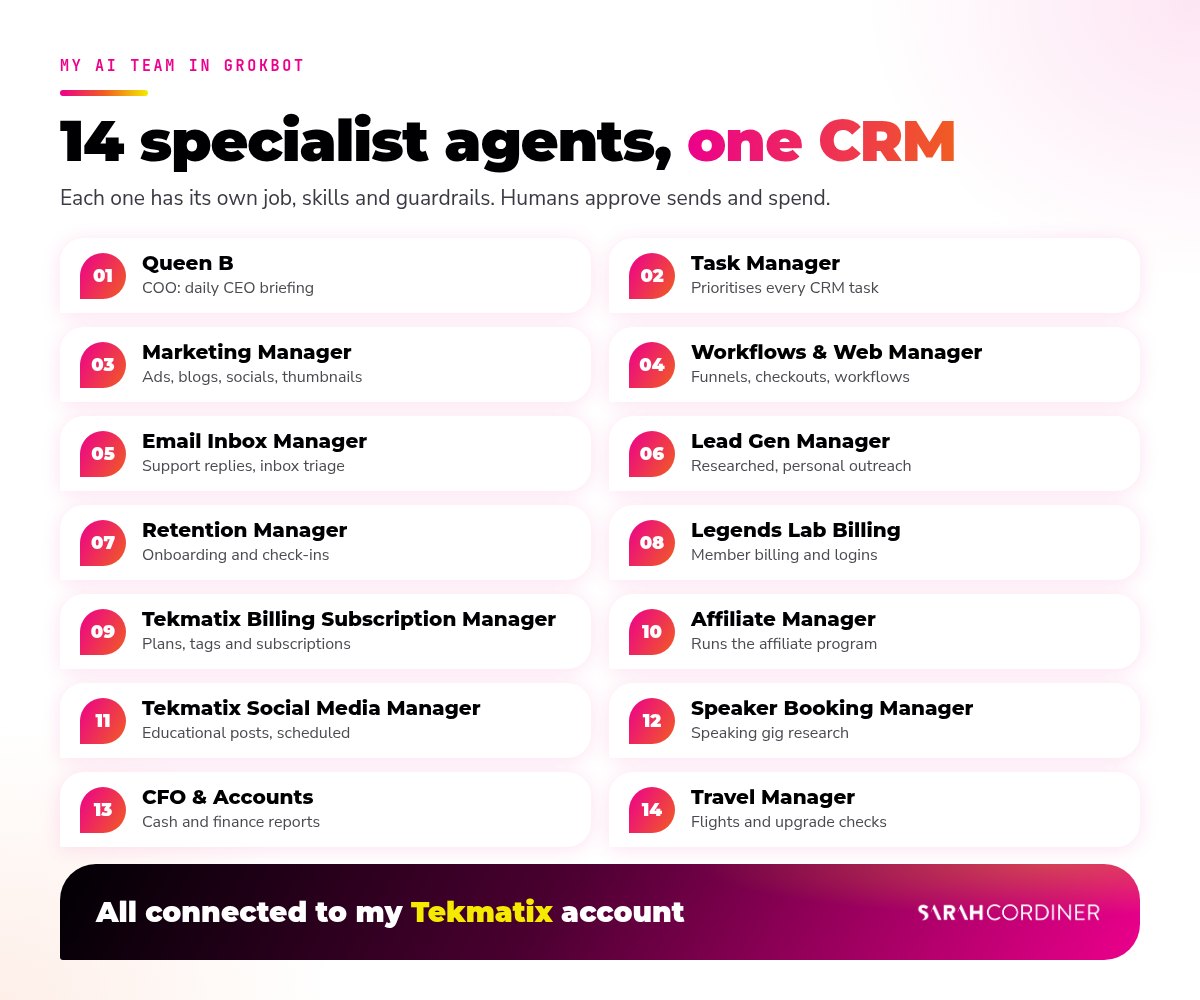
So I built a team of specialist AI agents in GrokBot and Claude, connected them to my Tekmatix CRM, and gave each one a job. Below are 20 real jobs they did this week, which agent did each one, and a prompt you can copy and try yourself.
Get every prompt I use in the Legends Lab
What’s in this post
- Built a complete 3-step funnel for my Concept to Course program
- Sorted 130 open tasks and suggested an agent for each one
- Drafted all of my Facebook ads into my ads tracker
- Turned my past workshops into helpful blog posts
- Made a funnel thumbnail from my real headshots
- Blurred customer names in a video and posted a reel to 8 accounts
- Scheduled a week of educational social posts
- Drafted my email campaigns, including event recaps
- Drafted replies to support tickets
- Logged every new contact with a note on how we know them
- Wrote personalised lead activation emails
- Checked in with existing customers and suggested helpful add-ons
- Invited new trial users to an onboarding call
- Sorted out member billing and login mismatches
- Kept Tekmatix subscriptions, plans and tags in sync
- Managed my affiliate program
- Researched speaking opportunities
- Checked my flights and upgrade options
- Pulled together my cash and finance reporting
- Wrote my daily CEO briefing
- The guardrails that make this safe
- How to start with AI agents in your own business
- FAQs about AI agents for small business
Why separate specialist agents work better than one big AI chat
Would you hire one person to do your marketing, your bookkeeping, your support inbox and your travel?
Of course not.
So why do we expect one AI chat to do it all?
Each of my agents has its own job description, its own skills, its own rules and its own memory. My Marketing Manager knows my brand voice and my link directory. My Legends Lab Billing agent knows exactly how memberships and logins work. My Task Manager knows who on my team owns what.
Not because AI is magic. But because a focused agent with clear instructions does better work. Exactly like a human.
1. Built a complete 3-step funnel for my Concept to Course program
Who did it: Workflows & Web Manager (GrokBot)
I simply connected my Tekmatix account and asked it to build a 3-step funnel for my upcoming Concept to Course program.
It designed the pages in my branding. It built the funnel. It created the checkout and added the product to it.
Then it built the fulfilment workflow, the abandoned cart workflow, and drafted the emails.
Not a wireframe. Not a to-do list. The actual funnel, sitting in my account waiting for me to check it.
Prompt to try
“Log into my Tekmatix account and build a 3-step funnel for [offer]: sales page, checkout with [product] added, and a thank you page. Use my brand colours and voice. Then create the fulfilment workflow and an abandoned cart workflow, draft the emails, and leave everything unpublished for me to review.”
How Tekmatix helps: Funnels, checkouts, products, workflows and emails all live in one place in Tekmatix, so your AI isn’t stitching five tools together. Here’s the full step-by-step guide to building a sales page funnel with your AI, and my own walkthrough of purchase and opt-in workflows in Tekmatix.
Try it with Ask AI: Ask AI inside Tekmatix can generate funnel pages for you. The workflows are a job for your connected AI (GrokBot, Claude or ChatGPT). Open Ask AI in your Tekmatix account and type:
Ask AI prompt
“Generate a sales page funnel for my [offer name] workshop, with a sales page, checkout page and thank you page.”
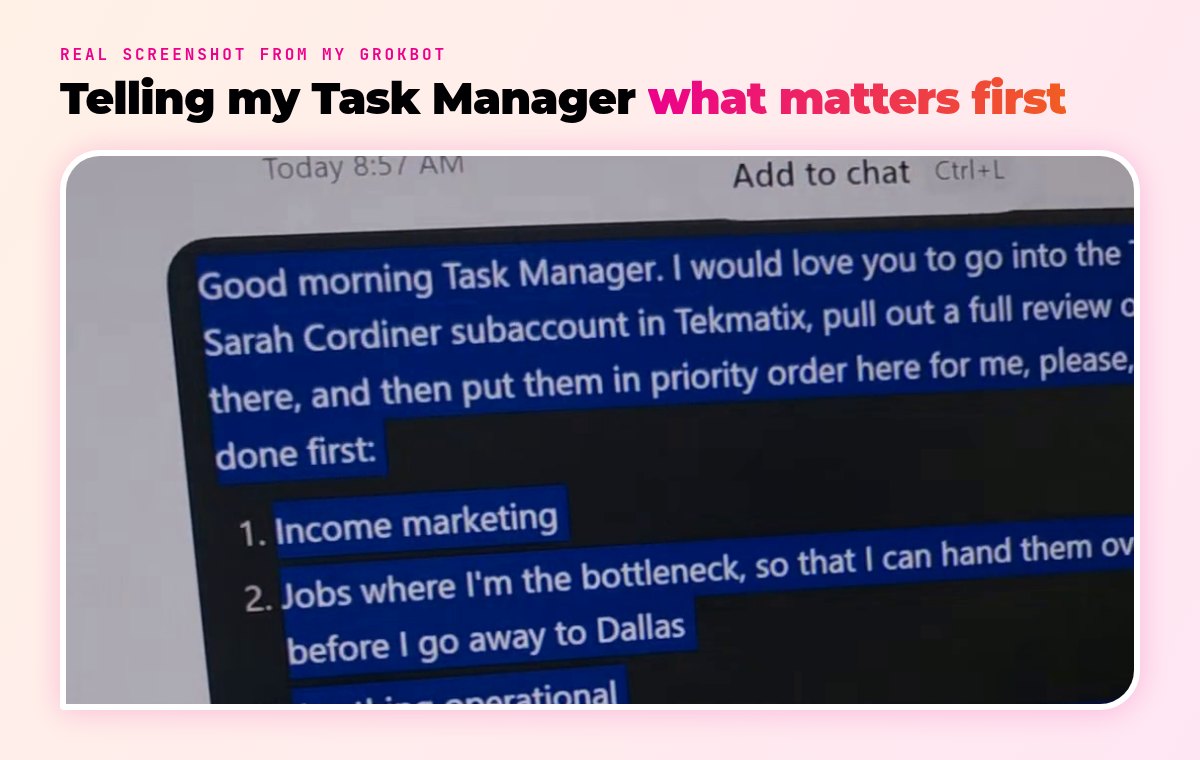
2. Sorted 130 open tasks and suggested an agent for each one
Who did it: Task Manager (GrokBot)
I asked my Task Manager to pull every open task out of my CRM and put them in priority order: income and marketing first, then jobs where I’m the bottleneck, then operations.
There were 130 of them.
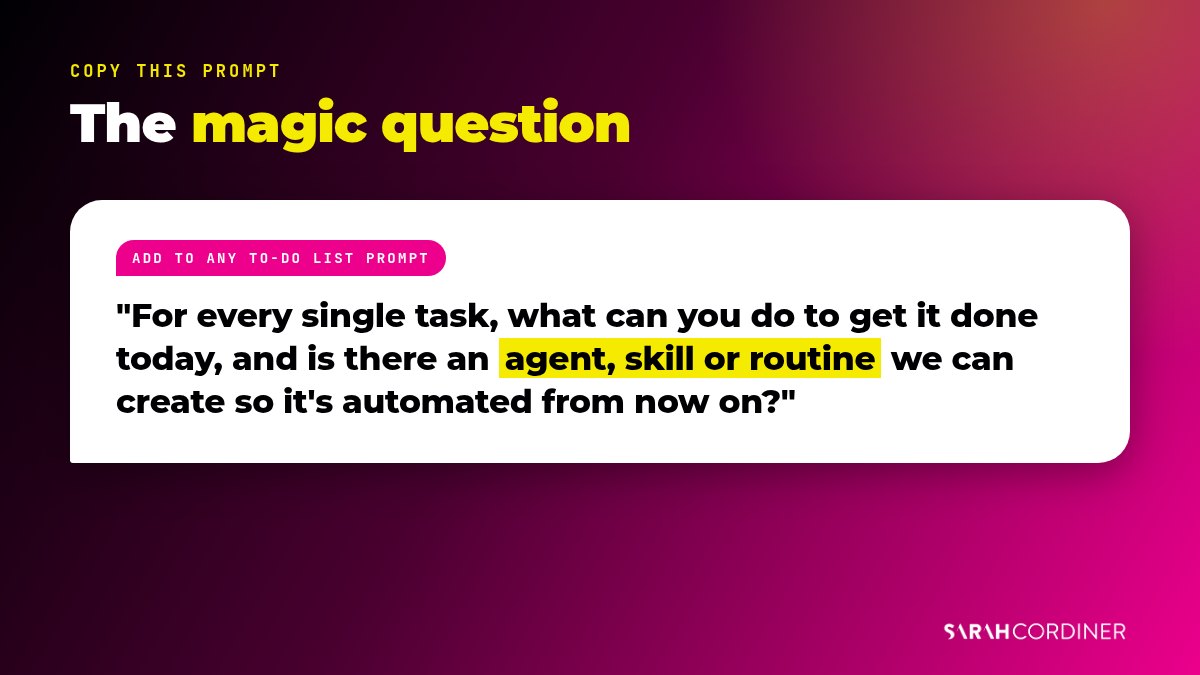
Then I asked the magic question. For every single task, what can you do to get it done today, and is there an agent, skill or routine we can create so it’s automated from now on?
That one question turns a to-do list into a growing team.
Prompt to try
“Go into my Tekmatix account, pull out every open task, and sort them into: 1. income and marketing, 2. jobs where I’m the bottleneck, 3. anything operational. For every task, tell me what you can do to get it done today, and whether there’s an agent, skill or routine we can create so it’s automated from now on.”
How Tekmatix helps: Every task, contact and conversation sits in Tekmatix, so your AI can see the whole picture and not just one inbox.
Try it with Ask AI: Ask AI can look after your tasks and reminders right inside your account. Open Ask AI in your Tekmatix account and type:
Ask AI prompt
“Show me all of my open tasks, grouped by who they’re assigned to, and flag anything that’s overdue.”
3. Drafted all of my Facebook ads into my ads tracker
Who did it: Marketing Manager (GrokBot)
My Marketing Manager studied my past ads, then wrote the new ones straight into my Facebook ads tracker sheet. Headlines, primary text, audiences and placements, ready for me to review.
It’s also connected to my Meta ad account through the official API, so once I approve an ad it can build it inside Meta, switched off, for a final check.
Nothing goes live and not a cent is spent until I say yes.
Prompt to try
“Look at my last 20 Facebook ads in [sheet]. Using what worked, write 5 new ads for [offer] with a headline, primary text, audience and placement for each. Add them as new rows in the sheet and don’t delete anything.”
How Tekmatix helps: Every ad needs somewhere to land. Your sales pages, opt-ins and checkouts are built in Tekmatix, so the agent writing the ads can check the page it’s sending people to.
4. Turned my past workshops into helpful blog posts
Who did it: Marketing Manager (GrokBot)
I’ve run a lot of workshops. Most of that gold was sitting in recordings nobody watches twice.
Now, when a workshop becomes a replay, my Marketing Manager turns the transcript into a proper how-to blog post, with SEO, internal links and a thumbnail, and links it back to the replay.
That’s how posts like how to create a welcome email sequence come to life.
Prompt to try
“Here’s the transcript from my workshop on [topic]. Turn it into a practical how-to blog post with numbered steps, short paragraphs, an FAQ and a meta description. Keep my voice. Don’t give away the full workshop, and link to [replay page] where it fits.”
How Tekmatix helps: Your blog, your replay sales page and your email list can all live in Tekmatix, so one piece of content feeds the whole funnel.
Try it with Ask AI: Ask AI can help you write content right inside your account. Open Ask AI in your Tekmatix account and type:
Ask AI prompt
“Write a 600-word blog post on [topic] for [audience], with three practical tips and a call to action to book a call.”
5. Made a funnel thumbnail from my real headshots
Who did it: Marketing Manager (GrokBot)
I sent 13 headshots. The agent stored them with proper names, uploaded them to my media library, removed the background cleanly and built a branded thumbnail for my funnel.
It used a real photo of me, never an AI-generated face. That’s one of my hard rules.
And when I didn’t love the first version? I told it why, and it fixed it. Just like briefing a designer.
Prompt to try
“Use [photo] to make a 1280×720 thumbnail for [page]. Remove the background cleanly, use my brand colours and fonts, put [headline] on the left, and don’t alter my face.”
How Tekmatix helps: The finished image goes straight into the media library in Tekmatix and onto the funnel page, so there’s no downloading and re-uploading.
6. Blurred customer names in a video and posted a reel to 8 accounts
Who did it: Marketing Manager (GrokBot)
I recorded a three-minute screen video. Customer first names were readable on screen for a bit of it.
Before anything went out, my agent spotted them, blurred every one, and then published the reel across 8 of my social accounts, with the links in the comments rather than the caption.
That’s the part people miss. A good agent doesn’t just do the task. It protects you while it does it.
Prompt to try
“Before you post this video, watch it and list every moment where a customer name, email address or financial figure is visible. Blur all of them, show me a few frames to check, then schedule it to [accounts].”
How Tekmatix helps: The Social Planner in Tekmatix posts to all your connected accounts from one place, so one approved video becomes 8 posts.
Try it with Ask AI: Ask AI can write and prepare your social posts for you. Open Ask AI in your Tekmatix account and type:
Ask AI prompt
“Write a short, friendly Facebook and Instagram caption for my new video about [topic], and end it with a question.”
7. Scheduled a week of educational social posts
Who did it: Tekmatix Social Media Manager (GrokBot)
My Tekmatix Social Media Manager writes helpful, educational posts for the Tekmatix pages and schedules them in the Social Planner.
It follows a positioning brief, an approved list of claims, and a list of words it’s never allowed to use.
Consistent posting, without someone losing their whole Monday to it.
Prompt to try
“Write 5 educational social posts for [audience] about [topic]. Each one should teach one useful thing, include one copy-paste prompt, and end with a question. Then schedule them in my Social Planner, one a day at 10am.”
How Tekmatix helps: Scheduling, posting and comments all happen in Tekmatix‘s Social Planner, which your AI can reach through the Tekmatix AI connection.
Try it with Ask AI: Ask AI can write social posts and get them ready in your planner. Open Ask AI in your Tekmatix account and type:
Ask AI prompt
“Create 5 social media posts for this week about [topic] and add them to my Social Planner as drafts.”
Want the full GrokBot setup, step by step? My GrokBot Masterclass gives you 60+ ready-made prompts that build your account from scratch, set up the right guardrails and preload agents I’ve already trained for you. It’s also included inside the Legends Lab.
8. Drafted my email campaigns, including event recaps
Who did it: Marketing Manager (GrokBot)
New blog post? Workshop replay? Event just finished?
My agents draft the email, build it from my master template, and leave it as a draft. Then I get a message saying it’s ready to check.
I read it, tweak a line, and hit send. That’s my job now. Approver, not typist.
Prompt to try
“Draft an email to my [list] about [topic]. Open casually, give them 3 useful takeaways, link to [page] with one clear button, and sign off as me. Save it as a draft and don’t send it.”
How Tekmatix helps: Email campaigns, templates, lists and reporting are all built into Tekmatix. If you want the sequences that sell for you, my Email Automation Mastery workshop walks you through them.
Try it with Ask AI: Ask AI can write email copy for you inside the account. Open Ask AI in your Tekmatix account and type:
Ask AI prompt
“Write a warm, friendly email to everyone who attended last week’s webinar, thank them for coming and invite them to book a 15-minute call with me.”
9. Drafted replies to support tickets
Who did it: Email Inbox Manager (GrokBot)
My Email Inbox Manager reads incoming support emails, checks the customer’s account, and drafts a reply using our reply rules and templates.
Empathy without blame. Reply, don’t repeat. Anything unusual gets flagged to a human.
My team then spend their time on the tricky ones, not on typing “here’s your login link” for the fortieth time.
Prompt to try
“Review my unanswered enquiries from the last seven days. For each one, check the contact’s history and draft a short, helpful reply. Don’t send anything. Flag anything about refunds or complaints for me.”
How Tekmatix helps: Email, SMS, Facebook and Instagram messages all land in one conversations inbox in Tekmatix, so your AI checks one place, not five.
Try it with Ask AI: Ask AI can help manage your enquiries and suggest replies. Open Ask AI in your Tekmatix account and type:
Ask AI prompt
“Show me every conversation that hasn’t had a reply in the last 48 hours and suggest a reply for each one.”
10. Logged every new contact with a note on how we know them
Who did it: Email Inbox Manager (GrokBot)
When a real human emails me, the agent adds or updates them in the CRM and writes a short note on who they are and how the contact came about.
So when my team speaks to them later, they already know the backstory.
Small job. Huge difference to how people feel when they deal with us.
Prompt to try
“For each new person who emailed me this week, check if they’re in my CRM. If not, add them. Then add a short note saying who they are, how they found me, and what they asked about.”
How Tekmatix helps: Contacts, notes, tags and history live on one record in Tekmatix, with unlimited contacts on every plan.
Try it with Ask AI: Ask AI can manage your contacts, tags and smart lists for you. Open Ask AI in your Tekmatix account and type:
Ask AI prompt
“Find all of my contacts who live in Sydney, tag them ‘Sydney’ and create a smart list of them.”
11. Wrote personalised lead activation emails
Who did it: Lead Gen Manager (GrokBot)
My Lead Gen Manager researches each lead first: their website, what they do and what they asked about.
It screens out anyone we shouldn’t email. Then it writes a genuinely personal email, not a mail merge with their first name stuck on the front.
That’s personalisation at a scale no human team could keep up with.
Prompt to try
“Take the 10 newest leads in my CRM. For each one, look at their website and what they signed up for, check they haven’t unsubscribed, then draft a short personal email that mentions one specific thing about their business. Don’t send.”
How Tekmatix helps: Lead details, form answers and email history are all on the contact record in Tekmatix, which gives your AI the context it needs to write like a human.
Try it with Ask AI: Ask AI can write and send follow-up emails to your warm leads once you approve them. Open Ask AI in your Tekmatix account and type:
Ask AI prompt
“Create a warm-leads follow-up email and send it to all warm contacts, encouraging them to book a free strategy call with me.”
12. Checked in with existing customers and suggested helpful add-ons
Who did it: Retention Manager (GrokBot)
My Retention Manager looks at what each customer has and what they’re not using yet.
Then it drafts a warm check-in that helps them get more out of what they’ve already bought, and mentions an add-on only when it’s genuinely relevant.
Retention is revenue. Most of us just never get around to it.
Prompt to try
“Find customers who bought [product] more than 30 days ago. For each one, check what they have and haven’t used, and draft a friendly check-in with one tip to get more value. Only mention [add-on] if it clearly fits.”
How Tekmatix helps: Purchases, course progress and conversations all sit on the same contact record in Tekmatix, so the check-in can be specific.
Try it with Ask AI: Ask AI can reach out to customers for you. Open Ask AI in your Tekmatix account and type:
Ask AI prompt
“Reach out to all of my students who haven’t completed their course, remind them to log in and include their login link.”
13. Invited new trial users to an onboarding call
Who did it: Retention Manager (GrokBot)
Every new trial gets a personal invitation to an onboarding call, based on what they signed up for.
It also posts a daily report in our team chat, so the humans know who’s coming.
People who get help early stick around. Simple.
Prompt to try
“Find everyone who started a trial in the last 3 days. Draft a short, personal email inviting each of them to book an onboarding call at [booking link], and mention the thing they said they wanted help with.”
How Tekmatix helps: Booking calendars are built into Tekmatix, so the invite, the booking and the reminder all happen in one system.
Try it with Ask AI: Ask AI can build your booking calendars for you. Open Ask AI in your Tekmatix account and type:
Ask AI prompt
“Create a new appointment calendar called Onboarding Calls, 30 minutes long, available weekdays 9am to 3pm.”
14. Sorted out member billing and login mismatches
Who did it: Legends Lab Billing (GrokBot)
“I paid but I can’t log in.” Every membership business knows that email.
Usually it’s a different email address on the payment and the login. My Legends Lab Billing agent cross-checks them, finds the mismatch and drafts the fix for my team to action.
No more digging through two systems while the member waits.
Prompt to try
“Check every active member: does the email on their payment match the email on their course login? List any mismatches with what you think happened, and draft a friendly email for each one explaining how we’ll fix it.”
How Tekmatix helps: When payments, memberships and course logins are in one platform like Tekmatix, there are far fewer mismatches to fix in the first place.
Try it with Ask AI: Ask AI can chase unpaid invoices for you, politely. Open Ask AI in your Tekmatix account and type:
Ask AI prompt
“Send polite, friendly reminder emails to everyone who still owes me money on an unpaid invoice.”
Halfway through and wondering where on earth to start? The automations underneath a lot of these jobs are the same 10 workflows every business needs. I teach them in Workflows That Wow, and if you want to build the funnel side yourself, start with Funnels on Fire.
15. Kept Tekmatix subscriptions, plans and tags in sync
Who did it: Tekmatix Billing Subscription Manager (GrokBot)
This one’s behind the scenes, and it matters.
The agent checks every customer’s subscription against their tags and pipeline stage in the CRM, so the right people get the right emails and nobody’s tagged as a trial when they’ve already upgraded.
Clean data means every other agent works better.
Prompt to try
“Compare every customer’s current plan with their tags and pipeline stage. List anyone who doesn’t match, tell me what you’d change, and wait for my yes before updating anything.”
How Tekmatix helps: Tags, smart lists and pipelines are all part of the CRM in Tekmatix, so one agent can keep them tidy for everyone else.
Try it with Ask AI: Ask AI can update pipelines and stages for you. Open Ask AI in your Tekmatix account and type:
Ask AI prompt
“Move all opportunities in ‘Proposal Sent’ that haven’t been updated in 14 days to ‘Stalled’.”
16. Managed my affiliate program
Who did it: Affiliate Manager (GrokBot)
My Affiliate Manager keeps an eye on new affiliates, checks referrals and drafts the updates and resources they need to promote well.
Affiliates who feel looked after promote more. That’s just human nature.
Prompt to try
“List every affiliate who joined in the last 30 days and hasn’t made a referral yet. Draft a friendly email for each one with three easy ways to share [offer] and their link.”
How Tekmatix helps: This one runs through my connected AI rather than Ask AI. Your AI can connect to Tekmatix and your affiliate software and work across both.
17. Researched speaking opportunities
Who did it: Speaker Booking Manager (GrokBot)
My Speaker Booking Manager researches events, conferences and organisers that fit my topics, and drafts the outreach for my review.
Speaking on real stages is still one of the best lead generators I know. Now the research doesn’t eat my week.
Prompt to try
“Find 10 business events in Australia in the next 6 months that book speakers on [topics]. For each, give me the organiser, the audience, why it’s a fit, and draft a short pitch email. Don’t send anything.”
How Tekmatix helps: Every lead goes into a pipeline in Tekmatix, so follow-ups don’t fall through the cracks.
Try it with Ask AI: Ask AI can summarise your pipeline for you. Open Ask AI in your Tekmatix account and type:
Ask AI prompt
“Summarise my open opportunities in my Speaking pipeline, grouped by stage.”
18. Checked my flights and upgrade options
Who did it: Travel Manager (GrokBot)
I’m heading overseas to speak soon. My Travel Manager checked my Qantas bookings and the upgrade options, and told me what was worth doing.
Not glamorous. But it’s exactly the kind of fiddly admin that used to steal an hour of my evening.
Prompt to try
“Check my upcoming flights to [destination]. Tell me the seat, the fare class, whether an upgrade is possible and roughly what it would cost in points or cash. Don’t book or pay for anything.”
How Tekmatix helps: Honest note: not every job needs your CRM. Some agents just give you your evenings back.
19. Pulled together my cash and finance reporting
Who did it: CFO & Accounts (GrokBot)
My CFO & Accounts agent pulls the numbers from my accounting and payment systems and gives me a plain-language summary of where cash is at.
I’m not going to show you my financials. But I will tell you that reading a clear summary beats opening four dashboards.
Prompt to try
“Give me a plain-language summary of this month’s cash position: money in, money out, overdue invoices and anything unusual. Explain it like I’m not a numbers person.”
How Tekmatix helps: Payments go straight to your own Stripe or PayPal through Tekmatix, with no Tekmatix transaction fees, so your sales data is all in one place.
Try it with Ask AI: Ask AI can summarise your numbers for you. Open Ask AI in your Tekmatix account and type:
Ask AI prompt
“Summarise my key metrics for last month across leads, sales, revenue and email performance, and explain them like I’m not a data person.”
20. Wrote my daily CEO briefing
Who did it: Queen B, my COO agent (GrokBot)
Every morning, Queen B checks what the other agents did, what’s waiting on me, and what’s urgent.
Then it gives me one short briefing with the decisions only I can make.
That’s the real win. I’m not managing 14 bots. I’m making a handful of decisions a day.
Prompt to try
“Every weekday at 7am, check my CRM, inbox and calendar. Give me a short briefing with: what got done yesterday, what’s waiting on my approval, anything urgent, and the 3 decisions only I can make today.”
How Tekmatix helps: Because tasks, contacts, calendars and conversations are all in Tekmatix, one agent can see everything it needs to brief you.
Try it with Ask AI: Ask AI can send you regular reports. Open Ask AI in your Tekmatix account and type:
Ask AI prompt
“Send me a contacts report every Monday at 9am.”
The guardrails that make this safe
Let’s talk about the bit nobody puts in their shiny AI posts.
Guardrails.
- Agents draft. Humans approve. Anything that sends, publishes or spends money only happens with a human yes, or a standing permission I’ve personally given for one specific job.
- Privacy first. My agents never show customer names, email addresses or my financials in anything public. That video in job 6? Blurred before it went anywhere.
- One brand at a time. My agents never mix Sarah Cordiner content with Tekmatix content, links or colours.
- Real links only. Every link comes from my links directory. No guessing.
- Real photos only. Never an AI-generated version of my face.
Without guardrails, AI is a liability. With them, it’s the best team member you’ll ever have.

How to start with AI agents in your own business
- Connect your AI to your business system. Your AI can only do the work if it can reach it. Mine connects to Tekmatix, and you can connect ChatGPT, Claude and other AI tools to Tekmatix too.
- Start with Ask AI. If you’re on Tekmatix, Ask AI is already in your account and can carry out around 600 tasks across 40+ areas. Try one of the Ask AI prompts above today.
- Write down your to-do list and ask the magic question. For each task: can you do it today, and what agent, skill or routine would automate it from now on?
- Give each agent one job. Start with the job that annoys you most. Then add the next one.
- Set your guardrails before you hand over the keys. What can it do on its own, and what needs your yes?
- Keep the humans. Train your team to drive the bots. That’s where the 10x comes from.
If you need the systems side sorted first, my Productivity & Processes workshop shows you how to systemise before you automate. And you can check the Tekmatix plans if you’re not on it yet.
FAQs about AI agents for small business
What are AI agents for small business?
AI agents are AI assistants set up to do a specific job in your business, like drafting support replies, building funnels or prioritising tasks. Unlike a normal AI chat, an agent has its own instructions, skills and rules, and when it is connected to your CRM it can actually carry out the work, with you approving anything important.
Will AI agents replace my staff?
They haven’t replaced anyone on my team. My admin team drive the bots and get about 10 times more done in the same hours. The best results come from people and agents working together, with humans reviewing and approving.
What is the difference between Ask AI in Tekmatix and GrokBot or Claude?
Ask AI is the built-in AI assistant inside every Tekmatix account. It can carry out around 600 tasks across 40+ areas, such as writing emails and social posts, managing contacts and tags, building calendars and summarising reports. GrokBot, Claude and ChatGPT are separate AI tools you can connect to Tekmatix for bigger, multi-step jobs like building workflows.
Is it safe to let AI agents into my CRM?
It can be, with guardrails. Give each agent only the access it needs, have it draft rather than send, and require a human yes for anything that sends, publishes or spends money. Never let AI show customer names, email addresses or financial details in public content.
Where can I get the prompts Sarah uses?
Every prompt I use in my business is shared with members of the Legends Lab, along with my master list of AI skills and agent prompts, the GrokBot Masterclass and the Claude CoWork Masterclass.
Want every prompt I use? Come into the Legends Lab
If you want the actual prompts behind all 20 of these jobs…
Come and join me in the Legends Lab.
Inside, you get my master list of AI skills and agent prompts, the full GrokBot Masterclass, my Claude CoWork Masterclass, monthly mastermind training, and every single prompt I use in my business, shared as I create them.
Not a course you watch once and forget. A living library that grows every week, because my agents keep learning new jobs.
More coming. I’m not done yet.
Sarah x
How Sarah Cordiner Can Help You Scale Your Business with Tech, AI, and Automation
Tech doesn't have to be hard or scary. I help you make it easy to learn, fun to implement, and even better to see the amazing results that you can get with some simple tech tools and strategy.
Here are all of the different ways that I can help you scale your business, streamline your operations, and make your bottom line full of joy using tech, AI, and automation (as well as traditional methods) as your secret weapon.
One platform. Your whole business. Finally talking to each other.
"What tech do you use, Sarah?" I get asked this every single week. The honest answer? Almost all of it lives in one place: Tekmatix. It's the all-in-one AI business platform I founded, and it runs my websites, funnels, courses, emails, bookings, payments and AI agents. Here's everything it does, who it's for, and the handful of other tools I love.
No lock-in contracts / Cancel anytime / Australian owned and female owned
I run my business on it.
- 5.0 on Google from 100+ reviews
- 98% recommended on Facebook
- 1,000+ businesses in 30+ countries
- Award-winning 24/7 support
- 3 free live training calls every weekday
- Replace $500 to $1,000+ a month in subscriptions
Eight logins. Eight bills. Zero of them talking.
Most business owners I meet are paying for a website here, an email tool there, a booking app, a course platform, a CRM they never open... and then paying someone to glue it all together with duct tape and Zapier.
- 1Leads fall through the cracks because your forms, inbox and CRM live in different places.
- 2Every new tool means another login, another bill and another thing to learn.
- 3You can't see what's actually working because your data is scattered across ten dashboards.
Everything your business runs on, under one roof.
Tekmatix is an all-in-one CRM, marketing, sales, course and AI platform. Here's what's inside, grouped by the job it does for you. Tap a category to filter, or scroll the lot.
AI that does the work
Hand the repetitive stuff to AI that already knows your contacts, calendar and offers.
- AI Employees that answer chats, DMs and enquiries 24/7
- Voice AI receptionist that answers your phone and books calls
- AI booking bot on your website chat widget
- AI Studio to build apps and tools by describing them (vibe coding)
- Ask AI assistant built into your account
- AI website and funnel builder plus content and image AI
- Connects to Claude and ChatGPT via MCP, so your AI can work inside Tekmatix
Get found and grow your list
Everything you need to get seen, capture leads and build your audience.
- Unlimited websites with free hosting and your own domains
- Unlimited funnels, landing pages, sales pages and opt-ins
- 100+ ready-made templates for sites and funnels
- Blogging with unlimited posts
- Social media planner with auto-posting
- Forms and quizzes, unlimited
- Surveys with conditional logicPro
- Reviews and reputation management, incl. Google Business Profile
- Link-in-bio pages and QR codes
Nurture and convert
Turn strangers into clients with automated follow-up that never forgets.
- CRM with unlimited contacts and full client records
- Unified inbox for email, SMS, Facebook and Instagram DMs
- Email marketing with automated newsletters
- SMS and phone, incl. missed-call text back
- Unlimited workflows and automations
- Sales pipelines so you see every deal
- Booking calendars for individuals, teams and groups, with 2-way sync
- Advanced reporting on ads, calls, courses and lead sourcesPro
Sell and get paid
Take money online, in person and on autopilot. Payments go straight to your Stripe or PayPal.
- Checkouts with upsells and order bumps
- Invoicing: one-off, recurring and payment plans
- Tap to pay on your phone (EFTPOS)
- Request payments by SMS
- Products and e-commerce, digital and physical, plus coupons
- Proposals, quotes and contracts with e-signaturesPro
- Affiliate program with unlimited affiliatesPro
- Event management with QR code ticketingPro
Courses, memberships and community
Built especially for course creators, educators and coaches. (It's where I teach my own students.)
- Unlimited courses and memberships
- Unlimited students and video hosting
- Assessments and quizzes inside your courses
- Student mobile app in your branding
- Communities and groups, unlimitedPro
- Course certificatesPro
Run the business
The behind-the-scenes admin, organised and in one place for your whole team.
- Project management and Kanban boards
- Task manager with deadlines and tracking
- Unlimited staff users with permission controls
- Admin mobile app for Apple and Android
- Business card scanner
- Integrations with Zapier, Make, WordPress, Google and more
- Up to 5 sub-accounts for your other businessesMax
Want to see it with your own eyes?
Start a 7-day free trial and a Tekspert will jump on a free set-up call with you.
If you sell your expertise or your services, it's built for you.
Solo operators, growing teams and multi-business owners all run on Tekmatix. Here's where it shines brightest.
Coaches, course creators and educators
Your website, sales pages, checkout, courses, membership, community and email, all connected. Tekmatix was made especially for you.
Consultants, speakers and experts
Bookings, proposals, contracts, invoices and follow-up that makes you look like a big firm, even if it's just you.
Health, allied health and NDIS providers
Online bookings, reminders, reviews and client records for clinics, therapists and practitioners.
Tradies and local service businesses
Missed-call text back, quotes, tap to pay and review requests, so you win the job while you're still on the tools.
Studios, salons and personal trainers
Class bookings, memberships, payments and reminders that cut the no-shows and the admin.
Agencies, associations and multi-business owners
Pipelines, staff permissions, reporting and (on Max) up to 5 sub-accounts to run several brands from one login.
Honest moment: if you only need one simple tool and you're genuinely happy juggling logins, you probably don't need Tekmatix yet. But the minute you're copying leads from one app to another, or paying for five subscriptions that don't talk to each other, it's time.
Most software gives you a login. We give you a team.
I'm an educator first, so Tekmatix was built education-first. Every plan comes with real humans, real training and real templates to get you up and running fast.
Free one-on-one set-up call
A Tekspert jumps on a call with you to set up your account and connect your integrations.
Award-winning live chat
Stuck at 11pm? Real support, any time of day or night.
3 free live training calls
Drop in, share your screen and get your questions answered live.
Starter kit and training library
Ready-made templates and automations, a step-by-step help centre, video tutorials and a free Tekmatix training course.
Rather someone just did it for you?
Teksperts are available by the hour, plus fixed-price done-for-you set-up and migration from your old platforms.
Simple pricing that doesn't punish growth.
Unlimited contacts on Starter and Pro, so your bill doesn't jump every time your list grows. Pay in AUD or USD, monthly or yearly (pay yearly and get a month free).
Everything you need to market, sell and deliver, in one place.
- Unlimited contacts, staff users and courses
- Websites, funnels, CRM, email and bookings
- Payments, invoicing and tap to pay
- AI Agents, AI booking bot, AI Studio and Ask AI
- 24/7 live chat and a free set-up call
Everything in Starter, plus the tools to build a community and scale.
- Communities, groups and course certificates
- Event management with QR ticketing
- Your own affiliate program
- Proposals, contracts and e-signatures
- Unlimited surveys and advanced reporting
Everything in Pro, plus more AI, more accounts and a strategist in your corner.
- Up to 5 sub-accounts
- AI Employee Growth plan included: 1,000 AI conversation replies and 100 voice AI minutes a month
- Monthly 60-minute strategy call with a senior Tekspert
- Early access to Tekmatix Labs
Just starting out? The Launch plan is $75 AUD ($50 USD) a month for up to 1,000 contacts. No lock-in contracts.
Chat about the Launch planEmails, SMS, phone calls and AI usage are pay-as-you-go and billed in USD, so you only pay for what you use. See the full rates at tekmatix.com/rebilling. Prices current as at September 2026. Always check tekmatix.com/pricing for the latest.

I didn't build software. I built the toolbox I needed.
After 20+ years in business and more than 280,000 students, I kept seeing the same thing. Brilliant people with brilliant expertise, drowning in tech. Paying for ten tools, using two of them, and spending their evenings on YouTube trying to make them talk to each other.
So I put everything a business needs into one platform, then wrapped it in the thing I know best: education and support. Tekmatix runs my own websites, courses, funnels, emails and AI agents every single day. I wouldn't recommend it if I didn't use it.
Sarah x
Want me to teach you how to get the most out of it?
Inside the Legends Lab I show you step by step how to use tech, AI and automation to grow your business, with live calls, workshops and templates you can copy.
Non-techie people love their tech again.
Tech is hard for non-techie people, and they really get that and make it fun.
Yesterday I felt overwhelmed. Now I feel excited and empowered.
I have used a number of top CRM systems. This is up there with the very best.
Solved problems I have had for weeks, in 50 minutes. Wonderful.
The other tools I use and actually recommend.
Tekmatix is the engine. These are the extras that plug in around it for AI, video, design, content and admin. Tap a category to filter.
Some of these are affiliate links, which means I may earn a small commission at no extra cost to you. Thanks for supporting the brand!
Wondering where the email, booking, course, funnel and CRM tools are? I don't need them any more. Tekmatix does all of that, so I'd rather you didn't pay for them twice.
See what Tekmatix covers ↑Tech stack FAQs.
Still wondering if Tekmatix is right for you? Here are the straight answers.
What is Tekmatix?
Tekmatix is an all-in-one AI business platform. It brings your website, funnels, CRM, email marketing, bookings, payments, courses, memberships, communities, social media scheduling and AI agents together in one connected account, so everything talks to each other.
Do I need to be techy to use it?
No. Tekmatix was built for non-techie business owners. You get a free set-up call, 24/7 live chat, three free live training calls every weekday, a help centre, video tutorials and ready-made templates to get started.
Is there a free trial?
Yes. The Starter and Pro plans come with a 7-day free trial. The Max plan starts with a demo, so the team can make sure it's the right fit.
Can I pay in Australian dollars?
Yes. You can pay your subscription in AUD or USD. Usage charges for emails, SMS, calls and AI are pay-as-you-go and always billed in USD. See tekmatix.com/rebilling for rates.
Will my price go up as my list grows?
No. Starter and Pro include unlimited contacts, so your plan price doesn't increase as your business grows. You also get unlimited courses, students and staff users.
Can you move me off my current platforms?
Yes. Tekmatix Teksperts offer fixed-price migration and done-for-you set-up services, or can help you integrate the tools you want to keep. See tekmatix.com/services.
Can I run courses, memberships and communities in it?
Yes. Tekmatix was made especially for course creators, educators and coaches. Courses and memberships are included on every plan, and communities and certificates come with Pro and Max.
Which plan should I choose?
Starter suits most service businesses and solo experts. Pro is best if you run courses with a community, events, contracts or an affiliate program. Max is for people running more than one business or who want more AI and a monthly strategy call. Not sure? Book a demo.
Stop juggling your tech. Start loving it.
One login. One bill. One platform that runs your marketing, sales, courses and AI, with a real team behind you. Try it free for 7 days and see how much simpler business gets.
7-day free trial on Starter and Pro / Free set-up call / Cancel anytime
See you inside. Sarah x